
Before you start a YouTube channel in 2027, work through five things: a niche and a named viewer, YouTube’s policies, your account setup, your route to monetization, and the new Partner Program thresholds that apply to new applicants from February 1, 2027. Most new channels will apply after that date, so plan for the new numbers, not the old ones. There is a first-upload checklist further down.
1. Pick a niche you can sustain
The first check has nothing to do with YouTube’s rules: can you name the viewer this channel is for, in one sentence?
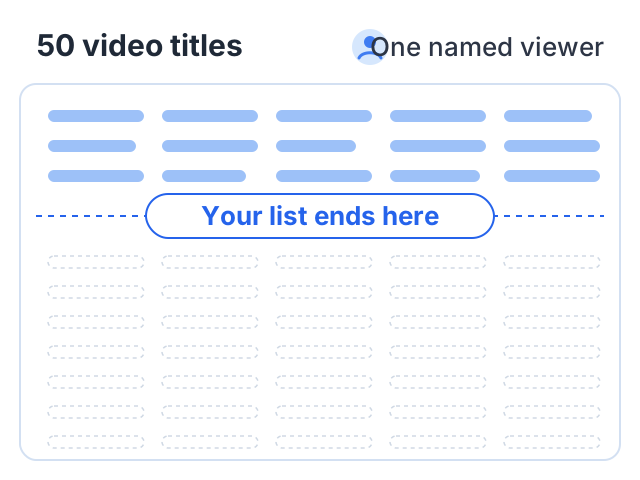
A useful way to test the answer is to try listing 50 video titles for that viewer. It is an optional exercise, not a rule, and the point is what happens while you write: if the list dries up at 12 or 15, the topic may be narrower than it looked, or you may be describing a single video rather than a channel. Both of YouTube’s eligibility windows are rolling — 12 months (365 days from 2027) for watch hours, 90 days for Shorts views — so old views drop out as new ones come in, and a channel needs a supply of ideas rather than one good run.
Ask one more question while you are choosing: is there a paid version of this channel? A channel that teaches has more ways to earn than one that only entertains, because viewers who learn from you may later pay for the full, organized lesson.
Our list of YouTube channel ideas groups ideas by type and says what each one could sell later.
2. Read the policies before your first upload
It is much easier to build a channel inside the rules than to fix one after a rejection. Three sets of rules matter.
Community Guidelines apply to everyone, monetized or not. A first violation is usually a warning, and after that a strike stays on the channel for 90 days. Three strikes in the same 90 days may get the channel removed. An active strike also blocks a Partner Program application.
Channel monetization policies decide whether you can earn. YouTube’s monetization policies ask for content that is original and authentic, and rule out four things: reused clips with little commentary, generic or repetitive videos made from a template, content built on shock or emotional manipulation, and AI personas giving advice on sensitive topics. They apply to the channel as a whole, so plan the format with them in mind from video one.
AI disclosure applies per video, and is a separate rule: if AI makes realistic content, set “AI use” to Yes during upload. YouTube says disclosure alone does not limit reach or earnings. Our guide to the YouTube monetization policy for AI content covers both rules in full.
3. Set up the account properly
Do these before you upload, not when you are ready to apply.
| Setting | Why it matters | Where |
|---|---|---|
| 2-Step Verification | Required to join the Partner Program | Google Account security settings (Google’s guide) |
| Phone verification | Unlocks intermediate features: videos over 15 minutes, custom thumbnails, live streaming on a computer | YouTube, per its advanced features page |
| Advanced features | Required to apply for monetization | Comes with channel history, or sooner with ID or video verification where available |
| Audience setting | Every creator must say whether videos are made for kids; YouTube says it is your legal responsibility | When you set up the channel, and on each upload |
Do not create an AdSense account yet. YouTube says to create a new AdSense for YouTube account only from inside YouTube Studio, when you apply. One active account per channel is what you need.
4. Choose your monetization route
There are two tiers and two routes inside each. Decide which you are aiming for, because it shapes what you upload.
The two tiers:
- Fan funding (the expanded Partner Program, available in India): 500 subscribers, 3 valid public uploads in the last 90 days, and either 3,000 qualified watch hours in 12 months or 3 million qualified Shorts views in 90 days. This unlocks memberships, Super Chat, Super Thanks and Shopping, not ads. It is not changing in 2027.
- Ad revenue: 1,000 subscribers plus a watch-hour or Shorts-view threshold. This is the one that changes.
The two routes are long-form watch hours or Shorts views. They do not add together: YouTube says watch hours from the Shorts feed do not count toward the watch-hour threshold. A channel that mixes both evenly can end up short on each.
Our guide to the monetization rules explains both tiers in full.
5. Know what changes on February 1, 2027
YouTube announced these changes on its official blog and set them out on its Partner Program changes page.
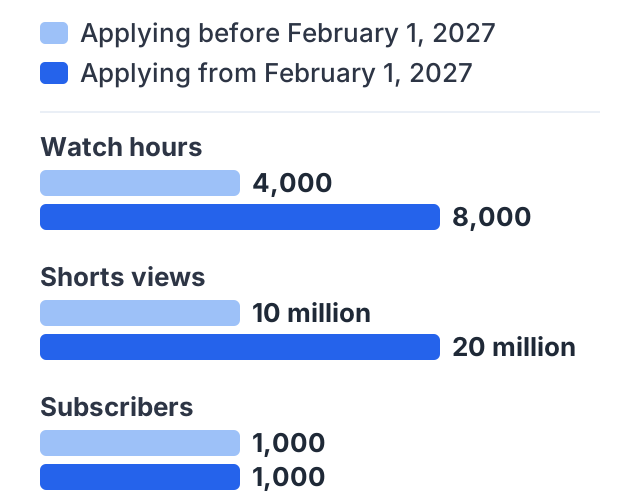
| Applying before February 1, 2027 | Applying from February 1, 2027 | |
|---|---|---|
| Subscribers | 1,000 | 1,000 |
| Either watch hours | 4,000 qualified, last 12 months | 8,000 qualified, last 365 days |
| Or Shorts views | 10 million qualified, last 90 days | 20 million qualified, last 90 days |
Other changes a new channel should know about:
- Shorts revenue needs a running total. From February 1, 2027, sharing in Shorts ad and subscription revenue needs 10 million qualified Shorts views over the trailing 90 days. A channel below that stays in the program and keeps earning from long-form videos.
- “Active” gets a definition. A channel in the program counts as active if it meets any one of: 1,000 qualified watch hours in 365 days, 1 million qualified Shorts views in 90 days, or 2 long-form videos or 5 Shorts uploaded every 90 days. A channel that falls below gets a 90-day window to recover.
- Existing partners are not affected by the new entry thresholds.
- Fan funding, Shopping and Creator Partnerships keep their current requirements.
The practical result for a new channel: the ad tier is twice as far away as it was, and the fan funding tier is where it was. That makes the fan funding tier, and income that does not depend on YouTube at all, more important in your first year.
A worked example: planning for 8,000 hours
Say you start a long-form teaching channel in November 2026. You will almost certainly apply after February 1, 2027, so the ad tier means 8,000 qualified watch hours in 365 days.
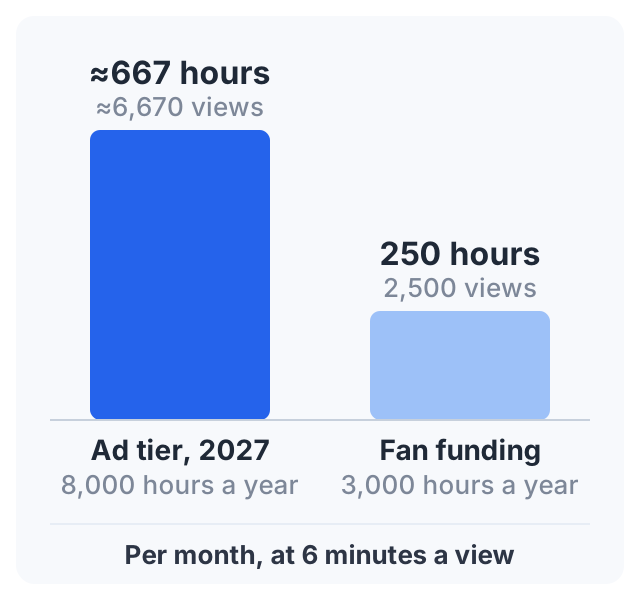
- 8,000 hours ÷ 12 months ≈ 667 qualified hours a month, on average.
- If the average view lasts 6 minutes, that is 667 × 60 ÷ 6 ≈ 6,670 long-form views a month, every month.
Now the fan funding tier, which does not change:
- 3,000 hours ÷ 12 months = 250 qualified hours a month.
- At 6 minutes a view, that is 2,500 long-form views a month.
Both are simple arithmetic from a stated view length, not a forecast. The point is the ratio. The fan funding tier needs well under half the watch time of the 2027 ad tier, which is why many new channels will reach it a long time before ads.
Once you are in the program, the “active” rule means about 2 long-form uploads every 90 days is a floor, not a target.
6. Plan income that does not need YouTube
Three ways to earn need no threshold at all:
- Brand deals. A sponsor buys access to a specific audience, so a small, clear niche can be enough.
- Affiliate links for tools and materials you actually use.
- Your own product: a course, a template pack, a set of notes.
None of them need YouTube’s approval. Our guide on making money on YouTube without monetization compares them honestly. YouTube’s blog also said it plans new incentives for Shorts channels below the 10-million-view bar, including Shopping bonuses and brand deal incentives, with details still to come.
Your first upload
The account items above are setup. These are the ones that apply to the video itself, and they are easier to get right the first time than to fix across 30 uploads:
- Record a video that answers one question from your list of titles, and say in the first ten seconds which question it is.
- Set the audience on the upload: made for kids, or not. It is a per-video setting as well as a channel one.
- Set “AI use” to Yes or No in the Attributes section. Realistic AI needs Yes; scripts, thumbnails and captions made with AI do not.
- Check the paid promotion box if anyone paid you for the mention, including a free product you were sent.
- Write a title and description a stranger can read. The description is where your links live: links in long-form descriptions are clickable once your channel has access to advanced features, while links typed into Shorts descriptions are not clickable at all.
- Add it to a playlist from the start. A playlist is what you will later import if you turn the channel into a course.
- Watch the first 30 seconds back before you publish, with the sound on a phone speaker. Most fixable problems are audible there.
The checklist, in one place
- A niche with 50 titles and a named viewer
- Read the Community Guidelines and the monetization policies
- Decided how you will use AI, and when you will disclose it
- 2-Step Verification on
- Phone verified
- Audience setting chosen (made for kids or not)
- Chosen a route: long-form watch hours or Shorts views
- Planned for the 2027 ad thresholds, and the unchanged fan funding tier
- An income plan that does not wait for a threshold
When you get close to a threshold, our eligibility check shows how to see where you stand, the way YouTube counts it.
Another way to earn: sell a course
If your new channel teaches, the playlist you build from video one can become a course later. Courselink imports a YouTube playlist as lessons in order, and students pay into your own Stripe or Razorpay account with 0% taken by Courselink — no subscriber count or watch-hour threshold applies. You can build the course free while the channel grows, but the Free plan cannot sell: paid courses start on Lite at $19 a month (₹1,499), and your own domain on Standard. See pricing for each plan.
Sources
- Changes to the YouTube Partner Program: the February 1, 2027 thresholds, Shorts revenue rule and active channel rules.
- New opportunities to earn and changes to the YouTube Partner Program, YouTube Official Blog, August 2026.
- YouTube Partner Program overview and eligibility and Overview of the expanded YouTube Partner Program: current requirements and tiers.
- YouTube channel monetization policies: reused, repetitive and off-putting content, and AI personas on sensitive topics.
- Sharing links with your audiences: which links are clickable, and the advanced features requirement.
- Advanced features, Made for kids and Community Guidelines strike basics.