

To check your YouTube monetization eligibility, open the Earn section of YouTube Studio: if your channel qualifies you can apply there, and if not you can select Get notified so YouTube emails you when you do. The numbers are only half of it, though, so this guide also walks through the five other checks that block applications. For the thresholds themselves and what each tier unlocks, see our guide to the monetization rules.
The full checklist
| Check | Where to look | What counts as a pass |
|---|---|---|
| Subscribers | YouTube Studio dashboard or Analytics | 500 for fan funding, 1,000 for ads |
| Qualified watch hours | YouTube Analytics, long-form videos | 3,000 or 4,000 in the last 12 months, public videos only |
| Or qualified Shorts views | YouTube Analytics, Shorts | 3 million or 10 million in the last 90 days |
| Recent uploads (fan funding tier) | Content tab | 3 valid public uploads in the last 90 days |
| Country | YouTube’s availability list | Your country is on it |
| Strikes | Studio dashboard and Content tab | No active Community Guidelines strikes |
| 2-Step Verification | Google Account security settings | Turned on |
| Advanced features | Studio, Settings, Channel, Feature eligibility | Enabled |
| AdSense for YouTube | Earn section during the application | One active account, linked or ready to set up |
| Monetization policies | Your own review of the channel | Original, not reused or mass-produced |
Every row comes from YouTube’s Partner Program overview or its expanded Partner Program page. Now the detail for each one.
Check 1: the Earn section
Start here, because it answers the main question directly.
YouTube says you apply in the Earn section of YouTube Studio once your channel is eligible, and that you can check the status of your application there at any time. If you are not eligible yet, select Get notified in the same place. YouTube says it will email you once you meet either threshold.
The Earn section works in YouTube Studio on a computer and in the YouTube Studio app. If you only use a phone, our guide to monetizing a YouTube channel on mobile has the app steps YouTube documents.
What the Earn section does not tell you is why you are short, or by how much on each requirement. For that, check the numbers yourself.
Check 2: your numbers, the way YouTube counts them
This is where most people get it wrong. YouTube does not count all your watch time or all your views. It counts qualified watch hours and qualified Shorts views, and the difference can be large.
Qualified watch hours
YouTube counts watch hours from long-form videos you have set public, over the last 12 months. These do not count:
- Private, unlisted or deleted videos
- Ad campaigns
- YouTube Shorts
- Live streams that are unlisted, deleted or not converted to video on demand
YouTube Analytics reports watch time in hours, and its Content tab splits reports into Videos, Shorts and Live, according to YouTube’s Analytics help page. Look at the long-form videos, over a date range covering the last 12 months. Then subtract anything you know will not qualify, such as a video you made unlisted or a live stream you deleted.
Qualified Shorts views
YouTube counts views from Shorts you have set public that appear in the Shorts Feed, over the last 90 days. Private, unlisted and deleted Shorts do not count, and neither do ad campaigns or image posts that appear in the Shorts Feed.
The two routes do not add up
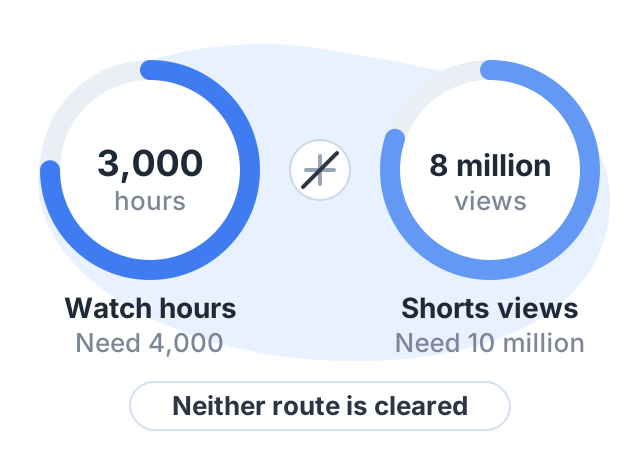
YouTube says watch hours from Shorts views in the Shorts Feed do not count toward the 4,000-hour threshold. A channel with 3,000 long-form hours and 8 million Shorts views has not cleared either route for ads. You need one route, cleared on its own.
The window moves
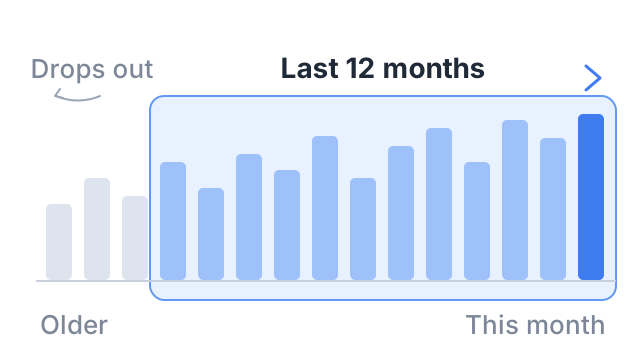
Both numbers are counted over a rolling window. Hours from 13 months ago drop out, and Shorts views from 91 days ago drop out. If you stop uploading, your total can fall even though nothing was deleted.
Check 3: country and strikes
Country. You must live in a country or region where the Partner Program is available. India is on YouTube’s list for both the standard program and the expanded 500-subscriber tier.
Strikes. You cannot apply with an active Community Guidelines strike. YouTube’s strike page says the first violation is usually only a warning, that each strike expires 90 days after it was issued, and that you can see policy issues on the Studio dashboard and in the Content tab. Once a strike expires, or you win an appeal, you can apply.
Check 4: 2-Step Verification and advanced features
2-Step Verification is a Google Account setting. If it is off, turn it on from your Google Account’s security settings; Google’s 2-Step Verification page has the steps.
Advanced features is a YouTube setting. YouTube’s advanced features page says to check it in YouTube Studio on a computer under Settings, then Channel, then Feature eligibility, where features you can use show as enabled. Channels with enough history usually get access automatically. You can also unlock it sooner by verifying your identity with an ID or a video, though YouTube says that option is not available to every creator.
Check 5: AdSense for YouTube
You need one active AdSense for YouTube account linked to the channel, or you need to be ready to set one up during the application. YouTube says to create a new AdSense for YouTube account only from inside YouTube Studio. If you already have an active one, link it rather than making a second.
Check 6: the policy review
Meeting every number does not get you in automatically: YouTube reviews the channel as a whole, and says a decision typically takes about a month. You can run a rough version of that review yourself. YouTube says its reviewers may focus on your channel’s:
- Main theme
- Most viewed videos
- Newest videos
- Videos with the most watch time
- Titles, thumbnails and descriptions
- “About” section
Open each of those and ask whether a stranger would see original work. Clips from other creators with little commentary, or bulk uploads made from one template, are the usual reasons for rejection. If you use AI tools, our guide to the YouTube monetization policy for AI content explains where the line is.
A worked example
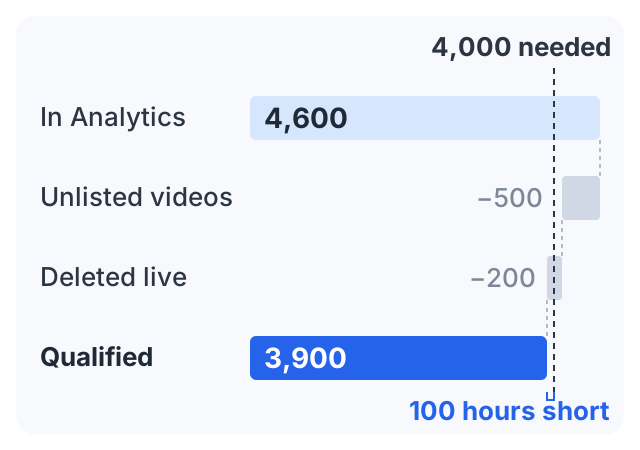
Meena teaches spoken English. Her Studio dashboard shows 1,350 subscribers. In Analytics, her long-form videos show 4,600 watch hours over the last 12 months. Her Shorts show 2.1 million views in the last 90 days.
At first glance she clears the ad tier. But she remembers two things:
- She made two old videos unlisted in the spring. Together they had about 500 hours.
- She ran a live class that she later deleted. It had about 200 hours.
Neither counts. 4,600 − 500 − 200 = 3,900 qualified hours. She is about 100 hours short of 4,000. Her Shorts route is far from 10 million, and she cannot add the two together.
Now the fan funding tier: 1,350 subscribers is over 500, 3,900 hours is over 3,000, and she uploaded 5 public videos in the last 90 days. Meena can apply for the 500-subscriber tier today, and turn on Get notified for the ad tier.
One more thing matters for Meena. YouTube says creators applying from February 1, 2027 will need 8,000 qualified watch hours for the ad tier. If she reaches 4,000 and applies before that date, she joins on today’s numbers.
Checking someone else’s channel
Many people search for a “monetization check” to see whether another channel earns from ads. YouTube’s help pages do not describe any way to do this. They explain how to check your own status, in your own Studio. Websites and extensions that claim to check other channels are not YouTube tools, and we have not verified any of them, so treat their answers as guesses.
Another way to earn: sell a course
Nothing on this checklist applies to selling your own course: no threshold, no review. Courselink imports a YouTube playlist as lessons in order, and students pay into your own Stripe or Razorpay account with 0% taken by Courselink. You can build the course free, but the Free plan cannot sell — paid courses start on Lite at $19 a month (₹1,499), and your own domain on Standard. See pricing for each plan.
More ways to earn below the thresholds are in how to make money on YouTube without monetization.
Sources
- YouTube Partner Program overview and eligibility: requirements, the Earn section, qualified watch hours and Shorts views, and review time.
- Overview of the expanded YouTube Partner Program: the 500-subscriber tier and its countries.
- Changes to the YouTube Partner Program: the thresholds for creators applying from February 1, 2027.
- Community Guidelines strike basics, Advanced features and Understand your YouTube content performance.
The worked example uses invented round numbers to show the arithmetic. It is not a typical or average channel.