

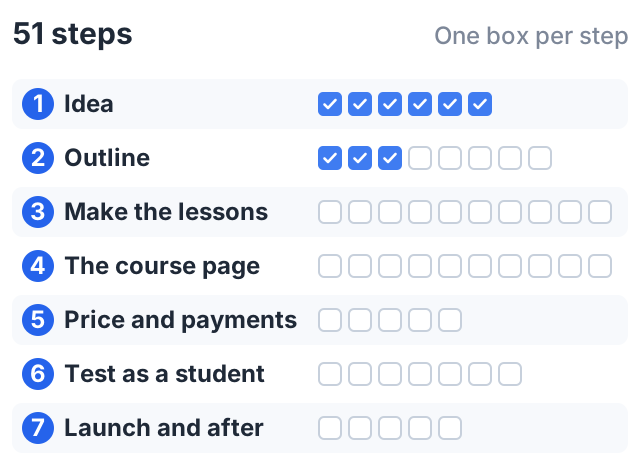
A course creation checklist keeps you from forgetting the small things that stop a launch, like a broken payment link or a lesson with no sound. This one has 51 steps in seven stages, from testing your idea to the week after launch.
Copy it into your notes app and check items off as you go. An illustrative example at the end shows the decisions one creator made at each stage.
Stage 1: idea
- Write one sentence that names your student. (“US freelance designers who dread bookkeeping,” not “people who want to learn money.”)
- Write one sentence that names the result they will reach.
- Find proof that people already spend money or time on this problem: books, paid courses, coaches or repeated questions in forums.
- Check that you have done the thing you plan to teach, not just read about it.
- Check if the topic needs a license or a disclaimer, as health, legal and money topics often do.
- Talk to two or three people who match your student. Ask about their problem, not your course.
Need help here? See our list of online course ideas and how to test them.
Stage 2: outline
- Write three to six learning objectives, each with an action verb you can observe (“mix”, “send”, “build”, not “understand”).
- Decide how students will show each objective: a quiz, an assignment or a small project.
- List everything you could teach, then cut anything that does not serve an objective.
- Group what is left into modules, about one per objective.
- Order the lessons so that nothing needs a skill you have not taught yet.
- Put an early, easy win in the first module.
- Give each lesson a title that says what the student will do.
- Show the outline to one person who matches your student, and fix what confuses them.
The full method is in our guide on how to create a course outline.
Stage 3: make the lessons
- Check what you already have. Old videos, slides, blog posts and handouts can save weeks.
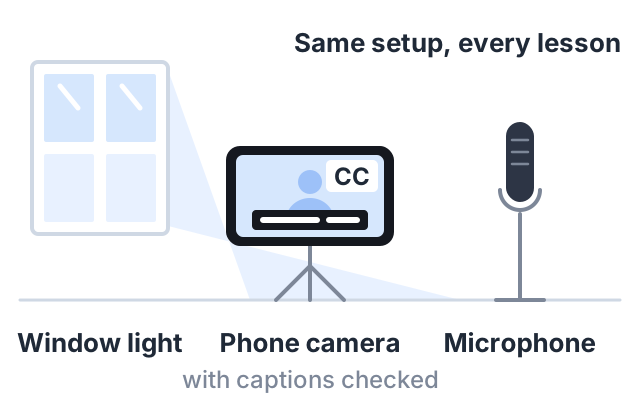
- Choose one simple setup and keep it the same for every lesson: same room, same light, same microphone.
- Record a one-minute test and listen to it with headphones before recording a full lesson.
- Write bullet points for each lesson. Write a full script only where exact wording matters.
- Keep each lesson to one idea or one task.
- Edit out long pauses and mistakes, but do not chase perfection.
- Add captions to every video, and check them. YouTube’s own help page says automatic captions can misrepresent what was said and should always be reviewed.
- Make the worksheets, templates or practice files students need.
- Write the quizzes and assignments you planned in stage 2.
- Get permission for anything you did not make yourself: music, images, other people’s work.
Why captions? The W3C’s Web Content Accessibility Guidelines list captions for prerecorded video as a Level A requirement, the most basic level. They also help anyone watching on a train with the sound off.
Stage 4: the course page
- Write a title that names the result, not just the topic.
- Write a one-line subtitle that says who it is for.
- Write a short course description. Our course description examples include a simple formula.
- List what students will learn, as three to six outcomes.
- Show the full lesson list.
- Add a short “about the teacher” paragraph.
- Choose one strong lesson to offer as a free preview.
- Make a thumbnail image that reads clearly at small size.
- Write an FAQ: access length, refunds, level, time needed, what equipment is required.
- Only use real testimonials. If you have none yet, leave the section out.
See course landing page examples for four page patterns.
Stage 5: price and payments
- Pick a price, and write down why. Compare it with what your student already pays for help with this problem.
- Decide on a refund policy and write it in plain words on the page.
- Connect your payment account and make sure payouts go to the right bank account.
- Decide if you will run a launch discount, and when it ends.
- Create any coupon codes you plan to share.
Stage 6: test as a student
- Enroll in your own course with a test account.
- Do a real purchase with a coupon, then refund it if your payment provider allows.
- Watch every lesson from start to end at normal speed, at least once.
- Open every attachment and every link.
- Take every quiz and submit every assignment.
- Open the course page and a lesson on a phone.
- Ask one friend to buy and take the first module, and to tell you where they got lost.
Stage 7: launch and after
- Tell the people who already know you first: your email list, your channel, your social accounts, your clients.
- Post one free, useful piece of content linked to the course, like a short lesson from it.
- Answer every question from early students within a day.
- Note where students stop or get stuck, and fix those lessons first.
- Ask students who finish for honest feedback and, with permission, a testimonial.
A word on testimonials: in the US, the FTC announced a final rule in August 2024 that bans fake reviews and testimonials, and bans paying for reviews that must say something positive. Ask for honest feedback, and use only what students actually wrote.
An illustrative example: the decisions at each stage
Sam is invented, and this is one way the checklist can play out rather than a typical path. What is worth copying is the decision each stage forced.
- Idea and outline. A question repeated in the comments — “how do I switch chords faster?” — became the student and the result, then four objectives, one per module, each ending in an assignment the student records and submits.
- Making the lessons. Of 12 existing YouTube videos, 8 fit the outline, so only 6 new lessons were recorded. Reviewing the auto-captions caught chord names the captions got wrong.
- The course page. A drill viewers already liked became the free preview lesson. With no students yet, the testimonials section stayed off rather than being filled with anything.
- Price and testing. $39 one-time, a 14-day refund policy, and a launch coupon with an end date. A test purchase found a worksheet link pointing at the wrong file — the kind of thing only stage 6 catches.
- Launch. A new video on the same topic, with the course link in the description. What 25 buyers at $39 would come to is simple arithmetic ($975 before fees); whether 25 buy is not something the checklist can tell you.
How to do this on Courselink
Most of this checklist maps to a screen in Courselink. Lessons hold video, a description and attachments. You can add quizzes and assignments, organize lessons into sections and issue certificates. If your videos are on YouTube, paste the playlist link and they import in order. Lessons that use YouTube links do not count against your upload storage.
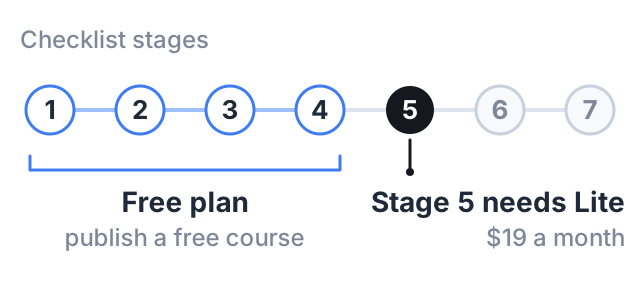
Stages 1 to 4 fit on the Free plan, which publishes up to 2 free courses for 100 students at yourname.course.link. Stage 5 is where you need Lite at $19 a month: paid courses, payments, coupons and free preview lessons start there, because the Free plan cannot sell. Your own domain starts on Standard. Courselink takes 0% of every sale on every plan — compare them on the pricing page.
Sources
- W3C, Understanding Success Criterion 1.2.2: Captions (Prerecorded) — a Level A requirement.
- YouTube Help: use automatic captioning — automatic captions should be reviewed and edited.
- FTC announces final rule banning fake reviews and testimonials, August 14, 2024.
The prices, buyer numbers and refund period in the worked example are made up to show how the checklist works.