

To launch an online course with a small audience, sell it to a few people before you make all of it, run a short beta with them, then open it to everyone for a fixed window with a real deadline. A small audience is not a problem if you talk to the people in it one by one.
This is one launch model, not the only one, and it is built for the case where a single post will not reach enough people: a small launch runs on direct conversations and several reminders rather than one announcement. Below, the four stages, a checklist you can copy and a worked example.
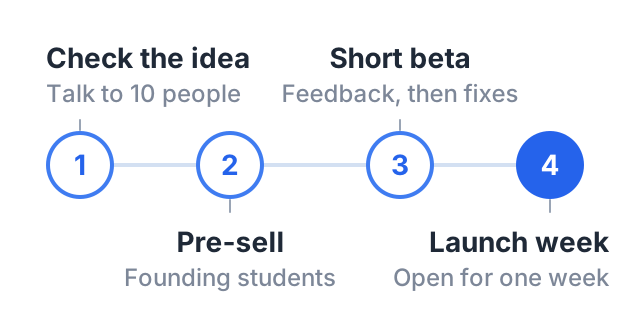
Stage 1: check that people want it
Before you record anything, find out if people will pay. This is the step most first launches skip, and it is the cheapest one.
Talk to ten people who have the problem. Not friends being kind. People who have asked you about this topic, commented on your posts, or work in the field. Ask them:
- What have you already tried?
- What is the hardest part?
- What would it be worth to you to have this solved?
Write down the words they use. Those words go on your course page later.
Then make an offer. Share your course outline and a price. If you have not written the outline yet, our course outline template gets you there in an afternoon.
Stage 2: pre-sell to founding students
A pre-sale is an honest deal: “The course is not finished. If you join now, you pay a lower price, you get each module as I finish it, and you help shape it.”
Founding students give you three things:
- Proof that the course will sell, before you spend weeks recording.
- Money up front, which pays for your time.
- Feedback while you build, so the course answers real questions.
Be honest about dates. Say when each module will be ready, and keep to it. If you cannot deliver, refund people without being asked twice.
Decide what counts as success before you start. For example: “If five people join, I build it. If nobody joins, I rethink the topic or the price.” Writing the number down before you launch stops you from changing the rules afterward.
Stage 3: run a short beta
Build the course with your founding students inside it. Release modules as they are ready and watch what happens.
- Ask after each module: what was unclear, what was missing, what was too long?
- Watch where people stop, then ask those students what happened before you change anything. The same drop-off can mean the lesson was long, that it arrived before they needed it, or that the week got busy — and the three have different fixes.
- Fix it before the public launch. Re-record a confusing lesson. Split a long one. Add the example people asked for.
- Ask for a testimonial from students who got a result. Ask permission to use their name, and quote them exactly. Never write a review for someone.
By the end of the beta you have a tested course, real quotes and a clear idea of who it helps.
Stage 4: the launch week
Now open the course to everyone for a fixed window. A week is a common choice, and the length matters less than sticking to it.
Before launch week
- Finish the course page. What students will be able to do, who it is for and not for, the module list, who you are, the price, and your refund rule.
- Prepare your messages. One announcement, one mid-week post with a student quote or a free lesson, and one reminder before the deadline.
- Tell people the date in advance. “Doors open Monday” gives people time to notice.
During launch week
- Day 1: announce on every channel you have. Send your email, post on social media, and add the link to your video descriptions.
- Middle of the week: share something useful. A free lesson, a student result or answers to the questions people sent you.
- Last day: remind people the launch price ends tonight. Then end it.
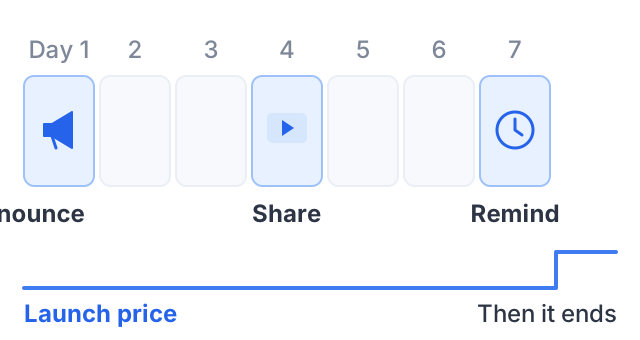
Be clear about what the deadline ends. Two different things get called “the deadline”, and mixing them up is what makes a launch feel dishonest. A launch price ending means the price goes up on that date and the course stays on sale. Closing enrollment means nobody can buy at all until you open again. Say which one you mean, in those words, and then do it: if you extend either, people learn that your dates do not mean anything.
After launch week
- Thank your buyers, and tell them how to get help.
- Write down what worked. Which post, message or channel brought each sale? Our guide on how to promote an online course covers the ongoing channels and how to measure them.
- Decide what happens now: stay open at the regular price, or close until the next launch. Both work; just say which one you are doing.
A launch checklist you can copy
COURSE LAUNCH CHECKLIST

Check the idea
[ ] Talked to 10 people who have the problem
[ ] Wrote down the words they use
[ ] Wrote the course outline

Pre-sell
[ ] Set a founding price and a public price
[ ] Wrote down what success looks like
[ ] Shared the outline and the offer
[ ] Gave clear dates for each module

Beta
[ ] Released modules on the dates promised
[ ] Asked for feedback after each module
[ ] Fixed unclear or long lessons
[ ] Collected testimonials, with permission

Launch week
[ ] Course page finished and tested
[ ] Launch dates announced in advance
[ ] Day 1 announcement sent
[ ] Mid-week useful post sent
[ ] Last-day reminder sent
[ ] Deadline kept

After
[ ] Thanked buyers
[ ] Noted which channel brought each sale
[ ] Decided: stay open, or close until next launch
A worked example: 600 followers, one course
These numbers are an example to show the method, not a forecast.
Sam is a yoga teacher with 600 Instagram followers and a WhatsApp group of 80 past students. She wants to launch “Morning yoga for stiff backs”, a 4-week video course.
Check the idea. She messages 12 past students who often complained about back pain. Nine reply. Most say the same thing: they want a routine short enough to do before work.
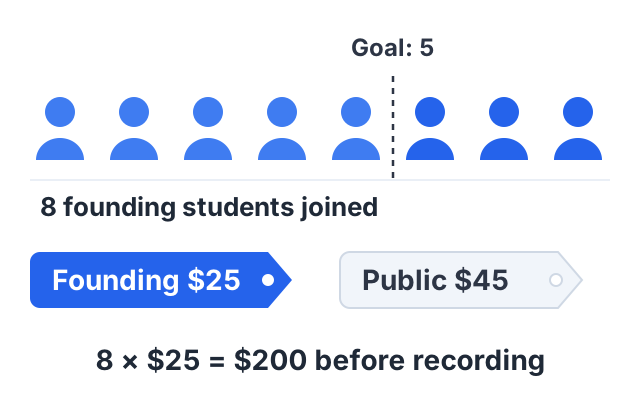
Pre-sell. She shares a one-page outline in the WhatsApp group: 4 modules, one per week. The founding price is $25, and the public price will be $45. She decides that if 5 people join, she will build it. Eight people join, which is $200 before she has recorded the course.
Beta. She releases one module a week. After week 1, three students say the routine is too long for a weekday morning, so she makes a shorter version of each session. At the end, four students send her a short quote about how their backs feel, and agree to have their first names used.
Launch week. She tells her followers the date ten days ahead, opens on a Monday, shares a free 10-minute session mid-week, and ends the launch price on Sunday night as promised. The course stays on sale afterward at $45; it is the price that ends, not the enrollment.
Whatever she sells that week, she now has a tested course, real quotes and a list of which posts brought buyers. Her next launch starts from there.
Mistakes that hurt small launches
- Recording the whole course first. You risk weeks of work on something nobody buys.
- Posting once and waiting. With a small audience, direct messages do most of the work.
- No deadline, or a deadline that moves. People put off decisions with no end date.
- Hiding the price. People who find a surprise price at the end feel tricked.
- Choosing a platform late. Pick where you will sell before you pre-sell. Our comparison of online course platforms sets out what each costs.
More selling guides are on the blog, and more planning guides are in the plan and launch a course hub.
How to do this on Courselink
You can build the whole course on Courselink before you charge anything. Paste your YouTube, Vimeo or Google Drive links and the lessons import in order. The Free plan publishes up to 2 courses for 100 students, but it cannot sell.
The launch itself needs Lite, at $19 a month: paid courses and payments into your own Stripe or Razorpay account, invite-only courses for a founding-student beta, coupons with start and end dates for a launch price, and sales analytics. Your own domain starts on Standard. Courselink does not send marketing email, so announce your launch from your own email tool or by message, and it takes 0% of your sales on every plan. See the pricing page for every plan.