

A good course landing page answers one question fast: “Is this course for me, and will it get me the result I want?” The examples that work all show who the course is for, what students will be able to do, the full lesson list, the price and one clear way to enroll.
Below are four sample layouts we made up for this article. None is a real course or a real customer’s page, and none of them is evidence of what converts — they are illustrations of four ways to order the same material, so you can see which one fits your course. After the samples: the sections every course page needs, and the mistakes that cost the most sales.
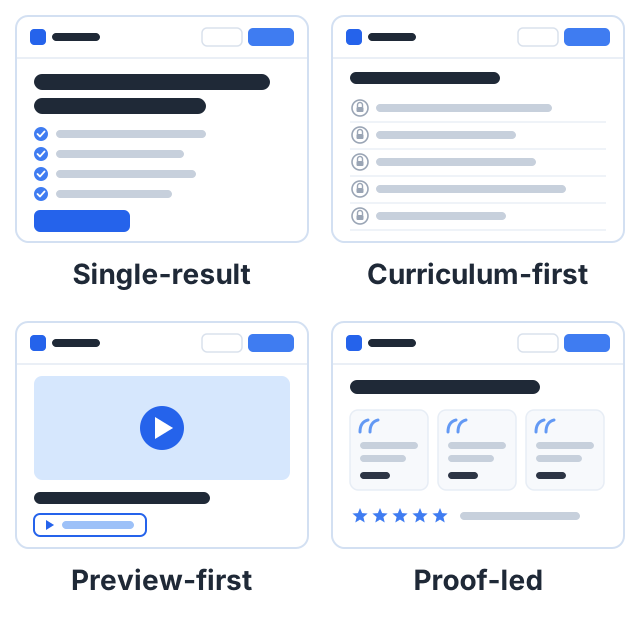
Layout 1: the single-result page
When to use it: a short, focused course with one clear promise.
Sample page — not a real course
Title: Close your freelance books in one evening
Promise: A short course for US freelance designers who dread bookkeeping.
What you will learn:
- Set up a simple system for income and expenses
- Send invoices that get paid on time
- Do a monthly close in one evening
- Hand your tax preparer a clean set of numbers
Course content: 5 sections, 14 lessons
Price: $49, one-time payment
Button: Enroll now
What it does well: the title is the result, so a freelance designer knows in five seconds that this page is for them, and the “what you will learn” list turns the promise into four checkable steps.
What to watch: a page this short needs a sharp promise. If the promise is vague, there is nothing else on the page to carry it.
Layout 2: the curriculum-first page
When to use it: longer courses, or buyers who compare options carefully, such as people learning software for work.
Sample page — not a real course
Title: Spreadsheets for office managers
Promise: Build the five spreadsheets every small office uses, from a blank file.
Course content (shown high on the page):
- Section 1: Clean data in five minutes (4 lessons)
- Section 2: The staff schedule (3 lessons)
- Section 3: The expense tracker (4 lessons)
- Section 4: The supplier list with lookups (3 lessons)
- Section 5: The monthly report (4 lessons)
Includes: practice files for every lesson, a quiz after each section, a certificate at the end
What it does well: careful buyers want to see exactly what they get, and showing the lesson list early answers “will this cover my problem?” before they have to ask. Lesson titles that name a task carry most of the page.
What to watch: vague lesson titles like “Lesson 3” waste this layout. Every title should say what the student will do. Our guide on creating a course outline covers how to write them.
Layout 3: the preview-first page
When to use it: skills where teaching style matters a lot, like art, music, fitness or cooking.
Sample page — not a real course
Title: Watercolor for complete beginners
Top of page: a short video of the teacher painting a sky, with a “Watch a free lesson” button
Promise: Paint a small landscape you are happy to frame, starting from zero.
Free preview: Lesson 4, “Paint a graded sky wash”, open to everyone
Price: $39, one-time payment
What it does well: a buyer who has watched one full lesson knows whether they like how you teach, which removes the biggest doubt with a single click.
What to watch: pick your strongest lesson for the preview, not your first one. Lesson 1 is usually setup and supplies, which shows very little of your teaching.
Layout 4: the proof-led page
When to use it: after launch, once real students have finished the course.
Sample page — not a real course
Title: Your first 5K, in eight weeks
Below the title: three short testimonials from students, each with a first name and what they did
Example testimonial (made up for this sample): “I could not run for two minutes when I started. I finished my first 5K in week nine.” — Dana
Reviews section: star reviews collected from enrolled students
What it does well: a testimonial that names a specific change says more than the teacher can say about themselves — far more than “Great course!”
What to watch: the rules. In the US, the FTC’s Endorsement Guides, revised in 2023, say that if a testimonial shows results that are not typical, the page must make clear what results people can generally expect. In August 2024, the FTC also announced a final rule banning fake reviews and testimonials, including ones written by AI or attributed to people who never used the product. Only publish testimonials from real students, and never pay for positive ones.
The sections every course landing page needs
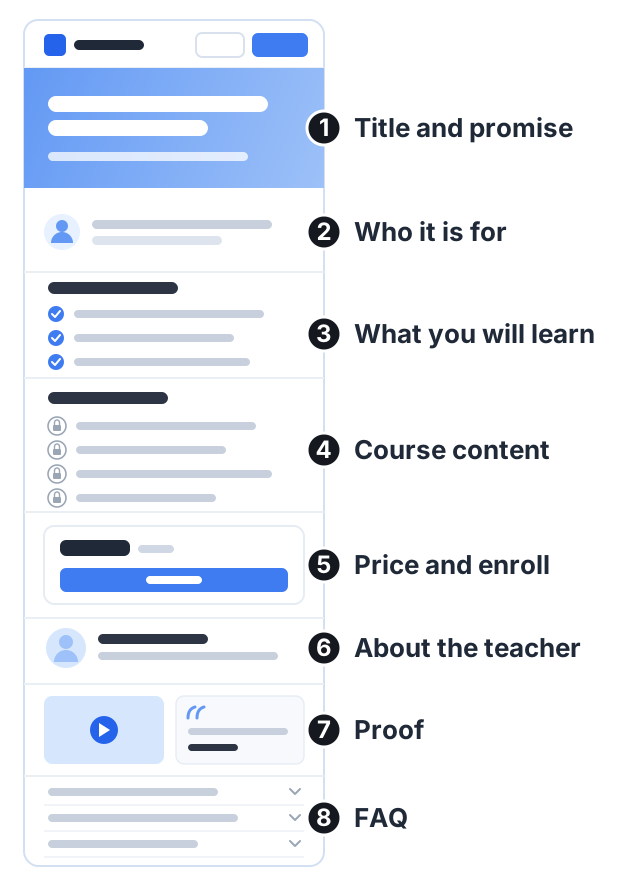
All four layouts above are built from the same blocks. What changes between them is the order, and which block goes at the top.
- Title and one-line promise. What the course is and the result it delivers.
- Who it is for. And, just as useful, who it is not for.
- What you will learn. Three to six outcomes, written as things the student will be able to do.
- Course content. The full list of lessons, so the buyer can see the path.
- Price and one enroll button. Near the top, and again near the end.
- About the teacher. Why you can teach this. One short paragraph.
- Proof. A preview lesson, sample work, or real testimonials.
- FAQ. The questions people ask before paying: access, refunds, level, time needed.
Our course sales page guide takes each of these sections in turn, including the US rules on testimonials.
Worked example: fixing a weak course page
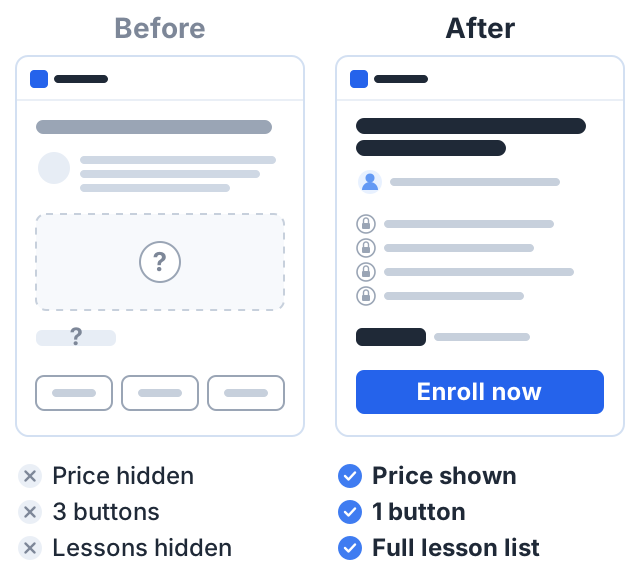
Here is a made-up “before” page and what we would change.
Before:
- Title: “Mastering the Art of Photography”
- First paragraph: three sentences about the teacher’s career
- Lesson list: hidden, with “Contact me for details”
- Price: not shown
- Three buttons: “Learn more”, “Join”, “Follow me on Instagram”
After:
- Title: “Phone product photos for Etsy sellers.” It now names the student and the result.
- First paragraph: who it is for and what they will be able to do. The teacher’s story moves down to a short “About” section.
- Lesson list: shown in full, with task-based lesson titles.
- Price: shown next to the button, with “one-time payment” so buyers know it is not a subscription.
- Buttons: one. “Enroll now”, repeated at the top and the bottom. The Instagram link moves to the footer.
- FAQ added: “Do I need a new phone?”, “How long do I have access?”, “What if it is not for me?”
None of these changes needed a designer. They needed the page to answer the buyer’s questions in the order the buyer asks them.
Mistakes that cost sales
- A title about the topic, not the result. “Photography” tells the buyer nothing; “better product photos with your phone” tells them what they get.
- Too many buttons. Every extra link is a way to leave. Keep one action.
- Hidden price. Buyers assume the worst.
- No lesson list. People want to see the path before they pay for it.
- Made-up proof. Fake numbers or testimonials can break the law and break trust. Leave proof out until you have real proof.
- Not checking on a phone. Many visitors will see your page on a small screen. Open it on your own phone before you share it.
Search titles and descriptions
Your page also needs a title and description for search results. Google says it has no maximum length for meta descriptions, but long ones get cut off to fit the screen. Google also often writes its own snippet from your page text. Write a unique, accurate summary for each course anyway, because Google may use it when it describes the page well. For help writing it, see our course description examples.
How to do this on Courselink
Every course on Courselink comes with a landing page built from sections you turn on and off: a course banner, highlights, overview, what you will learn, course content, testimonials, FAQ and student reviews. The lesson list fills in from your course, so it never goes out of date. Each course also has its own URL slug, meta title and meta description, and a 16:9 thumbnail for course cards and sharing.
You can build and publish this page on the Free plan at yourname.course.link, but it cannot sell: a price, a sale price, free preview lessons and coupons all come with paid courses, which start on Lite at $19 a month. Your own domain and removing Courselink branding start on Standard. Courselink takes 0% of your sales on every plan — see the pricing page for the full list.
Sources
- FTC’s Endorsement Guides: What People Are Asking — testimonials showing results that are not typical.
- FTC announces final rule banning fake reviews and testimonials, August 14, 2024.
- Google Search Central: control your snippets in search results — how Google uses meta descriptions.
All sample pages, prices, testimonials and names in this article are made up to illustrate a layout. They do not describe real courses or real students, and they are not evidence that one layout sells better than another.