

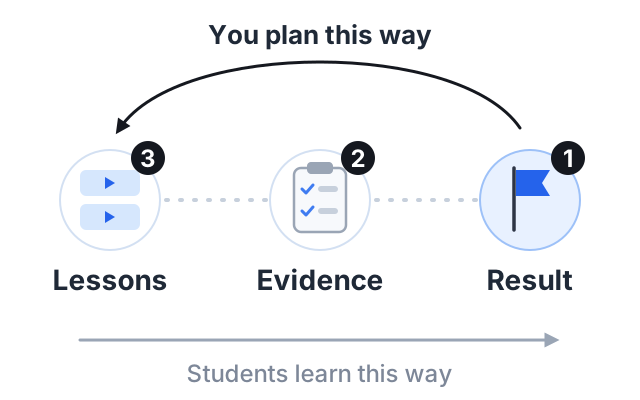
To create a course outline, start with the result your student wants, write three to six clear learning objectives, and then group your lessons into modules that reach those objectives in order. Plan how students will practice each objective before you plan the lessons themselves.
This method is called backward design. It comes from Grant Wiggins and Jay McTighe’s book Understanding by Design, and teaching centers such as the University of Toronto’s still teach it. Below are seven steps that apply it to an online course, followed by a full example outline.
Step 1: name your student and the end result
Write two sentences before anything else.
- Who is the student? Be specific. “Adults who want to paint” is vague. “Adults who have never painted and want to finish a small watercolor landscape” is clear.
- What will they be able to do at the end? Use words the student would use. “Paint a simple landscape with a sky, trees and water that you are happy to frame.”
Every later decision checks back against these two sentences. If a lesson does not help this student reach this result, it does not belong in the course.
Step 2: write three to six learning objectives
An objective is one thing a student will be able to do. Good objectives use action verbs you can observe. Avoid verbs like “understand”, “know” or “learn”, because you cannot see them happen.
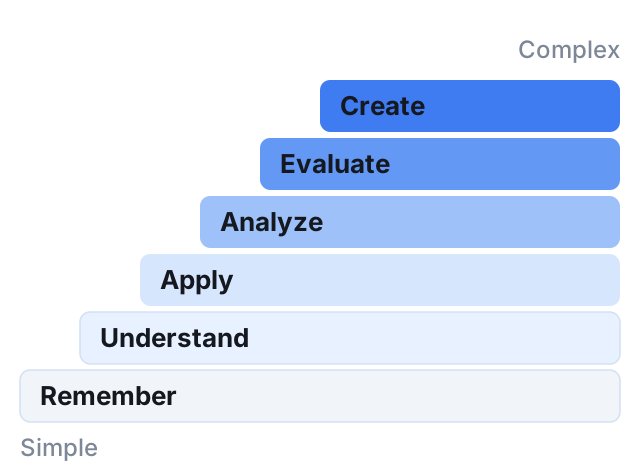
The revised Bloom’s taxonomy (Anderson and Krathwohl, 2001) is a common tool here. It sorts learning into six levels, from simple to complex: remember, understand, apply, analyze, evaluate and create. Each level has verbs that match it. Many universities publish lists, such as this action verb list from Old Dominion University.
| Instead of… | Write… |
|---|---|
| Understand color mixing | Mix three greens from blue and yellow |
| Know the brush types | Choose the right brush for a wash and for fine lines |
| Learn about composition | Sketch a landscape using the rule of thirds |
A practical test: ask “how would I check this?” If you cannot answer, rewrite the objective.
Step 3: decide how students will show each objective
This is the step most people skip, and it is the one that makes a course work. Before you plan any lessons, decide what students will do to prove they reached each objective.
For an online course, the evidence is usually one of these:
- A short quiz, for facts and terms.
- An assignment, where the student makes or does something and submits it.
- A checklist the student uses to judge their own work.
- A small project that pulls several objectives together.
The Toronto guide calls this “determine acceptable evidence”. In plain words: know what the finish line looks like before you build the track.
Step 4: list everything you could teach, then cut
Now brain-dump. Write every topic, tip and story that could go in the course, one per line. Do not judge yet.
Then go down the list and keep only the items that help a student reach one of your objectives. Mark each kept item with the objective it serves. Move the rest to a “later” list. Those can become bonus lessons, a second course or free videos.
Cutting is hard because everything feels important, but a course that tries to teach everything is slow to make and slow to finish.
Step 5: group items into modules
Sort the kept items into groups. A simple rule: one module per objective. Give each module a name that says what the student will be able to do, not just the topic.
- Weak module name: “Color”
- Strong module name: “Mix the colors you need”
If one module ends up much bigger than the others, look for a second objective hiding inside it and split it.
Step 6: put modules and lessons in order
Order matters more than most people think. Two rules help:
- Teach what is needed first. If lesson 9 needs a skill from lesson 4, lesson 4 must come before it. Draw arrows if you need to.
- Give an early win. Put something in the first module that the student can finish and feel good about. It keeps people going.
Inside each module, order the lessons the same way: simple before complex, and one idea or one task per lesson. End each module with the practice you chose in step 3.
Step 7: test the outline with a real person
Show the outline to one or two people who match your student. Ask them:
- Is anything here you already know? (Maybe cut it.)
- Is anything missing that you expected? (Maybe add it.)
- Which lesson would you watch first? (Maybe that is your free preview.)
Then fix the lesson titles. A lesson title should tell the student what they will do: “Paint a graded sky wash” beats “Lesson 4”.
Worked example: a full course outline
Here is a complete outline for a made-up beginner watercolor course. It follows all seven steps.
Student: adults who have never painted.
Result: paint a small landscape with sky, trees and water that you are happy to frame.
Objectives:
- Choose and set up basic supplies on a small budget.
- Mix the colors needed for a simple landscape.
- Control water and paint to make flat and graded washes.
- Paint trees and water with three basic brush strokes.
- Plan and finish a small landscape from a photo.
Module 1: Set up to paint (objective 1)
- What to buy and what to skip
- Setting up your table
- Your first marks: a quick warm-up
- Practice: photograph your setup and a page of marks
Module 2: Mix the colors you need (objective 2)
- Three colors are enough
- Mixing greens
- Mixing grays and browns
- Practice: a color chart of nine mixes
Module 3: Control water and paint (objective 3)
- Flat wash
- Graded wash
- Fixing mistakes while the paint is wet
- Practice: three skies on one page
Module 4: Trees and water (objective 4)
- Three strokes for trees
- Painting reflections
- Practice: a tree line above a lake
Module 5: Your finished landscape (objective 5)
- Choosing a photo that will work
- Sketching with the rule of thirds
- Painting it, step by step
- Final assignment: submit your finished landscape
Quiz: a 10-question quiz after module 3 on paper, water and brush choices.
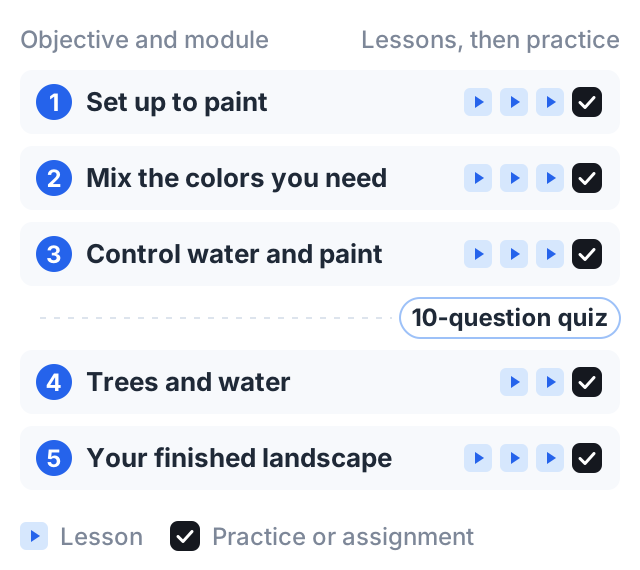
Five objectives, five modules, 14 teaching lessons, and a practice task or assignment at the end of every module.
If you want the structure drafted for you before you refine it by hand, the course outline generator takes your topics from step 5 and returns them as modules with a mix of lesson types in each.
Common outline mistakes
- Starting with lessons instead of the result. You end up with a list of topics, not a path.
- Objectives you cannot check. “Appreciate” and “understand” leave you no way to know whether the course worked.
- A long theory module at the start. Students want to do something early. Teach theory when they need it.
- No practice. Watching is not the same as doing. Every module should ask the student to do something.
How to do this on Courselink
Your outline maps straight onto a course in Courselink. Each module becomes a section and each lesson sits inside it. Lessons can hold a video, a written description and attachments like worksheets and PDFs. You can also add quizzes and assignments, which covers the practice you planned in step 3, and issue a certificate when students finish.
If your lessons are already on YouTube, paste the playlist link and they import in order with their titles and descriptions. Then rearrange them to match your outline.
You can build and publish the whole course on the Free plan, with up to 2 courses and 100 students; it cannot sell, so charging for it starts on Lite at $19 a month, with your own domain on Standard. Courselink takes 0% of your sales on every plan. Compare plans on the pricing page, or see the features.
Next, our course creation checklist covers what to do between a finished outline and launch day.
Sources
- Backward design, University of Toronto — the three stages: desired results, acceptable evidence, learning experiences. Attributed to Wiggins and McTighe, Understanding by Design (1998).
- Revised Bloom’s taxonomy action verbs, Old Dominion University — verbs for each of the six levels from Anderson and Krathwohl (2001).