

There is no single YouTube CPM for India. Your CPM is whatever advertisers bid to reach the specific people who watch your videos, and the only figure worth acting on is the one in your own YouTube Studio.
This matters because CPM varies enormously between channels in the same country. A finance channel in Pune and a comedy channel in Pune are selling access to different buyers, and the advertisers bidding for each of them are paying different prices. A national average, even if one existed, would describe neither.
This page does not give you a number. YouTube does not publish average CPM by country, and the ranges you find on earnings calculators and “CPM by country” lists are estimates stacked on other estimates, usually without a source. What this page gives you instead is the mechanism that sets your CPM, and the steps to read your real one.
CPM and RPM are not the same number
Most confusion about YouTube earnings is really confusion between these two metrics.
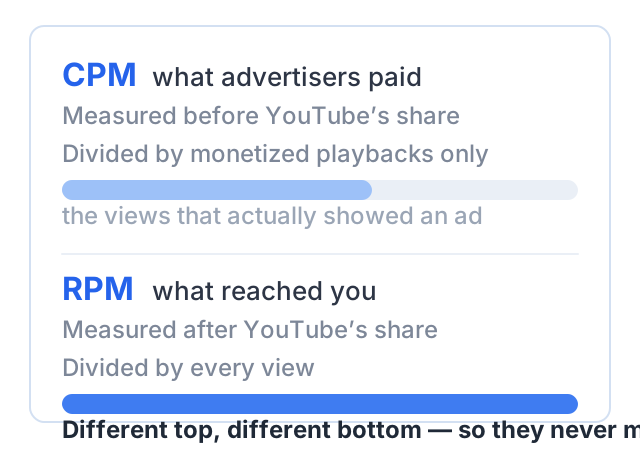
CPM is cost per thousand. YouTube’s help page on ad revenue analytics defines it as how much advertisers are spending to show ads on YouTube, counted per thousand ad impressions. It covers only views of monetized videos where an ad was actually shown, and it is measured before YouTube’s revenue share. CPM is an advertiser-side number. It is not your money.
RPM is revenue per thousand. The same help page defines it as how much money you have earned per thousand video views. It includes ads, channel memberships, YouTube Premium, Super Chat and Super Stickers. It counts all your views, including every view that carried no ad at all, and it is calculated after YouTube’s revenue share. RPM is your money.
So RPM is almost always much lower than CPM, and that is normal. It is not a sign that something is broken.
There is a third metric worth knowing. YouTube Studio also reports playback-based CPM, defined as the cost an advertiser pays for a thousand video playbacks where an ad is displayed. Plain CPM counts impressions; playback-based CPM counts playbacks. One playback can carry more than one ad, so the two numbers differ.
Alongside them sits estimated monetized playbacks: the number of times your video was watched with ads. YouTube notes that this also counts a viewer who quit during a pre-roll ad without reaching your video. Comparing monetized playbacks with total views tells you how much of your audience is actually earning.
What YouTube keeps
YouTube publishes its revenue share, so this is one figure you can rely on.
As of October 2026, YouTube’s partner earnings overview states that a partner who reviews and accepts the Watch Page Monetization Module is paid 55% of net revenues from ads displayed on their public videos on the watch page. The same page lists 70% for fan funding products such as channel memberships, Super Chat, Super Stickers and Super Thanks, and 45% of the revenue allocated to the creator from the Shorts pool for the Shorts Monetization Module. Your own partner agreement is the authoritative version of these terms.
That 55% is the gap between CPM and RPM, together with every view that never showed an ad.
Why Indian CPM sits below US CPM
Indian creators who compare notes with creators abroad report this gap constantly, and often read it as a judgment on their work. It is not.
CPM is an auction price. An advertiser decides what a thousand impressions in front of a particular audience are worth to them, based on what they can sell to that audience and at what margin, and then bids. More advertisers bidding, with more budget, pushes the price up. Fewer advertisers, or advertisers selling cheaper products, pushes it down.
So the difference between markets is a difference in advertiser demand, not a difference in creators. Nothing about your editing, your camera or your effort enters the calculation.
You will see confident multipliers for this gap on other sites. We are not going to repeat one, because nobody who publishes those numbers can show where they came from.
What actually moves your CPM
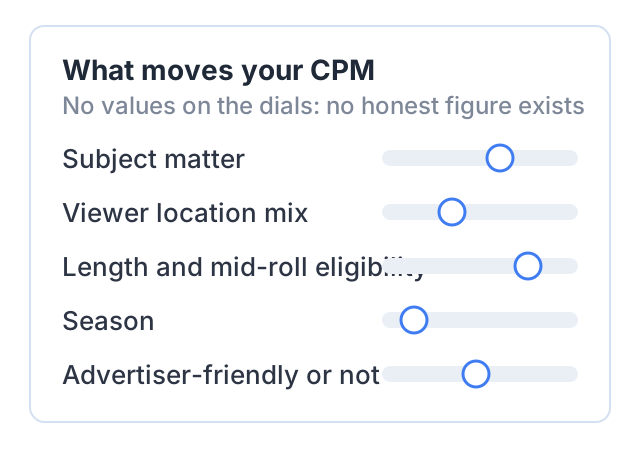
Subject matter
This is the largest lever. CPM follows the advertisers who buy against your topic. Subjects where a business can win a customer worth a lot of money — software, finance, insurance, education, business tools — attract advertisers with budget. Subjects nobody sells into attract cheap, leftover inventory.
Viewer location mix
Your channel is not in one country; your viewers are in several. A channel made in India with a large audience in the United States, the Gulf or the United Kingdom is selling impressions to the advertisers who buy in those markets. The mix moves your blended CPM, and it changes as your videos find new audiences.
Video length and mid-roll eligibility
YouTube’s help page on ad placement states that on monetized videos that are 8 minutes or longer, you can turn on ads during the middle of the video, known as mid-rolls. More ad slots per playback means more impressions per playback, which shows up in your revenue even when the price per impression has not moved. Do not pad a six-minute video to reach eight minutes; viewers leave, and the extra slots then sit in a video nobody finishes.
Season
Advertiser budgets are not spread evenly through the year. When advertisers are spending heavily, more of them compete in the auction and prices rise; when budgets reset, competition falls. If your CPM moves in a month when your views did not, the cause is usually on the advertiser’s side of the auction, not yours.
Whether videos are advertiser-friendly
YouTube’s advertiser-friendly content guidelines sort content into three tiers: content that can earn ad revenue, content with limited ad earnings, and content with no ad earnings. A video rated for limited ads is shown to a smaller pool of advertisers, so fewer bids arrive and the price falls. The yellow icon in Studio is therefore a CPM issue as well as a policy issue.
How to read your own CPM in YouTube Studio
This is the part worth doing today.
- Sign in to YouTube Studio at
studio.youtube.com. - In the left menu, select Analytics.
- From the top menu, select Revenue.
- On the Revenue tab, read the How much you’re earning card for estimated earnings by month, and the How you make money card for revenue by source — watch page ads, Shorts feed ads, memberships and the rest. The Content performance card shows your RPM.
- For CPM itself, open Advanced mode (also shown as See more) under a report. Advanced mode is where the full metric list lives, including CPM, playback-based CPM and estimated monetized playbacks.
- In Advanced mode, use the Geography filter at the top to look at one country at a time. This is how you find out what your Indian viewers are actually worth to advertisers, rather than what a blog says they are worth.
Set the date range to a full quarter, not a week. Short ranges swing for reasons that have nothing to do with your channel.
Working out your payout from your own numbers
Use letters, then put your own figures in. The values below are placeholders chosen to make the arithmetic readable. They are illustrative only. They are not a claim about what Indian channels earn, and you should replace every one of them with the number in your own Studio.
Take:
- V = total views in the period
- P = estimated monetized playbacks in the same period
- C = playback-based CPM in the same period
- 55% = the published watch page revenue share
Then:
- Advertiser spend on those playbacks = (P ÷ 1,000) × C
- Your share ≈ that figure × 0.55
- Your RPM = (your revenue ÷ V) × 1,000
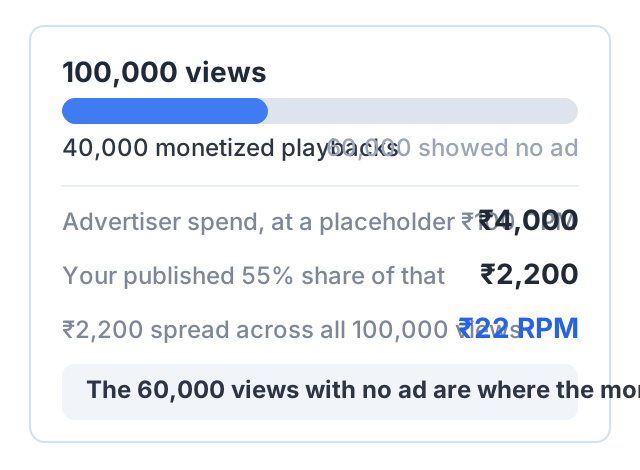
With placeholder values of V = 100,000 views, P = 40,000 monetized playbacks and C = ₹100:
- (40,000 ÷ 1,000) × ₹100 = ₹4,000 of advertiser spend
- ₹4,000 × 0.55 = ₹2,200 to you
- (₹2,200 ÷ 100,000) × 1,000 = ₹22 RPM
Two cautions. The 55% applies to net revenues, so treat this as an approximation and trust the Revenue tab over your own arithmetic. And notice what the example shows: 60,000 of the 100,000 views earned nothing, because no ad was shown. That gap, not the CPM, is usually where the money went.
Why CPM is the wrong lever for a small channel
Run the arithmetic above with your own numbers and the problem usually becomes obvious. For a channel with a few thousand views per video, even a large improvement in CPM moves a small base. Doubling a small number leaves you with a slightly less small number.
There are three things worth more per hour of your work.
Reaching more people. Views multiply everything, including CPM-based income. A better title and thumbnail on a subject people search for will almost always beat a month spent studying CPM.
Earning outside the auction. Sponsorships and affiliate links are priced by agreement, not by bid, and neither needs YouTube’s approval. Our guide to earning without the Partner Program covers how they work.
Selling something you set the price of. This is the only route where you control both sides of the equation.
If you are not yet in the Partner Program, CPM is not your question at all — the monetization rules are, and the thresholds there change on February 1, 2027. If you are in it and deciding where to spend your time, start with our comparison of the ways to monetize a channel, or browse the rest of the YouTube monetization hub.
Another way to earn: sell a course
CPM is a price advertisers set, in an auction you are not invited to. A course price is a number you set. Selling one needs no approval from YouTube, no subscriber threshold and no watch hours.
Courselink turns a playlist into a paid course site. Paste your YouTube links, the lessons import in order, and students pay into your own Stripe, Razorpay or Sepay account. Courselink takes 0% commission on every plan; the payment provider charges its own processing fee.
You can build the course free — the Free plan publishes 2 free courses for up to 100 students, with unlimited YouTube lessons. The Free plan cannot sell, though: paid courses, payment providers and coupons start on Lite, at $19 a month or ₹1,499 a month. Your own domain starts on Standard. See pricing for what each plan includes.
Sources
Every YouTube figure on this page comes from YouTube’s own help pages, checked as of October 2026:
- Understand ad revenue analytics — the CPM, playback-based CPM, RPM and estimated monetized playbacks definitions
- YouTube partner earnings overview — the 55% watch page, 70% fan funding and 45% Shorts figures
- Check your YouTube revenue — the Revenue tab and what it shows
- Learn how to use Advanced mode for analytics reports — Advanced mode and the Geography filter
- Ad placement and mid-roll ads — the 8-minute mid-roll threshold
- Advertiser-friendly content guidelines — the three ad-suitability tiers
This page publishes no CPM or RPM figure for India, or for any other country, because YouTube publishes none and we could not find a primary source that does. The worked example uses placeholder values, clearly labeled, to show the arithmetic — it is not an average, a benchmark or a forecast. What your channel earns depends on your audience, your subject and who is bidding for them.