

There is no single best way to monetize YouTube. The right route depends on two things: how big your channel is today, and whether your viewers trust you enough to pay you directly.
Ad revenue is the route most people mean, but it needs 1,000 subscribers and 4,000 watch hours first. Sponsorships, affiliate links and selling your own course need no threshold at all. Every YouTube figure below comes from YouTube’s own help pages, listed at the end.
Which route fits your channel
- Under 500 subscribers: sponsorships, affiliate links or your own product. They are the only three open to you, and none of them needs YouTube’s approval.
- Loyal viewers who return for every upload: channel memberships and the Super features, from the 500-subscriber tier. They pay when people come back, not when they pass through.
- High view counts from search and suggestions: ad revenue, once you clear the Partner Program thresholds. It rewards reach more than closeness.
- You teach a skill: your own course. The people who want the whole thing in order will pay for it at any subscriber count.
- You review or recommend products: affiliate links and YouTube Shopping, where buying is the natural next step after watching.
Most channels end up using two or three, and a common mix is ads plus one route you control, so a change in YouTube’s rules does not stop all your income at once.
Seven routes at a glance
| Route | What you need first | Who pays you | Your share |
|---|---|---|---|
| Ad revenue | 1,000 subscribers, plus 4,000 qualified watch hours in 12 months or 10 million qualified Shorts views in 90 days. From February 1, 2027: 8,000 hours or 20 million Shorts views | Advertisers, through YouTube | 55% of net ad revenue on long videos; 45% of the Shorts revenue allocated to you |
| Channel memberships | The 500-subscriber Partner Program tier, plus the memberships rules | Your viewers, every month | 70% of net revenue |
| Super Chat, Super Stickers, Super Thanks | The 500-subscriber tier, plus each feature’s rules | Your viewers, one payment at a time | 70% of net revenue |
| YouTube Shopping | The 500-subscriber tier; the affiliate program also needs Partner Program membership and an eligible country (India is one) | Buyers, or merchants as commission | Set by the product or merchant |
| Sponsorships | Nothing from YouTube, but you must disclose the deal | Brands | The price you agree |
| Affiliate links | Nothing from YouTube | Merchants | The rate the merchant sets |
| Your own course or product | Nothing from YouTube | Your viewers | The price you set |
Read the table from top to bottom and you see a pattern. The first four routes run through YouTube, and YouTube decides who qualifies. The last three are deals between you and someone else. YouTube’s only role is to host the video.
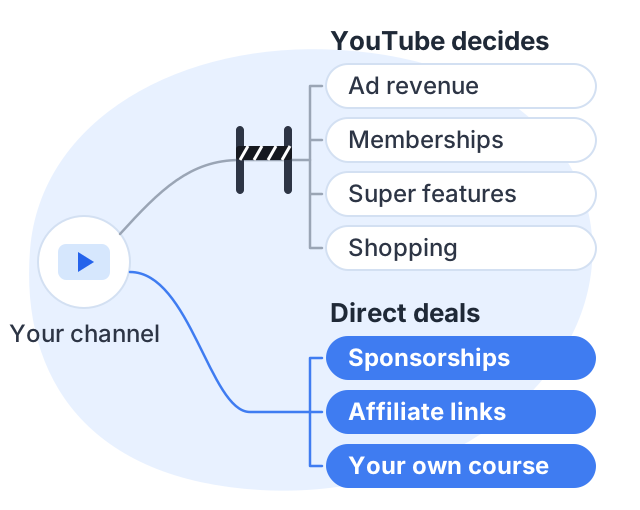
The routes that run through YouTube
Ad revenue
This is the YouTube Partner Program in its full form. You need 1,000 subscribers, plus either 4,000 qualified watch hours in the last 12 months or 10 million qualified Shorts views in the last 90 days. You also need 2-Step Verification, an AdSense for YouTube account and no active Community Guidelines strikes. Then YouTube reviews your channel, which it says typically takes about a month.
This bar rises for new applicants on February 1, 2027, and there is a January 31, 2027 deadline for existing partners to accept updated terms. Both are set out in our guide to the monetization rules.
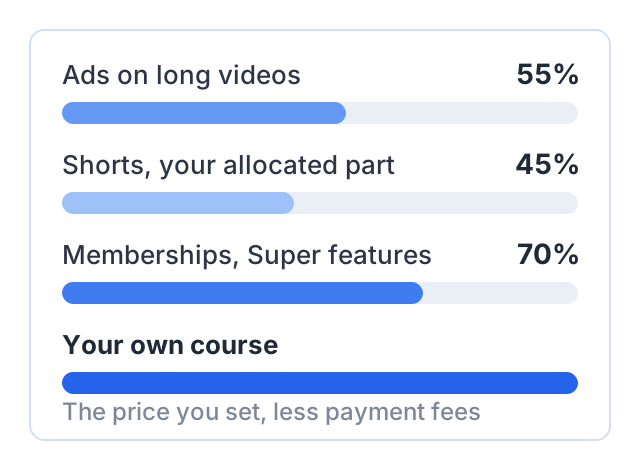
Once you are in, YouTube pays 55% of net revenue from ads on your long-form videos. For Shorts, the ad money goes into a Creator Pool, and YouTube pays you 45% of the part allocated to you.
What it suits: channels with steady, high view counts. The catch: your income is tied to your views. YouTube does not publish a rate per view, so you cannot plan around a fixed number.
Channel memberships
Viewers pay you every month for perks like badges, emojis or members-only videos. You can turn this on from the 500-subscriber tier. Memberships have extra rules too. For example, your channel must not be set as made for kids, and you must live in a country where memberships are offered.
What it suits: channels with a loyal group who watch every upload. The catch: you must keep giving members something extra, every month.
Super Chat, Super Stickers and Super Thanks
These are one-time payments. Super Chat and Super Stickers happen during live streams and Premieres. Super Thanks lets a viewer pay on a normal video. YouTube pays you 70% of net revenue from all three, as it does for memberships.
What it suits: live streamers and channels where viewers feel close to the creator. The catch: the money is irregular. It depends on how many people feel like paying that day.
YouTube Shopping
Shopping lets you show products in and below your videos. You can tag your own products, or join the Shopping affiliate program and earn a commission on other stores’ products. The affiliate program needs Partner Program membership and an eligible country. India is on YouTube’s list. Music channels and channels set as made for kids are excluded.
What it suits: review, fashion, beauty and gadget channels where buying is the natural next step. The catch: the commission rate is set by the merchant, not by you.
The routes that don’t need YouTube’s approval
Sponsorships
A brand pays you to mention or show its product. No subscriber count applies. A small channel about one clear subject can be easier to sell than a big general one, because the sponsor knows exactly who is watching.
YouTube has one rule here. If a video includes paid promotion, you must check the paid promotion box in the video details. YouTube then shows a disclosure label at the start of the video.
What it suits: channels with an audience a brand can name. The catch: each deal takes time to find, agree and deliver, and the income stops when the deals stop.
Affiliate links
You recommend a product and add a tracked link. When someone buys, the merchant pays you a share. Links in long-form video descriptions are clickable once your channel has access to advanced features. Links typed into Shorts descriptions are never clickable, so this route works better with long videos.
What it suits: tutorial and gear channels. The catch: the rate is set by the merchant, and it takes a lot of traffic before small commissions add up.
Your own course or product
You make something people pay for: a course, a template pack, a set of notes. You set the price. Apart from payment processing fees, the buyer’s money is yours.
What it suits: any channel that teaches a skill. The catch: you have to build the product, and a first course is real work. A mini course built from five videos you already have is a smaller first step. Our guide to earning without monetization looks at this route and the other no-approval routes in more detail.
A worked example
This example is hypothetical, built to show the arithmetic rather than a typical result. Take a channel that teaches Excel in Hindi. It has 5,000 subscribers and 40,000 views a month, and the average view lasts 4 minutes.
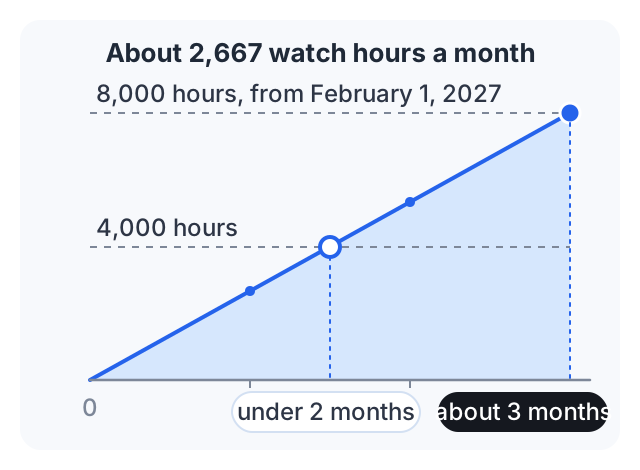
Ads. 40,000 views × 4 minutes is about 2,667 watch hours a month. The channel clears 4,000 hours in under two months, so it can apply for the full Partner Program. If it applies on or after February 1, 2027, it needs 8,000 hours instead, which takes about three months at this pace. What the ads then pay depends on the audience and subject. YouTube publishes no per-view rate, so we won’t guess one.
Memberships and Super Thanks. The channel qualifies from the 500 tier. Whatever viewers pay, YouTube passes on 70% of net revenue.
Sponsorships. Accounting software brands want to reach people who use Excel at work. The channel can approach them now, without waiting for any threshold.
A course. Suppose the channel sells a structured Excel course at ₹1,999. If 20 viewers buy in a month, that is ₹39,980 before payment fees — 20 people out of 40,000 monthly views. The creator sets the price; how many people buy is not in anyone’s control, which is why the 20 here is an assumption rather than a projection.
The example shows why the routes are not rivals. Ads reward reach. The course rewards trust. This channel has both, so it can use both.
Another way to earn: sell a course
Courselink turns the videos you have already published into a paid course site: paste the links, the lessons import in order, and students pay into your own Stripe or Razorpay account with 0% taken by Courselink. You can build your course free, but the Free plan cannot sell — paid courses start on Lite at $19 a month, and a custom domain on Standard. The full list is on the pricing page.
Sources
The YouTube figures on this page come from YouTube’s own help pages:
- YouTube Partner Program overview and eligibility: the 1,000-subscriber thresholds, account requirements and review time.
- Overview of the expanded YouTube Partner Program: the 500-subscriber tier and the features it opens.
- YouTube Partner Program terms and revenue shares: the 55%, 45% and 70% shares.
- Channel memberships eligibility
- YouTube Shopping affiliate program overview and eligibility
- Paid promotion disclosure
- Sharing links with your audiences: which links are clickable.
The course figure is arithmetic from a stated price and a stated number of buyers. It is not an average or a forecast.