

There is no single rate, and anyone who gives you one is guessing. YouTube pays you a published share of the advertising revenue that your views happen to generate, and that revenue is set by advertisers bidding to reach your viewers — not by a per-view price list.
So the honest answer to “how much does YouTube pay for 1,000 views” is: it depends on who watched, what the video was about, and whether an ad ran at all. This page explains what YouTube actually publishes, what it does not, and how to find the real number for your own channel in a few minutes.
Why this page has no per-country table
Almost every page ranking for this question shows a confident table: this much per 1,000 views in the United States, this much in India, this much in Brazil. Those tables are not sourced. YouTube does not publish per-country rates. The sites quoting them cite each other, or cite a calculator that invented them, and the figures drift as they are copied.
They are also misleading even when they are repeated honestly, because country is one of the weaker variables. A personal finance channel and a gaming channel in the same country, with the same audience size, can be several times apart. Subject matter and audience usually matter more than the flag.
This page does not publish figures it cannot source. What follows is what YouTube itself states, with links, and then the method for measuring your own.
What YouTube does publish
Two numbers are official, and both are revenue shares rather than per-view rates.
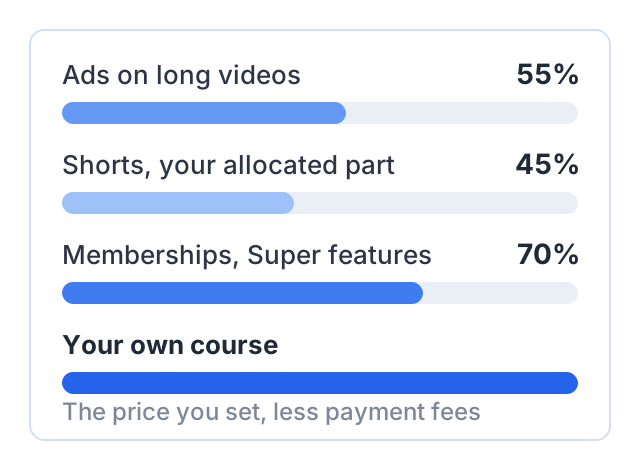
Ads on the watch page: 55% to the creator. YouTube’s partner earnings page states that for partners who accept the Watch Page Monetization Module, “YouTube will pay them 55% of net revenues from ads displayed or streamed on their public videos.” The same share applies when those videos play in the YouTube embedded player on other sites. Checked October 2026: YouTube partner earnings overview.
Shorts: 45% of the allocated amount. Shorts work differently. Ad revenue from the Shorts Feed goes into a shared Creator Pool, and each creator is allocated a portion of that pool based on their share of engaged views. YouTube’s Shorts monetization policies page states that “Monetizing creators will keep 45% of their allocated revenue, regardless if music was used or not,” and that YouTube pays the same 45% of net YouTube Premium revenue allocated for Shorts. Checked October 2026: YouTube Shorts monetization policies.
Notice what neither figure tells you: the size of the amount being shared. That is the part nobody can publish for you, because it is decided in an ad auction every time one of your videos is watched.
CPM and RPM: which one you actually receive
These two metrics get mixed up constantly, and the confusion is where most fake numbers come from.
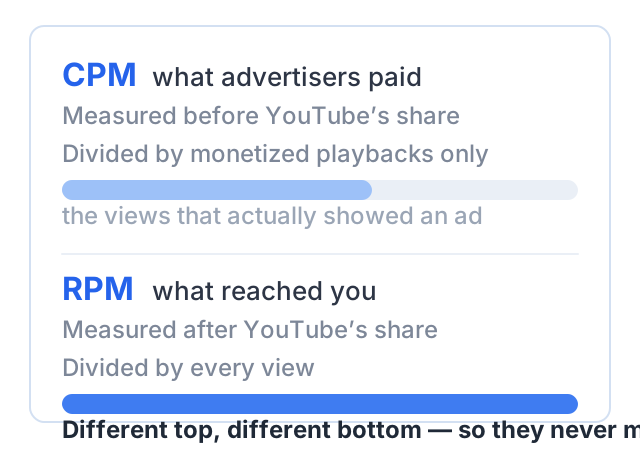
CPM is what advertisers pay for 1,000 ad impressions. It is measured before YouTube takes its share, and it counts only playbacks where an ad was actually shown. A high CPM looks impressive and is not money you received.
RPM is revenue per mille — what you earned per 1,000 views. It is measured after the revenue share, it includes income beyond ads (channel memberships, YouTube Premium, Super Chat, Super Stickers), and crucially it is divided by all your views, including the ones that carried no ad at all.
RPM is the number that matches what arrives in your account. CPM is the number that appears in headlines. Both are defined on YouTube’s own page, Understand ad revenue analytics, checked October 2026.
One more term from that page matters here: estimated monetized playbacks, which YouTube defines as “the number of times your video was watched with ads.” It is almost always lower than your view count. The gap between views and monetized playbacks is a large part of why a channel’s real RPM sits well below the CPM figures people quote.
Why two channels with the same views earn differently
Six things move the number, and only one of them is country.
Subject matter. An advertiser selling accounting software or a mortgage will bid far more for a viewer than one selling a snack. Your topic decides which advertisers are in the auction for your audience.
Where your viewers are. Advertising budgets differ by market, so the mix of countries in your audience shifts your average. This is real, but it is an average across your whole audience, not a fixed rate you can look up.
Video length and mid-roll eligibility. Longer videos can carry ad breaks in the middle, so a single view can produce several impressions instead of one.
How many views carried an ad at all. Ads are skipped, blocked, or simply not served. A video can be fully monetizing and still have a large share of views that generated nothing.
Advertiser-friendliness. A video limited for advertisers draws from a smaller pool of bidders, which lowers what it earns even while the views look identical in your analytics.
Seasonality. Advertiser spending rises toward the end of the year and drops in January. The same video, with the same views, earns differently in November and February.
How to find your own real number
This is the part that actually answers the question, and it takes about five minutes.
- Open YouTube Studio and select Analytics in the left menu.
- Open the Revenue tab. It appears once your channel is monetizing.
- Set the date range to the last 90 days. A single month, or a single video, is too noisy to read anything from.
- Read RPM. This is your real earnings per 1,000 views, after YouTube’s share. Multiply it by nothing — it is already the per-1,000-views figure.
- Compare it with CPM in the same view. The distance between them shows how much of your audience is reaching an advertiser at all.
- Open the revenue sources report to see how the total splits between ads and everything else. If memberships or Premium are a meaningful slice, your RPM is not an ad number.
- Sort your videos by revenue and look at the top five. Those tell you which subjects your advertisers value, which is far more actionable than any average.
Then watch the trend, not the single reading. Your own RPM over three months is the only credible forecast of your next three months.
A worked example, with placeholder numbers
The values below are illustrative placeholders chosen to show the arithmetic. They are not averages, not typical, and not a claim about what any channel earns. Substitute your own figures from the Revenue tab.
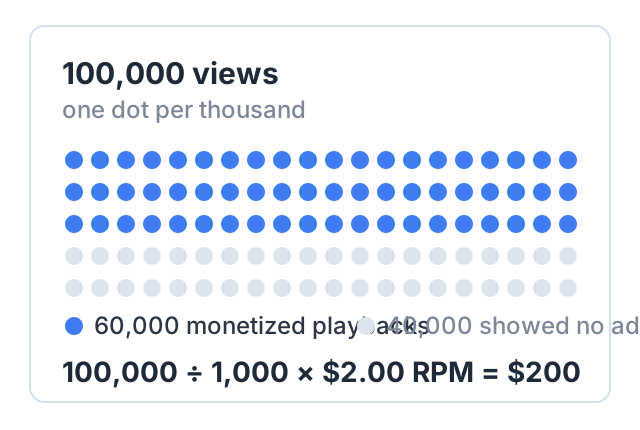
- Views in the period: 100,000
- Share of views that were monetized playbacks: 60% → 60,000 monetized playbacks
- RPM reported in YouTube Studio: $2.00
Payout = (views ÷ 1,000) × RPM = (100,000 ÷ 1,000) × $2.00 = $200.
RPM is already divided by all views, so the monetized-playback figure does not enter that calculation — it only explains why the RPM landed where it did. If you work from CPM instead, you need the extra steps: 60,000 monetized playbacks at a placeholder $8.00 CPM is $480 of gross ad revenue, of which the creator’s published 55% watch-page share is $264 before any other adjustment.
The two routes give different answers because they measure different things. That mismatch is exactly what makes quoted CPM figures useless as an earnings estimate.
What ads pay compared with the alternatives
Ad revenue scales with views, and only with views. That makes it the hardest route for a small channel and the one with the least control: you cannot raise your rate, and you cannot sell to the same viewer twice.
Creators with small, specific audiences usually earn more from sponsorships, affiliate links or their own product. A sponsor pays for access to a nameable group of people, so 3,000 views of a channel about warehouse logistics can be worth more than 50,000 views of a general vlog. An affiliate link pays on a purchase rather than an impression. A product is priced by you.
Ads also come last in time. They need YouTube’s approval and a subscriber and watch-time threshold — see our guide to the monetization rules for the current ones. The other routes start today, and we cover them in how to make money on YouTube without monetization. The rest of the make money on YouTube hub compares them side by side.
Another way to earn: sell a course
Ad revenue is a share of someone else’s transaction, paid at a rate you do not set, after YouTube approves you. A course is your own transaction at your own price, with no threshold to clear.
Courselink turns a playlist into a paid course site: paste your YouTube links and the lessons import in order, keeping your videos where they already are. Students pay into your own Stripe, Razorpay or Sepay account, and Courselink takes 0% commission on every plan — the payment provider charges its own processing fee.
You can build the course free and publish 2 free courses for up to 100 students. The Free plan cannot sell, though: paid courses, payment providers and coupons all start on Lite at $19 a month. A custom domain starts on Standard. See pricing for what each plan includes.
Twenty students at $49 is $980 — arithmetic from a price you choose and a number of buyers you can count, not an estimate of what any channel earns.
Sources
Checked October 2026:
- YouTube partner earnings overview — the 55% watch page revenue share
- YouTube Shorts monetization policies — the Creator Pool and the 45% share
- Understand ad revenue analytics — RPM, CPM and estimated monetized playbacks
No per-country, per-niche or per-view earnings figures appear on this page, because YouTube publishes none and no primary source for them exists. The worked example is arithmetic from clearly labeled placeholder values. The only accurate earnings figure for your channel is the RPM in your own Revenue tab.