

Yes, you can monetize a YouTube channel from your phone. Open the YouTube Studio app, tap Earn in the bottom menu, select Apply Now, accept the terms and link an AdSense for YouTube account, and YouTube puts your channel in a review queue.
The five steps in the Studio app
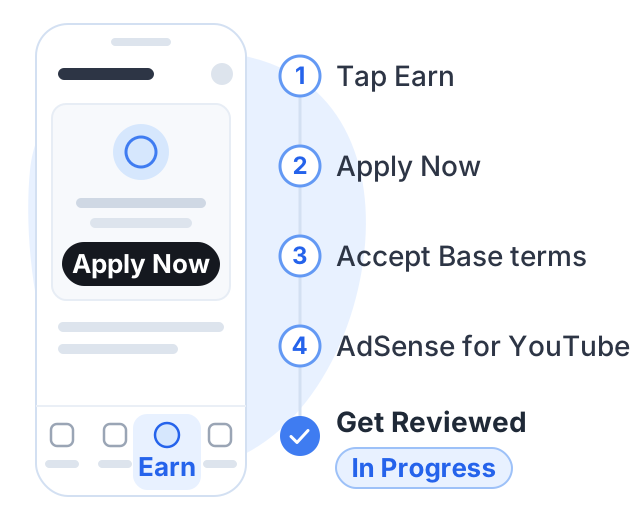
These are the steps YouTube gives for the app on both Android and iPhone:
- Open the YouTube Studio app.
- From the bottom menu, tap Earn.
- Select Apply Now to get started.
- Tap Start to review and accept the Base terms.
- Tap Start to set up an AdSense for YouTube account, or link an existing active one.
When you finish, the Get Reviewed step shows In Progress. That means YouTube has your application.
Two notes on AdSense. You need only one AdSense for YouTube account, and YouTube says to create a new one only from inside YouTube Studio, not from the regular AdSense website. If you already have an active one, link it rather than making another.
If the Apply Now button is not there, your channel has not crossed a threshold yet. Select Get notified in the same Earn area and YouTube will email you when it does.
What the app checks before it shows Apply Now
There are two ways in, both set by YouTube:
| Fan funding tier | Ad revenue tier | |
|---|---|---|
| Subscribers | 500 | 1,000 |
| Uploads | 3 valid public uploads in the last 90 days | Not stated |
| Either watch hours | 3,000 qualified, last 12 months | 4,000 qualified, last 12 months |
| Or Shorts views | 3 million qualified, last 90 days | 10 million qualified public, last 90 days |
The 500-subscriber tier is the expanded Partner Program, available in India among other countries; it unlocks fan funding like memberships and Super Thanks, not ads. Both tiers are explained in full in our guide to the monetization rules, including the higher ad revenue figures that apply to new applicants from February 1, 2027.
Apart from the numbers, YouTube’s Partner Program page lists these requirements:
- Follow the channel monetization policies.
- Live in a country or region where the Partner Program is available.
- Have no active Community Guidelines strikes.
- Turn on 2-Step Verification for your Google Account.
- Have access to advanced features on YouTube.
- Have one active AdSense for YouTube account linked, or be ready to set one up in YouTube Studio.
Fixing the three that usually block a phone application
2-Step Verification. A Google Account setting, not a YouTube one. Turn it on from your Google Account’s security settings; Google’s 2-Step Verification help page explains how.
Advanced features. YouTube says channels with enough history usually get them automatically, and that you can unlock them sooner by verifying your identity with an ID or a video (not available to every creator). The check lives in Studio under Settings, then Channel, then Feature eligibility, per YouTube’s advanced features page; on a phone, open Studio in your browser to reach it.
Strikes. Policy issues show on the Studio dashboard and in the Content tab. A Community Guidelines strike lasts 90 days, and you can apply once it expires or after a successful appeal.
What happens during review
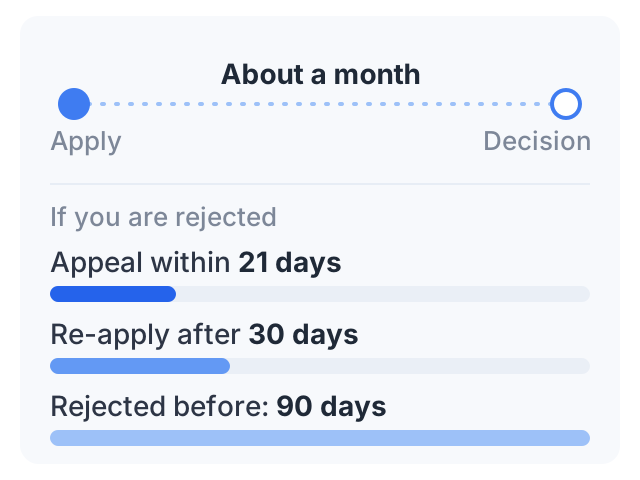
Once you accept the terms and link AdSense, your channel joins a review queue automatically. YouTube says automated systems and human reviewers check the channel as a whole against its policies, and that a decision typically comes in about a month. It can take longer when there are many applications.
A few things YouTube says about this stage:
- Your numbers can drop while you wait. If subscribers or watch hours fall below the line after you apply, YouTube still reviews the channel.
- Changing or deleting videos can affect the application. Making videos private or deleting them may change its status.
- You can check the status any time in the Earn section of YouTube Studio.
If your channel uses AI tools, read our guide to the YouTube monetization policy for AI content before you apply. Reviewers look at your channel’s main theme, most viewed and newest videos, and a channel full of templated uploads can be rejected.
If you are accepted
You choose how to earn — Watch Page ads, Shorts Feed ads, memberships and Supers — by accepting the module terms for each.
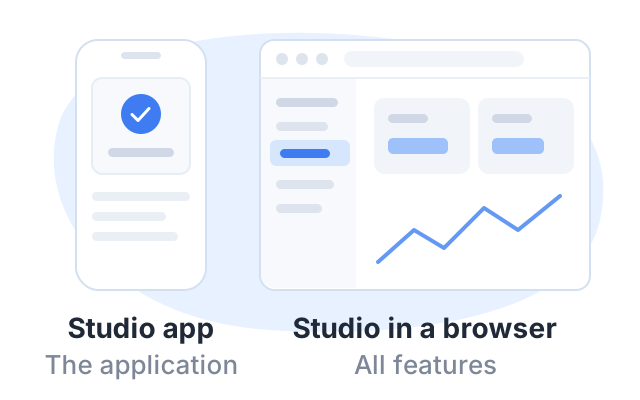
Apply in the YouTube Studio app. If a monetization setting is missing there, open Studio in your phone’s browser: YouTube’s Partner Program page says only the application process is currently available in the app, and points to Studio in a browser for all features.
Two things to keep in mind once you are in:
- Stay active. YouTube says it may turn off monetization on channels that have not uploaded a video or posted for six months or more.
- Accept the updated terms. YouTube asks creators to review and accept the updated terms in YouTube Studio by January 31, 2027 to keep fully monetizing.
If you are rejected
YouTube says that after a first rejection you can appeal within 21 days, or keep uploading original content and re-apply after 30 days. If it is not your first rejection, or you have re-applied before, you can try again after 90 days.
A rejection usually means reviewers found that a large part of the channel does not follow the policies. Fix that before you re-apply, not just the one video you suspect.
A worked example
Arjun films and edits everything on his phone; his channel teaches basic phone repair. He has 1,240 subscribers and 4,350 qualified watch hours over the last 12 months, so he clears the ad revenue tier. Before applying he turns on 2-Step Verification, confirms in a browser that advanced features show as enabled, and checks that he has no strikes. Then he runs the five steps above and keeps uploading while he waits.
Had he only 600 subscribers, the same Earn tab would be his route to the fan funding tier, provided he also had 3 public uploads in the last 90 days and 3,000 qualified watch hours.
Another way to earn: sell a course
While a review takes about a month, selling a course needs no threshold and no approval. Courselink imports a YouTube playlist as lessons in order, and students pay into your own Stripe or Razorpay account with 0% taken by Courselink. You can build the course free, but the Free plan cannot sell — paid courses start on Lite at $19 a month (₹1,499), and your own domain on Standard. See pricing for each plan.
For other options below the thresholds, read how to make money on YouTube without monetization.
Sources
- YouTube Partner Program overview and eligibility: requirements, the YouTube Studio app steps, review time, rejection rules and the activity rule.
- Overview of the expanded YouTube Partner Program: the 500-subscriber tier and its countries.
- YouTube Partner Program updates for 2027, YouTube Official Blog, August 2026.
- Advanced features and Community Guidelines strike basics.
The steps above are as YouTube documented them in October 2026. YouTube changes its app and its help pages often; if a button has moved, the Earn section of YouTube Studio is still where the application lives.