

Posting videos on YouTube does not earn money by itself. You start earning when your channel meets a threshold YouTube sets, or when you add an income source that does not need YouTube at all, such as a sponsor, an affiliate link or your own course.
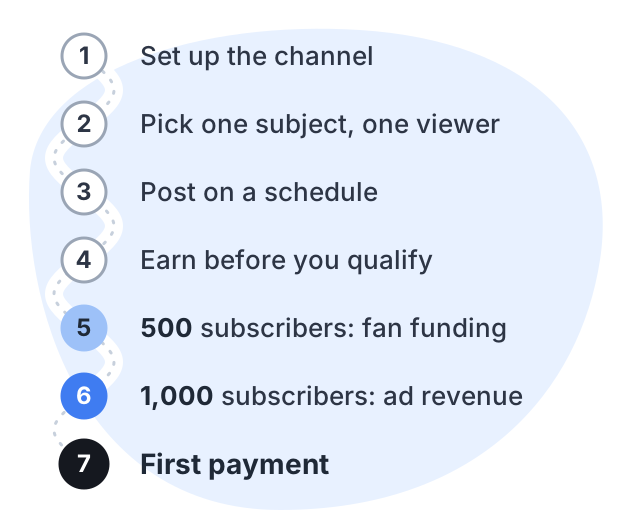
The path runs in order: set up, post, qualify, get approved, get paid. Each step below says what YouTube needs from you, using figures from YouTube’s own help pages.
Step 1: set up the channel so it can earn later
Two settings decide whether the channel can earn at all. Turn on 2-Step Verification for your Google Account, because the Partner Program requires it. And decide whether your videos are made for kids: a channel set that way loses several earning features, including memberships and end screens. While you are in your channel profile, add a contact email for business inquiries, since that is how sponsors reach you.
Step 2: pick one subject and one viewer
Watch time comes from people who stay and come back, and people come back when they know what they will get. Write one sentence — “This channel helps college students in India learn Excel for their first job” — and let every video answer one question that person has.
Step 3: post on a schedule
YouTube measures watch hours over the last 12 months and Shorts views over the last 90 days. Old views fall out of the window. A channel that stops posting can watch its numbers go down.
So the schedule matters more than any single video. Pick a pace you can keep for a year. One good long video a week is a common start. Add Shorts if they suit your subject.
Long videos and Shorts count separately. Watch time from the Shorts feed does not count toward the watch-hours figure. Choose one route to the threshold and focus on it.
Step 4: earn before you qualify
You do not have to wait for YouTube. Three income sources work from your first upload:
- Affiliate links. Add tracked links to products you really use. Links in long-form video descriptions are clickable once your channel has access to advanced features. Links typed into Shorts descriptions are not clickable at all.
- Sponsorships. Brands pay you to feature a product. No threshold applies. You must check the paid promotion box in the video details, which adds a disclosure label.
- Your own product. A course, notes or templates. You set the price.
Our guide to earning without monetization covers these three in depth.
Step 5: at 500 subscribers, apply for fan funding
India is one of the countries with the expanded Partner Program. You can apply when you have:
- 500 subscribers
- 3 valid public uploads in the last 90 days
- and either 3,000 qualified watch hours in the last 12 months or 3 million qualified Shorts views in the last 90 days
This tier opens memberships, Super Chat, Super Stickers, Super Thanks and Shopping. Your viewers pay you through these features, and YouTube pays you 70% of net revenue from memberships and the Super features. It is not ad revenue yet.
Step 6: at 1,000 subscribers, apply for ad revenue
The full Partner Program needs:
- 1,000 subscribers
- and either 4,000 qualified watch hours in the last 12 months or 10 million qualified Shorts views in the last 90 days
From February 1, 2027 the hours and views double for new applicants: 8,000 qualified watch hours in the last 365 days or 20 million qualified Shorts views in the last 90 days, still with 1,000 subscribers. If you are already in the program by then, you keep your status. Every partner must also accept YouTube’s updated terms in YouTube Studio by January 31, 2027. The fan funding tier in step 5 does not change.
You also need no active Community Guidelines strikes, access to advanced features, and you must follow YouTube’s channel monetization policies.
To apply, open YouTube Studio, select Earn, then Apply now. Accept the base terms, then set up or link an AdSense for YouTube account. Create the AdSense account from inside YouTube Studio. Your channel then goes into review, which YouTube says typically takes about a month.
Once approved, YouTube pays 55% of net revenue from ads on your long-form videos, and 45% of the Shorts revenue allocated to you. All the thresholds are explained in our guide to the monetization rules.
Step 7: get your first payment
Approval is not payment. Money reaches you through AdSense, on a monthly cycle:
| When | What happens |
|---|---|
| During the month | You build up estimated earnings |
| 3rd of the next month | Last month’s earnings are finalized and posted |
| 20th | Your balance must have reached the payment threshold |
| 21st to 26th | Payment is issued, if you met the threshold and have no payment hold |
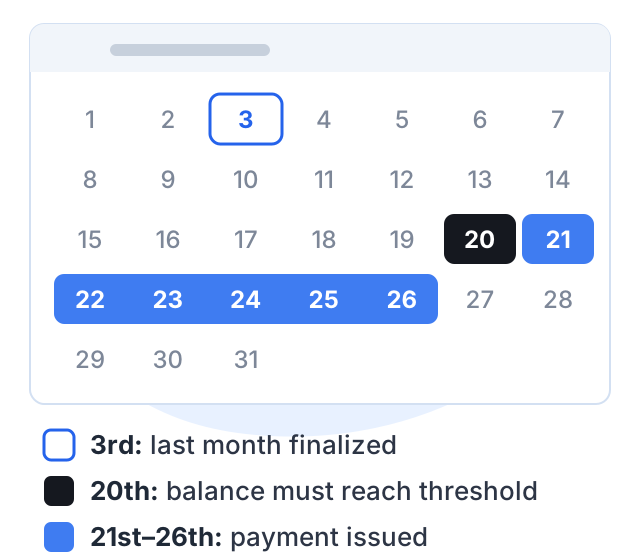
If your balance is below the threshold on the 20th, it rolls over to the next month. AdSense shows your threshold in your account. Before your first payment, you will also need to add a bank account and complete the checks AdSense asks for.
Tax. YouTube asks every creator, including those outside the US, to submit US tax information in AdSense. Withholding then applies only to earnings from US viewers. YouTube’s own example for a creator in India shows 15% withheld with a tax treaty claim, and 30% without one. If you submit nothing, Google may withhold up to 24% of your total earnings worldwide. Submit the form early.
A worked example: the timeline to the first payment
Take a creator who teaches spoken English, posting one long video a week. She reaches 500 subscribers and 3,000 watch hours in month 7 and turns on Super Thanks, then 1,000 subscribers in month 10. Applying after February 1, 2027, she needs 8,000 qualified watch hours for ad revenue, and crosses that in month 14. What happens next is the part worth knowing:
- Month 14. She applies for ad revenue on the 5th.
- Month 15. The review takes about a month. She is approved, and ads start showing on her videos.
- Month 16. Her first month of ad earnings is finalized on the 3rd. If her balance has reached the payment threshold by the 20th, she is paid between the 21st and the 26th. If not, she waits another month.
The assumptions here are one weekly upload, a channel that keeps growing, a review that lands at YouTube’s typical month, and a balance that clears the threshold first time.
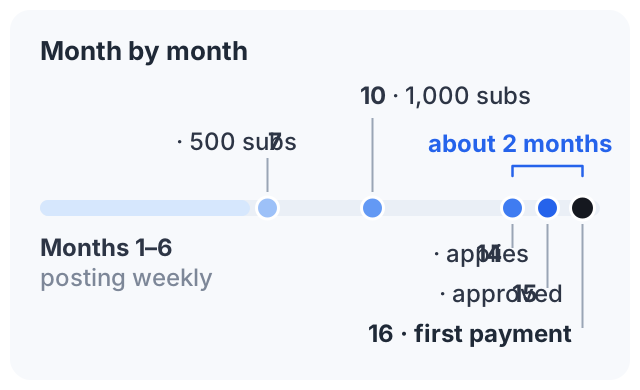
The months are an example, not a forecast. The useful part is the gap: even after she qualifies, it is about two months before the first ad payment arrives. That is why the earlier income sources in step 4 matter.
Another way to earn: sell a course
Selling a course involves no review and no waiting for a payment cycle. Courselink imports the videos you have already posted as lessons in order, and students pay into your own Stripe or Razorpay account with 0% taken by Courselink. You can build your course free, but the Free plan cannot sell — paid courses start on Lite at $19 a month, and your own domain on Standard. See the pricing page for what each plan includes.
Sources
The figures on this page come from Google’s own help pages:
- YouTube Partner Program overview and eligibility: the 1,000-subscriber thresholds, how to apply and the review time.
- Overview of the expanded YouTube Partner Program: the 500-subscriber tier.
- YouTube Partner Program terms and revenue shares
- Manage your channel’s profile: names, handles and links.
- Sharing links with your audiences
- Paid promotion disclosure
- Payment timelines for AdSense
- US tax requirements for YouTube earnings