

There is no single right online course platform. The biggest difference between them is what they cost once you start selling: the plan fee, plus the share each one takes from every sale. This comparison sets out both for seven platforms, using each company’s own pricing page.
We make one of them, Courselink. Every row says where that platform is stronger, and Courselink does not win every row.
The short version
Every row here is the entry plan: the cheapest plan that can take a payment at all. That is not always the cheapest way to sell once you have volume, which the worked example below works out separately.
| Platform | Free plan | Entry plan that can sell | Cut on that plan | Best fit |
|---|---|---|---|---|
| Courselink | Yes, but it cannot sell | Lite, $19/mo | 0% | Selling video lessons you already have |
| Payhip | Yes, and it can sell | Free Forever, $0 | 5% | Starting with no monthly fee, or mixed digital products |
| LearnWorlds | No, 30-day trial | Starter, $29/mo | $5 per paid enrollment | Training sold to companies |
| Teachable | No, 7-day trial | Starter, $39/mo | 7.5% | Student mobile apps and upsells |
| Podia | No, 14-day trial | Mover, $49/mo | 5% | Course plus newsletter and community in one tool |
| Thinkific | No, 30-day trial | Start, $109/mo | No Thinkific fee with Thinkific Payments | A long trial and an optional branded app |
| Kajabi | No, free trial | Basic, $179/mo | 2% with an outside payment provider | Replacing several marketing tools at once |
All prices are for monthly billing, in US dollars, from the pricing page linked in each row. Most of these platforms are cheaper if you pay for a year. Card processing fees from Stripe, PayPal or the platform’s own payments service apply on top, on every platform, and they go to the payment company.
Two things stand out. Payhip is the only one here that lets you sell for $0 a month. And the plan fee alone tells you little: a cheap plan with a cut on each sale can cost more than a pricier plan with none.
What we compared, and what we left out
We compared platforms where you run your own course site. You set the price, students pay you, and the platform charges you for the software.
Marketplaces such as Udemy work in a different way, as our guide to selling courses on Udemy explains. They sell your course inside their own store, next to courses from other teachers. That can bring students you would not find alone, but it is a different deal, so marketplaces are not in this table.
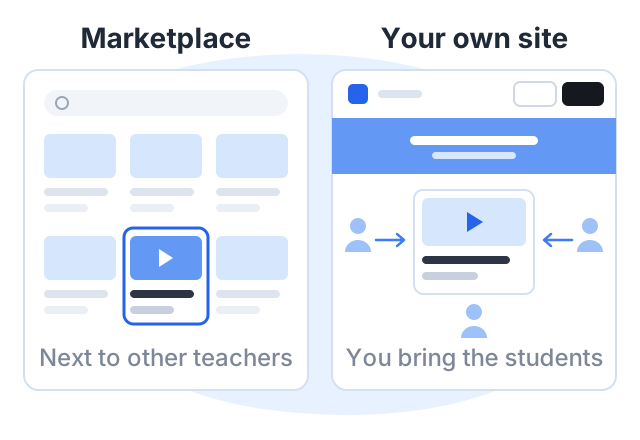
We also left out features that are hard to compare fairly, such as video quality or support speed. Where a row says a platform has a feature, that feature is listed on its own pricing page.
Each platform, and where it is stronger
Courselink
Courselink turns videos you already have into a paid course site. You paste YouTube, Vimeo or Google Drive links, the lessons import in order, and you set a price. Students pay into your own Stripe or Razorpay account.
- Free plan: 2 courses and 100 students, with no time limit. It cannot sell: no paid courses, no payment providers, no coupons.
- Selling starts on: Lite, $19 a month. Paid courses, invite-only courses, coupons and sales analytics are all on Lite.
- Cut on sales: 0% on every plan.
- Your own domain: from Standard, $49 a month. Every plan gets yourname.course.link.
Where others are stronger: Courselink has no built-in email marketing, no community and no mobile app. If you want those in the same tool, Kajabi and Podia have them. And our free plan cannot sell, while Payhip’s can.
Payhip
Payhip sells courses and also digital downloads, memberships, coaching and physical products. Its features page lists videos, quizzes, certificates, drip content and progress tracking for courses.
- Plans: Free Forever at $0 with a 5% fee, Plus at $29 a month with 2%, and Pro at $99 a month with no Payhip fee. Payhip says every plan has all features.
Where it is stronger: you can start selling with no monthly fee at all. If you sell many kinds of products, not only courses, it covers more of them.
LearnWorlds
LearnWorlds is built for training businesses as well as solo teachers.
- Plans: Starter at $29 a month, with a $5 fee on each paid enrollment. Pro Trainer at $99 a month has no enrollment fee. LearnWorlds says Starter includes paid courses but not free ones.
- Trial: 30 days.
Where it is stronger: its pricing page lists live sessions through Zoom, Meet, Teams and Webex, SCORM packages and interactive video. If you sell training to companies, that matters.
Teachable
Teachable is one of the longest-running course platforms.
- Plans: Starter at $39 a month with a 7.5% transaction fee. Builder at $89 a month drops the fee to 0% when you use Teachable Payments. Growth is $189 a month.
- Trial: 7 days.
Where it is stronger: iOS and Android student apps are listed on every plan, along with upsells and cart recovery. Courselink has no student app.
Podia
Podia covers courses, downloads, coaching, a community and email marketing.
- Plans: Mover at $49 a month with a 5% fee. Shaker at $99 a month and Earthquaker at $179 a month have no Podia fee.
- Trial: 14 days, no card needed.
Where it is stronger: email newsletters and a community live in the same account as your course, so you are not paying for a separate email tool.
Thinkific
- Plans: Start at $109 a month, Grow at $219 a month and Expand at $499 a month.
- Fees: with Thinkific Payments you pay processing only. Its pricing page says outside providers such as Stripe or PayPal add a gateway fee, but it does not list the amount.
- Branding: Grow is the lowest plan that removes Thinkific branding.
- Trial: 30 days.
Where it is stronger: it offers a branded mobile app as an add-on, listed at $199 a month, and its 30-day trial is one of the longest here.
Kajabi
- Plans: Basic at $179 a month, Growth at $249 a month and Pro at $499 a month.
- Fees: no extra fee with Kajabi Payments, which charges processing. With an outside provider Kajabi adds 2% on Basic, 1% on Growth and 0.5% on Pro.
- Products: 5 on Basic, 50 on Growth, unlimited on Pro.
Where it is stronger: email marketing, communities, funnels and a mobile app are all part of the product. If you would otherwise pay for three separate tools, the higher price can make sense.
A worked example: one month, 20 sales of a $49 course
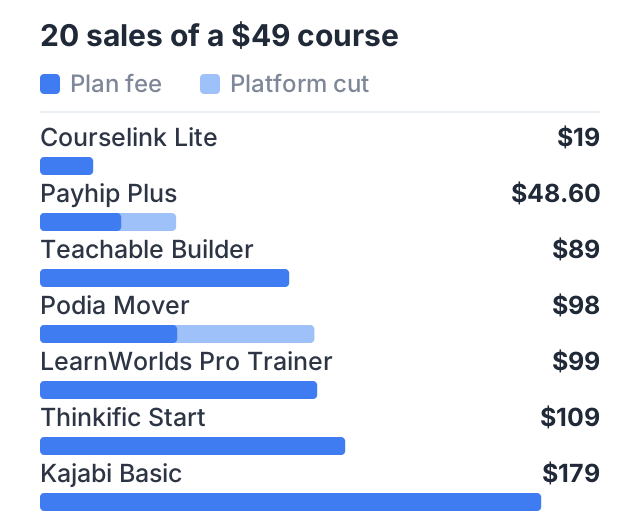
Prices on a pricing page are hard to compare. So here is one month, worked out from the figures above. You sell 20 copies of a $49 course. That is $980 in sales.
Two rules make the rows comparable. Each platform is shown on the cheapest plan of its own that costs least in total at this volume, not on its entry plan — a plan with a higher fee and no cut often wins here. And each is shown using its own payment service where that avoids an extra platform fee. The cost is what the platform charges you: the plan fee plus its cut. Card processing is left out, because you pay it on every platform and it goes to the payment company.
| Platform and plan | Plan fee | Platform cut | Platform cost for the month |
|---|---|---|---|
| Courselink Lite | $19 | 0% = $0 | $19 |
| Payhip Plus | $29 | 2% = $19.60 | $48.60 |
| Teachable Builder | $89 | 0% with Teachable Payments | $89 |
| Podia Mover | $49 | 5% = $49 | $98 |
| LearnWorlds Pro Trainer | $99 | no enrollment fee | $99 |
| Thinkific Start | $109 | no Thinkific fee with Thinkific Payments | $109 |
| Kajabi Basic | $179 | no extra fee with Kajabi Payments | $179 |
Three rows change under those rules, and the change is the point. LearnWorlds Starter would be $29 + 20 × $5 = $129, so Pro Trainer at $99 with no enrollment fee is cheaper at this volume. Teachable Starter would be $39 + 7.5% = $112.50, so Builder at $89 with Teachable Payments is cheaper. Payhip Free Forever would be $49, just above Plus at $48.60. If you use an outside payment provider instead, Kajabi Basic adds 2% ($19.60) and Thinkific adds a gateway fee it does not publish, so those two rows would rise by an amount you cannot compare in advance.
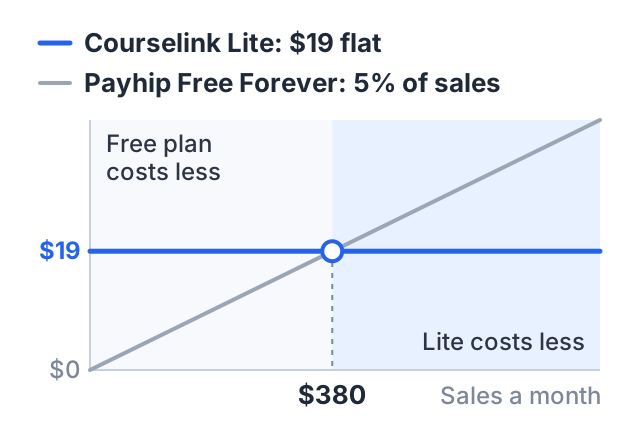
Now change the numbers. If you sell less than $380 in a month, Payhip’s free plan costs you less than Courselink Lite, because 5% of $380 is $19. Sell more than that and a flat fee with no cut costs less. So the right answer depends on how much you expect to sell, and you can work it out in two minutes with your own numbers.
The table also shows why a low plan price can mislead, in both directions. Teachable’s entry plan looks like $39 against Courselink Lite’s $19, but at this volume its cut makes Builder the cheaper Teachable plan, at $89. Run your own number before you pick a plan from a pricing page.
How to choose
- Decide what you are selling. Only video courses? Or courses plus downloads, coaching and a newsletter? The second needs a broader tool.
- Estimate one month of sales. Even a rough guess. Then add the plan fee and the cut, as in the example above.
- Check what is on the plan you can afford. Custom domains, branding removal and coupons are often on a higher plan than the one you first look at. Our guide to white-label course platforms compares what branding removal costs.
- Start with the trial or free plan. Build one module before you pay. You will learn more from an hour of use than from a feature list.
How to do this on Courselink
If your lessons already exist as videos, Courselink is built for that: paste a YouTube, Vimeo or Google Drive link and the lessons import in order, with PDFs, quizzes, assignments and certificates alongside them. Build free first — the Free plan cannot sell — then selling starts on Lite at $19 a month and your own domain on Standard, with 0% taken from your sales on every plan. See the full plan comparison, or read how the free course builder works.