

Promote an online course first wherever people already know you. Start with your current audience, even if it is small, then give away one real lesson, and only pay for ads once the course has sold without them.
That order matters. Most promotion fails because it starts with strangers. Strangers do not know if you teach well, and it costs money and time to show them. People who already watch your videos or read your posts are halfway there.
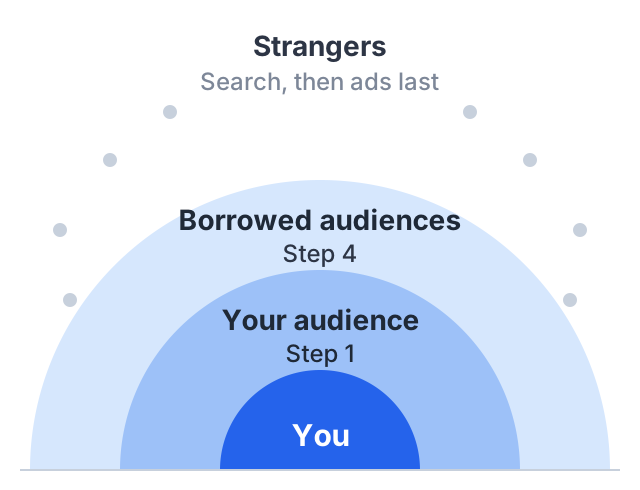
This guide sets out a plan in that order, with a worked example at the end.
Step 1: tell the people who already follow you
You probably have more reach than you think. Count every place where people already see your work: a YouTube channel, an Instagram account, a newsletter, a WhatsApp group, a LinkedIn profile, past clients.
Then put the course in front of them, plainly:
-
A post that says what the course teaches, who it is for, and the price. Do not hide the price. People who click and then find a surprise price feel tricked.
-
A personal message to people who have asked you questions in the past. If someone asked you how to do the thing your course teaches, they are the first person to tell. Keep it to three sentences:
Hi Priya — you asked me a while back how to stop rebuilding the same invoice sheet every month. I’ve put that whole setup into a short course, 6 modules, about two hours: [link], $39. Tell me if it’s not what you were after.
What makes it work is the first sentence: it names the thing they said, so it reads as a reply rather than an announcement.
-
A link everywhere your profile allows one.
Where course links work on YouTube
If you teach on YouTube, know where a link can be clicked. YouTube’s own help page on links says:
- Long-form video descriptions and comments: links are clickable, once your channel has access to advanced features.
- Shorts descriptions and Shorts comments: links are not clickable. YouTube says this is to reduce spam and scams.
- Your channel page: you can show up to 14 channel profile links.
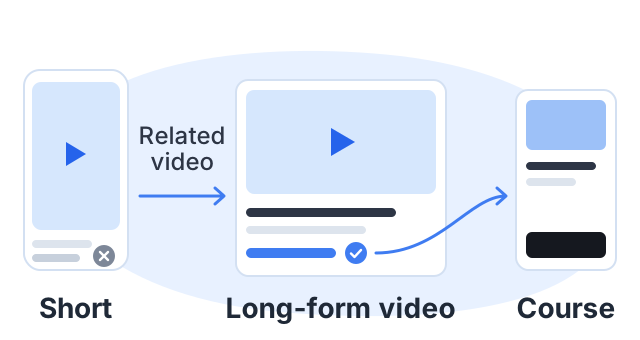
So a Short cannot sell your course directly. Use Shorts to send people to a long-form video, and put the course link in that video’s description and in a pinned comment. YouTube’s help page lists the “Related video” link in Shorts as clickable, which is a simple way to connect the two.
Step 2: give away one real lesson
People buy a course when they trust that you can teach. The surest way to earn that trust is to teach them something, for free, before you ask for money.
Pick one lesson that:
- Solves one small problem completely. “How to set up your first budget sheet” works. “Introduction to budgeting, part 1 of 3” does not.
- Sounds like the rest of the course. Same voice, same quality. If the free lesson is better than the paid ones, you will get refunds.
- Ends with a clear next step. One sentence: “The full course covers the next five steps. It is here.”
You can publish this lesson as a short free course of its own, or as a normal video, a blog post or a long Instagram post. What matters is that it is complete.
Step 3: make the course page do its job
All promotion ends on one page, so an unclear page wastes every post before it. It needs to answer what the student will be able to do, who it is and is not for, what is inside, who is teaching, and what it costs — our course sales page guide goes through each section with examples.
One test is worth doing before you promote anything: send the page to a friend and ask them to tell you, in one sentence, what the course is and who it is for. If they cannot, fix the page first.
Step 4: borrow other people’s audiences
Once your own audience has heard about the course, the next step is people who trust someone else.
- Guest on someone’s channel or podcast. Teach something useful in your topic. Do not pitch; mention the course once at the end.
- Swap mentions with a creator in a nearby topic. A photography teacher and a photo-editing teacher serve the same students without competing.
- Answer questions where your students ask them. Forums, Reddit communities, Facebook groups. Read each group’s rules first: many ban self-promotion, and a ban is worse than silence.
These take more time than a post, but each one puts you in front of people who already trust the person inviting you.
Step 5: be found in search
Search is slow but it keeps working. A useful video or article can bring people to your course for months after you publish it.
- Make one piece of content for each question your course answers. Each module in your outline is a possible video or article.
- Use the words students use. If they search “how to make a budget in Excel”, say that, not “personal finance spreadsheet methodology”.
- Link each piece to the course. On long-form YouTube videos, put the link in the description.
Step 6: give people a reason to decide now
People put off decisions that have no deadline, which is what a launch price with a real end date is for: say the date, keep it, and do not quietly extend it. Our guide on how to launch an online course covers the launch week itself.
Step 7: measure what each channel actually brings
Promotion that runs for months needs a number per channel, or you end up repeating whatever felt busiest. You do not need analytics software to start: give each place you post its own link, then write down what came back.
| Channel | Link used | Clicks | Sales | Notes |
|---|---|---|---|---|
| Video descriptions | ?src=yt-desc | 212 | 4 | Best on the invoice tutorial |
| Email list | ?src=email | 96 | 7 | Highest sales per click |
| Instagram bio | ?src=ig | 140 | 1 | Clicks but no buyers |
| Guest episode | ?src=guest-bk | 38 | 2 | One episode, still arriving |
The ?src= part is a tag you add to the end of your course link, like yourname.course.link/excel?src=email. It does not change the page; it just travels with the visitor, so your analytics can report where each visit came from. Fill the table in once a month.
Two patterns are worth acting on. A channel with clicks and no sales usually has a mismatch between what the post promised and what the page offers. A channel with few clicks but a high sale rate — often the email list — is the one to give more time to, not the one with the biggest audience.
Step 8: only then, run ads
Ads work well when they send the right people to a page that already sells. If the course has never sold without ads, an ad will not fix that. It will show the problem to more people at a higher cost.
When you are ready:
- Install tracking first. You need to know which ad brought which sale. That means the Meta Pixel for Facebook and Instagram ads, and Google Analytics for the rest.
- Start small and on one platform. Learn what works before you spend more.
- Show people your free lesson, not a “buy now” message. Cold audiences need the trust step too.
A worked example: a 4-week plan for a small channel
Maya is an example creator, not a real customer. She teaches spreadsheet skills on YouTube. She has 3,000 subscribers and a small email list. Her course, “Excel for small business owners”, has 6 modules and costs $39.
Week 1, her own audience. She posts on her channel and Instagram, sends an email to her list, and messages the 15 people who asked her spreadsheet questions in the past year. She adds the course link to the descriptions of her 10 most-watched long-form videos and pins a comment on each.
Week 2, the free lesson. She publishes one full lesson on YouTube: how to build an invoice tracker. It ends with one line about the course. She makes three Shorts from the lesson, each one pointing to the full video through the Related video link.
Week 3, borrowed audiences. She offers a guest tutorial to a bookkeeping channel and swaps newsletter mentions with a creator who teaches small business marketing.
Week 4, the deadline. She announces that the launch price ends on Sunday, reminds her list twice, and raises the price on Monday as promised.
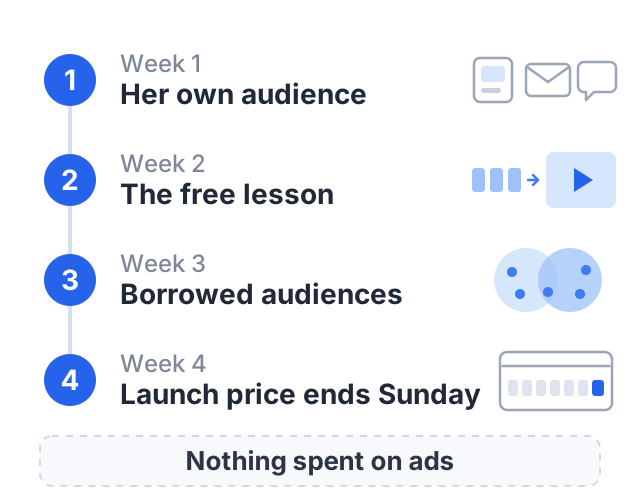
Notice what she does not do: she spends nothing on ads. At the end of four weeks she has a tagged link per channel and a count of what each one brought — which is what tells her whether an ad would have anything to amplify.
How to do this on Courselink
On Courselink, Lite includes paid courses, coupons for a launch price, sales analytics, and the Google Analytics and Meta Pixel connections ads need. Build a free course first — the free lesson in step 2 works well as one — then upgrade when you are ready to sell. See pricing for the full plan details, or how we compare with other online course platforms.