

A course outline template is a fill-in plan for your course: the promise, who it is for, then each module with its outcome and its lessons. Copy the template below, fill it in from the top down, and you will know what to record before you press record.
There is no email form and no download. The whole template is on this page.
The template
Select the text in the box, copy it, and paste it into a document, a spreadsheet or a notes app. Then replace each line in brackets.
COURSE OUTLINE

Course title: [what it teaches, in plain words]
The promise: After this course you will be able to
  [one result the student can see or use]
Who it is for: [one sentence about the student]
Who it is not for: [one sentence]
Before you start, you need: [skills, tools, software]
Price: [your price]

MODULE 1: [name]
Outcome: By the end of this module you can
  [one smaller result]
  Lesson 1.1: [title]
    Key point: [the one thing to learn]
    Student does: [exercise, quiz or task]
    Files: [worksheet, template, none]
  Lesson 1.2: [title]
    Key point:
    Student does:
    Files:
  Lesson 1.3: [title]
    Key point:
    Student does:
    Files:
Module check: [quiz or task that proves the outcome]

MODULE 2: [name]
Outcome: By the end of this module you can
  [one smaller result]
  Lesson 2.1: [title]
    Key point:
    Student does:
    Files:
  Lesson 2.2: [title]
    Key point:
    Student does:
    Files:
Module check:

MODULE 3: [name]
(copy the module block as many times as you need)

FINAL STEP
Final project: [one task that uses the whole course]
Certificate: [yes or no]
What next: [your next course, coaching, or community
  you run elsewhere]
How to fill in each part
Work from the top down: each line depends on the one above it. For the method behind these choices — writing objectives, designing practice and sequencing modules — see how to create a course outline in 7 steps.
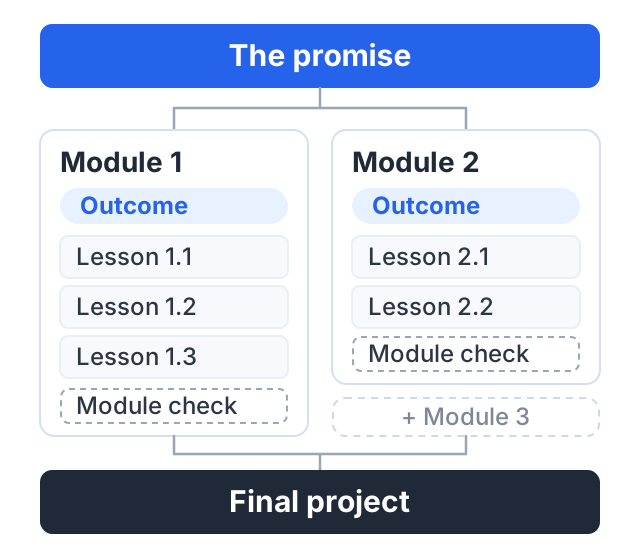
The promise is the line everything else hangs on. Write one result the student can see or use when they finish: “take sharp, well-lit photos of products for an online shop, using a phone”, not “understand photography”. If you cannot write this line, you are not ready to plan modules.
Who it is for, and who it is not for. “Beginners” is too wide; “shop owners who sell online and take their own product photos” tells you how much to explain and which examples to use. The “not for” line stops you adding advanced lessons that confuse beginners, and tells the wrong buyers not to buy.
Before you start is what the student needs before lesson one — a tool, an app, a basic skill. If the list is long, your first module may need to cover setup.
Modules are one step each toward the promise, so give each an outcome: a smaller result reached at the end of it. Read your module outcomes in order, with nothing else, and they should read like a path from where the student starts to the promise. Anything that does not fit the path moves or goes.
Lessons teach one key point each. If you need the word “and” to describe a lesson’s point, it may be two lessons. Fill in “Student does” wherever you can — a task, a quiz question, a worksheet — so the student can check they understood rather than hoping. A module with no tasks at all is a warning sign.
The module check is how the student knows they reached the outcome: a short quiz, a task to submit, or “try this and compare with my example”. It also tells you which modules are not working.
The final step is one project that uses the whole course, then a line telling the student what to do next.
A filled example: product photos with a phone
Here is the same template, filled in for a short course.
COURSE OUTLINE

Course title: Product photos with your phone
The promise: After this course you will be able to
  take clean, well-lit product photos for your
  online shop, using only a phone
Who it is for: small shop owners who photograph
  their own products
Who it is not for: professional photographers
Before you start, you need: a phone with a camera,
  a window, a sheet of white card
Price: $29

MODULE 1: Your setup
Outcome: By the end of this module you can
  build a simple photo corner at home
  Lesson 1.1: Why light matters more than the camera
    Key point: soft window light beats a new phone
    Student does: photograph one product in three
      spots and compare
    Files: none
  Lesson 1.2: A photo corner for almost nothing
    Key point: white card, a window, a table
    Student does: build the corner
    Files: shopping checklist (PDF)
Module check: upload one photo taken in your corner

MODULE 2: Taking the photo
Outcome: By the end of this module you can
  take a sharp, straight photo every time
  Lesson 2.1: Phone camera settings that matter
    Key point: focus lock and exposure
    Student does: lock focus on three products
    Files: settings cheat sheet (PDF)
  Lesson 2.2: Angles that sell
    Key point: front, side, detail, in use
    Student does: shoot all four angles
    Files: none
  Lesson 2.3: Keeping a product range consistent
    Key point: same spot, same distance, same light
    Student does: shoot five products the same way
    Files: none
Module check: quiz, five questions

MODULE 3: Editing and uploading
Outcome: By the end of this module you can
  edit and export photos ready for your shop
  Lesson 3.1: Three edits every photo needs
    Key point: crop, straighten, brighten
    Student does: edit five photos
    Files: none
  Lesson 3.2: Sizes and formats for online shops
    Key point: check your shop platform's guide
    Student does: export one product set
    Files: export checklist (PDF)
Module check: upload a before-and-after pair

FINAL STEP
Final project: photograph and edit one full product
  range of at least five items
Certificate: yes
What next: a follow-up course on lifestyle photos
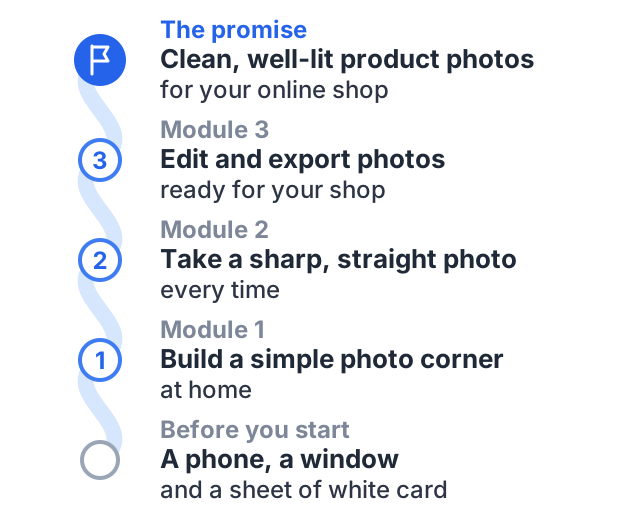
Notice three things. The promise is something you could see in a photo. Each module outcome is a smaller step toward it. And almost every lesson asks the student to do something, not only watch.
Common mistakes
- Starting with lessons instead of the promise. You end up with a pile of topics and no path through them.
- One module for “theory”. Put each idea in the module where the student needs it.
- Lessons that cover too much. Long lessons are hard to come back to. Split them by key point.
- No module checks. Without them, neither you nor the student knows if the course is working.
- Adding everything you know. The outline is for this promise only. Save the rest for your next course.
When your outline is done
Read it as a student would. Can you see how lesson 1.1 leads to the final project? If yes, you are ready to record.
If you would rather start from a filled-in structure than a blank one, the course outline generator turns a list of your topics into modules and lessons you can copy or download.
Next, plan how people will hear about it. Our guide on how to launch an online course starts where this one ends, and how to promote an online course covers the weeks after. More planning guides are in the plan and launch a course hub.
How to do this on Courselink
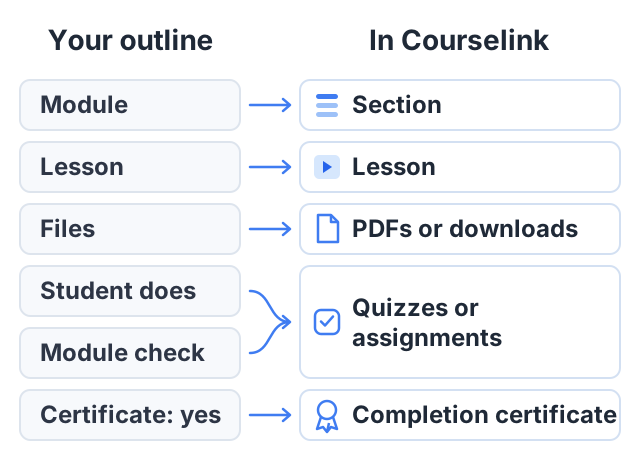
Your outline maps straight onto a course in Courselink. Each module becomes a section, and each lesson becomes a lesson inside it. If your lessons already exist as videos, paste the YouTube, Vimeo or Google Drive links and they import in order. You can also upload video files.
The parts of the template have a place too. “Files” become PDFs or other downloads on the lesson. “Student does” and “Module check” become quizzes or assignments. “Certificate: yes” becomes a completion certificate.
You can build and publish the whole course on the Free plan, for up to 2 courses and 100 students, but it cannot sell: charging your price starts on Lite at $19 a month, and your own domain on Standard. Courselink takes 0% of your sales on every plan. See the pricing page for every plan.