

To use YouTube for your business, make videos that answer the questions your customers already ask, and give every video one clear next step, such as booking a call, visiting your shop or buying a course. Done well, a channel works like a salesperson who explains your product the same way every time.
This guide is for small businesses, coaches and consultants. It covers setup, which videos to make, and how to turn a viewer into a customer. It does not depend on YouTube ad revenue, because for most businesses ads are the smallest part of what a channel earns.
Why YouTube works for a small business
People use YouTube to learn how to do things. Someone searching “how to fix a leaking faucet” or “how to file GST returns” has a problem right now. If your video solves it, you are the first expert they meet.
That is different from most social media. On many feeds, people scroll past. On YouTube, people often arrive with a question. A business that answers questions well gets found by people who need it.
Videos also last. A clear answer posted today can keep bringing viewers for a long time, as long as the answer stays correct.
Step 1: set up the channel properly
Use a business name, not your personal account
YouTube lets you create a channel with a business or other name, connected to a Brand Account. A Brand Account can use a different name from your Google Account, and it can have more than one owner or manager. Use this from day one, so you never have to move the channel later.
When someone helps you, such as an editor or an assistant, add them through channel permissions. Do not share your password. YouTube’s safety page lists marketing help that needs channel access as a suspicious offer, and says YouTube will never ask for your password.
Fill in the profile
In YouTube Studio, go to Customization, then Profile. Fill in:
- Name and handle. Use your business name. You can change each only twice in 14 days.
- Description. One or two sentences: who you help and what with.
- Contact email. Add a business email so brands and customers can reach you.
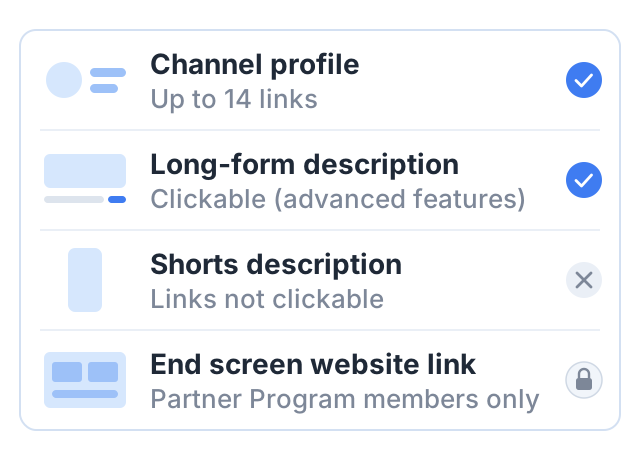
- Links. You can add up to 14. The first appears near the Subscribe button, so make it the page where people can buy or book.
Step 2: choose the right kinds of videos
Start with a list of the questions customers ask you every week. Each question is a video. Most small businesses can work from five types:
| Video type | Example for a yoga coach | Example for a CA firm |
|---|---|---|
| How-to | ”5 stretches for lower back pain" | "How to download your Form 16” |
| Common mistakes | ”3 mistakes beginners make in Surya Namaskar" | "Mistakes that delay your income tax refund” |
| Product or service demo | ”What happens in my online batch" | "What our GST filing service includes” |
| Frequent questions, as Shorts | ”Can I do yoga after eating?" | "Do I need to file ITR if my income is below the limit?” |
| Customer stories | A student explains her progress, with her permission | A client explains a problem you solved |
Long videos are where people learn from you, and where your clickable links live, once your channel has access to advanced features. Shorts help new people find you. Use Shorts to answer one quick question and point to a long video that goes deeper.
Keep the teaching real. A business channel works when the free videos solve a real problem. If every video holds back the answer to sell something, viewers notice and leave.
Step 3: turn viewers into customers
A view is not a customer. You need a path from the video to your business. Here are the tools YouTube gives you, and their limits.
| Tool | Who can use it | Notes |
|---|---|---|
| Channel profile links | Every channel | Up to 14 links; the first shows near Subscribe |
| Long-form video description links | Channels with access to advanced features | Clickable |
| Shorts description links | Every channel | Not clickable; a Short can link to a related video instead |
| End screen link to your website | Partner Program members only | Needs a video of at least 25 seconds |
For most new business channels, this means the description and profile links do the work. YouTube’s page on sharing links notes that clickable external links need your channel’s access to advanced features turned on, so check that before you rely on them. Put the most important link in the first lines of each long-form description, where people see it without expanding the text.
Give one next step per video. “Book a free 15-minute call”, “See today’s prices” or “Join the course” works better than five links at once. Say it in the video too, not only in the description.
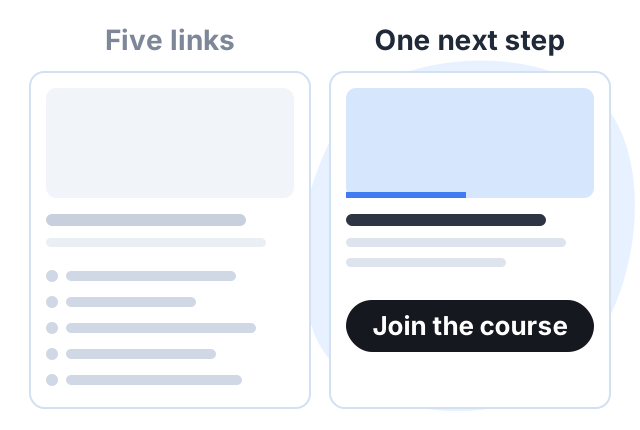
Match the step to the video. A how-to video suits a free resource or a course. A demo video suits a booking link. A customer story suits a “start here” page.
Step 4: sell what you know
For a coach, consultant or trainer, the most natural product is a course. Your free videos already show how you teach; a course packs the full method into lessons people follow in order. It also fits around client work: a one-to-one session pays once, for one hour of your time, while a course is made once and can be bought many times. A CA firm might sell a short course on bookkeeping for small shops, a gym a home workout plan — income in itself, and often a source of clients for the main service.
Courselink builds that course from the videos you have already posted: paste the playlist link, the lessons import in order, and students pay into your own Stripe or Razorpay account with 0% taken by Courselink. You can build the course free, but the Free plan cannot sell — paid courses start on Lite at $19 a month, a custom domain and removing Courselink branding on Standard, and team members on Plus. See the pricing page for details.
Step 5: measure what matters
YouTube Studio shows views, watch time and subscribers. None of those tells you whether the channel brought in a customer. Two things do, and both take an afternoon to set up.
Tag the link you put in descriptions. Instead of linking to yoursite.com/book, link to yoursite.com/book?utm_source=youtube&utm_medium=description&utm_campaign=back-pain-video. The page is the same; the tags travel with the visitor, so your analytics can report how many sessions and bookings came from YouTube, and from which video. Use a different utm_campaign for each video, and keep the tags consistent — youtube and YouTube are counted as two sources.
Add a “How did you hear about us?” field to your booking form, inquiry form or first-call script, with YouTube as one of the options. Tagged links miss anyone who watched on a phone and booked later on a laptop, which in practice is a lot of people; the field catches them. Write the answer into the same field on every record, so you can count it later.
Together they give you one number worth watching each month: inquiries and bookings attributed to YouTube. If three of them name the same video, make more videos like it.
What about YouTube ad revenue?
A business channel can join the YouTube Partner Program like any other, but for most businesses the customers a video brings in are worth far more than the ad share — and the ad bar rises for new applicants on February 1, 2027 (see our guide to the monetization rules). Treat ads as a bonus and build the channel around your customers.
A worked example
Meera is a yoga coach in Pune. She teaches small batches in person and wants more students without renting a bigger hall.
Setup. She creates a channel under her studio’s name, connected to a Brand Account, and gives her assistant access through permissions. Her first profile link goes to her course page.
Videos. She lists the ten questions her students ask most, and records one long video for each. She cuts a Short from each video that answers one small part of the question.
The path. Every long video ends with one line: “If you want the full 30-day plan, the link is in the description.” The Shorts point to the related long video.
The product. She records her 30-day beginner plan as a course: 30 short lessons, each one a session. She sells it at ₹1,499.
The numbers. If 15 people buy in a month, that is ₹22,485 before payment fees — 15 buyers, not 15,000 views, and no YouTube threshold involved. Meera sets the price; the 15 is an assumption for the example. Her booking form’s “How did you hear about us?” field is what tells her which of those buyers came from the channel.
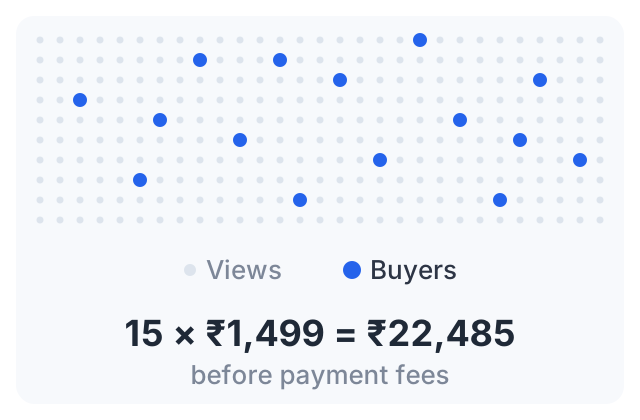
The example is illustrative. The point is the structure: free answers on YouTube, one clear next step, and a paid product that delivers the full method.
Sources
- Create a YouTube channel: channels with a business name and Brand Accounts.
- Manage your channel’s profile: names, handles, contact email and the 14-link limit.
- Sharing links with your audiences: which links are clickable.
- Add end screens to videos: external links need Partner Program membership.
- Safety tips and resources for YouTube creators
- YouTube Partner Program overview and eligibility
- Changes to the YouTube Partner Program: the February 1, 2027 thresholds.
The course figure is arithmetic from a stated price and a stated number of buyers. It is not an average or a forecast.