

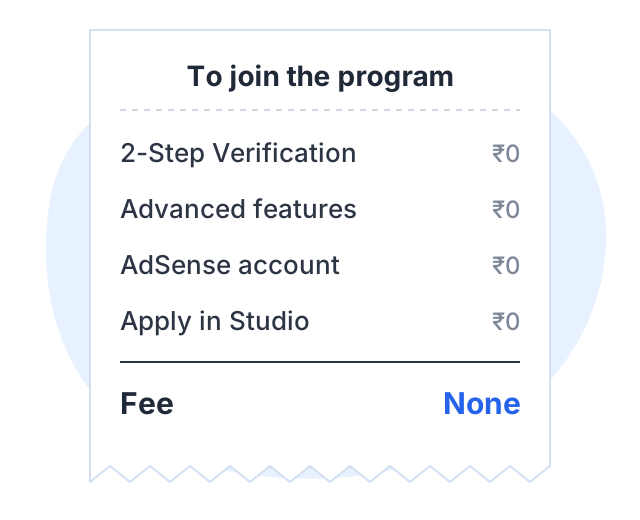
You do not have to pay anyone to monetize a YouTube channel. YouTube’s Partner Program lists no fee in its requirements, and you apply for it yourself inside YouTube Studio.
So if someone asks you for money to “monetize” your channel, be careful. Below: what the application actually asks for, the one route where a cost may legitimately appear, and how to spot the paid services that put channels at risk.
What joining the Partner Program costs: nothing
YouTube’s eligibility page lists what you need. It is a list of numbers and settings, not payments:
- 1,000 subscribers, plus 4,000 qualified watch hours in the last 12 months or 10 million qualified Shorts views in the last 90 days, for ad revenue. From February 1, 2027 new applicants need 8,000 hours in 365 days or 20 million Shorts views in 90 days.
- 500 subscribers, 3 valid public uploads in 90 days, plus 3,000 watch hours or 3 million Shorts views, for the fan funding tier
- 2-Step Verification turned on
- Access to advanced features
- No active Community Guidelines strikes
- An AdSense for YouTube account linked to the channel
The AdSense account is free too. Google describes AdSense as “a free of charge, simple way for publishers of all sizes” to earn. YouTube also says to create a new AdSense account only from inside YouTube Studio. That matters, because it means no outside website or agent is part of the process.
The full thresholds are in our guide to the monetization rules.
Ways to earn that need no money up front
| Route | Money you need to start | What you need instead |
|---|---|---|
| Ad revenue | None | The 1,000-subscriber thresholds and a YouTube review |
| Memberships, Super Chat, Super Stickers, Super Thanks | None | The 500-subscriber tier and each feature’s rules |
| Shopping affiliate program | None | Partner Program membership and an eligible country; India is one |
| Sponsorships | None | An audience a brand wants to reach |
| Affiliate links outside YouTube | None | Approval from the merchant’s own affiliate scheme |
| Your own course | Depends where you sell it | The time to make the course |
All of these cost time, not money, and no paid service changes that. YouTube’s own routes pay a share once your channel is approved: 55% of net revenue from ads on long-form videos, 45% of the Shorts revenue allocated to you, and 70% from memberships and the Super features. Sponsorships and affiliate links need no threshold and no fee; the only rule YouTube adds is to check the paid promotion box when a video contains a paid promotion. Our comparison of all seven routes covers what each one suits.
Your own course: the one route that may cost something
Selling a product often needs a tool to take payments and host the lessons. Some tools charge a monthly fee, some take a share of each sale, and some do both. Check both before you choose. A tool that is free to start may charge a large share later.
The paid “monetization services” to avoid
Search for YouTube monetization and you will find offers like these:
- “4,000 watch hours in 7 days”
- “1,000 real subscribers, monetization 100% sure”
- “We are a YouTube partner agency. Pay a one-time fee to activate monetization.”
- “Send us your login and our team will grow your channel.”
Each one breaks a YouTube rule or is a direct scam. Here is why.
Bought watch hours and subscribers break the fake engagement policy
YouTube’s fake engagement policy covers anything that artificially inflates views, likes, subscribers and other metrics. The policy says:
- Traffic found to be artificial will not be counted on YouTube.
- It can lead to strikes on your account. Three strikes within 90 days can end your channel.
- A method that breaks the rules can lead to content removal or a channel takedown, even if someone you hired did it.
The last point is important. You cannot blame the seller. If the hours are fake, the risk is yours, and the money is gone.
The policy also bans “sub4sub”, where creators agree to subscribe to each other only to raise counts.
”Agencies” that activate monetization are not part of the process
There is no fee and no agent in YouTube’s application steps. You open YouTube Studio, select Earn, then Apply now, accept the terms and link AdSense. YouTube then reviews the channel. Nobody outside YouTube can speed up or approve that review.
Requests for your login are a warning sign
YouTube’s safety page for creators is clear:
- YouTube will never ask for your password, email address or other account information.
- YouTube will never send a form asking for ID numbers, financial data or passwords.
- “Marketing assistance that requires channel access” is on its list of suspicious offers.
If you work with a real editor or manager, give them access through channel permissions. Never share your password.
Fake sponsorship offers
Some scams pose as brand deals. YouTube’s advice is to check that an unexpected offer is real before you reply, for example by phoning the company. A real sponsor will not need your password.
A quick checklist before you pay anyone
Ask these five questions about any offer:
- Does it promise watch hours, views or subscribers? If yes, say no. The fake engagement policy covers it.
- Does it promise that your channel will be monetized? Nobody outside YouTube can promise that, because YouTube reviews every channel.
- Does it ask for your password or a sign-in through its link? If yes, say no.
- Does it ask for an upfront fee to “activate” or “unlock” earnings? YouTube charges no fee, so this is not a YouTube process.
- Can you check it on YouTube’s own help pages? If a claim is not on support.google.com, treat it with caution.
A worked example
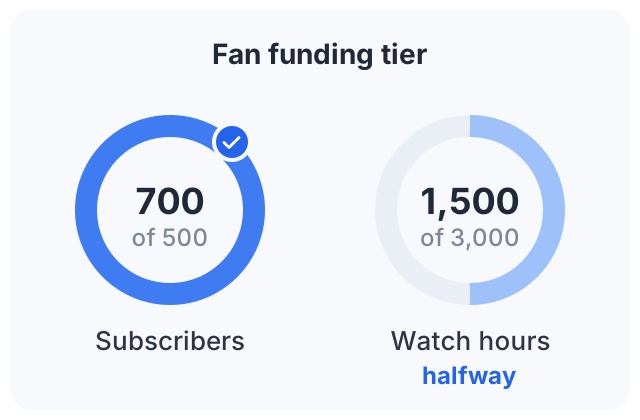
A creator in Jaipur makes cooking videos. She has 700 subscribers and about 1,500 watch hours in the last 12 months. She gets this message:
“Hi, we are an official YouTube growth partner. For ₹2,999 we will add 4,000 watch hours in 7 days and get your channel monetized.”
The offer is an example, but messages like it are common. Here is what she checks:
- The price. YouTube charges nothing to join, so ₹2,999 buys her nothing she can’t get free.
- The hours. Any hours that YouTube finds to be artificial will not count. She may also get a strike.
- The claim. “Official partner” can’t make YouTube approve her channel. YouTube reviews it either way.
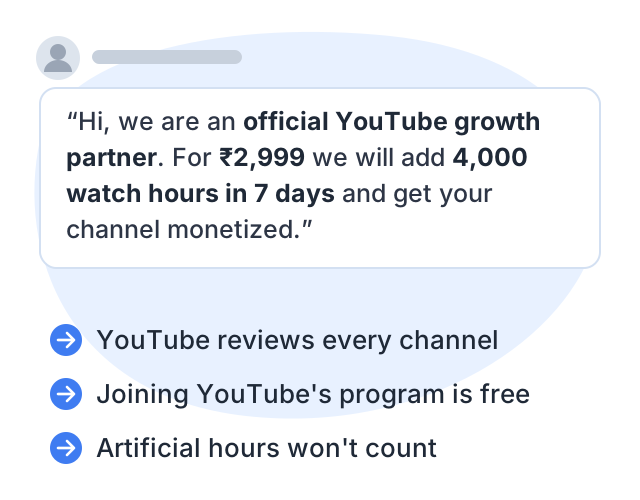
So she says no. Instead, she looks at what she can do free today. At 500 subscribers she needs 3,000 watch hours for the fan funding tier, so she is halfway there. She adds an affiliate link for the spice grinder she uses in every video, in her long-form descriptions. And she replies to a local spice brand that asked about a sponsored recipe, and checks the paid promotion box when the video goes live.
None of that cost her money. All of it is within YouTube’s rules.
Another way to earn: sell a course
Courselink imports your YouTube videos as lessons in order and publishes them as a course site. To be clear about the cost: you can build and publish a course free, but the Free plan cannot sell. Paid courses start on Lite at $19 a month, and your own domain on Standard. On every plan, Courselink takes 0% of your sales and students pay into your own Stripe or Razorpay account. The pricing page lists what each plan includes.
Sources
- YouTube Partner Program overview and eligibility: the requirements, the application steps, and the advice to create AdSense accounts only in YouTube Studio.
- Overview of the expanded YouTube Partner Program
- YouTube Partner Program terms and revenue shares
- Why publishers use Google AdSense: AdSense is free of charge.
- Fake engagement policy
- Safety tips and resources for YouTube creators
- Paid promotion disclosure