

Selling a digital product takes four things: something to sell, a page that sells it, a way to take money, and a way to deliver the file or the access. Every decision below — which platform, what price, how to launch — is a choice about one of those four, not an extra step on top of them.
The part that decides whether you earn anything is not on that list. It is whether anyone knows the product exists. No platform supplies buyers, and the sellers who do well almost always had an audience, a mailing list or a search ranking before they had a product.
Where you can sell
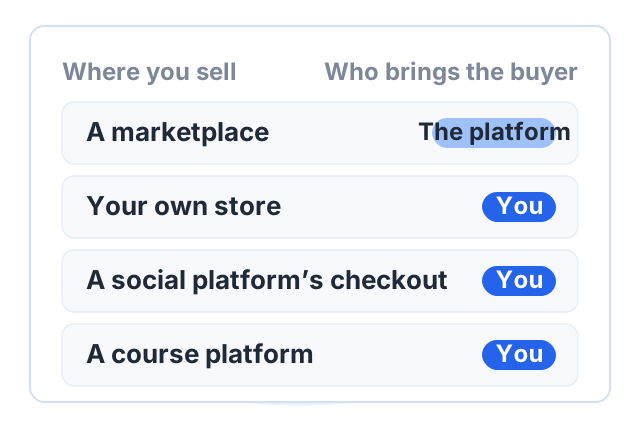
There are four normal routes. They differ in who brings the buyer, who owns the relationship afterwards, and how much of each sale you keep.
A marketplace
A marketplace already has shoppers browsing it. You list your product, their search brings people to it, and you pay for that with a cut of every sale and with the rules that come attached.
What it gives you: the only route where the platform can send you a buyer you did not find yourself.
What it costs you: the biggest share of each sale, and usually the customer. The buyer belongs to the marketplace, so you often cannot email them, and the marketplace can change its fees, its ranking or its rules without asking you. Your product also sits beside competing ones, which pushes prices down.
A real example of the fee structure: Gumroad’s own pricing page, checked on October 29, 2026, charges 10% plus $0.50 per transaction on sales through your own profile or your own links, and 30% when a new customer finds you through its Discover marketplace (gumroad.com/pricing). That gap is the price of discovery, stated plainly. Most marketplaces work the same way even when they do not split the rate out so clearly.
Your own store or site
Your own checkout, on your own domain or a subdomain, under your name.
What it gives you: you keep the buyer’s email address, you set the refund policy and the price, and nobody can change the terms underneath you. You can also sell the second and third product to people who already bought the first, which is the part a marketplace listing cannot give you: it keeps the customer relationship, not you.
What it costs you: you bring every visitor. A store with no traffic sells nothing, however good the product is. You also pay for the store, usually as a monthly fee, whether or not you sell that month.
A social platform’s own checkout
Instagram, TikTok, YouTube and others let some creators sell without the viewer leaving the app.
What it gives you: the shortest possible path from watching to buying, which matters because every extra tap loses people.
What it costs you: eligibility rules, country restrictions and a product catalog designed mostly for physical goods. Delivery of a digital file is often awkward, and the feature can be withdrawn or changed. Treat it as an extra till, not as your only one.
A course platform
If what you are selling is taught rather than downloaded — lessons in order, with materials and a finish — a course platform fits it better than a file store.
What it gives you: lessons in sequence, student accounts, progress, and a product the buyer consumes over weeks rather than in one download. That is also why a taught product usually carries a higher price than a single file on the same subject.
What it costs you: a monthly fee in most cases, and it is the wrong tool for a one-file product. Selling a single template through a course platform is more setup than the product needs.
How to price it
Price against what the buyer is comparing you to, not against the hours you spent making it. Someone looking at a $12 resume template is comparing it to other templates and to an afternoon of building their own. Someone looking at a $200 course is comparing it to a book, a weekend of YouTube videos, and the cost of staying stuck.
Three things move the number:
- Is it one file, or is it taught? A single file is bought in a minute and judged on whether it saves an hour. Something taught in order, with your answers attached, is bought as a way to reach an outcome. The second usually prices several times higher than the first, even when the subject is identical.
- How specific is the buyer? A spreadsheet for “small businesses” is a cheap product. The same spreadsheet rebuilt for “freelance physiotherapists in India filing quarterly GST” is a more expensive one, because the buyer can see it was made for them.
- What does it cost you per sale? Digital products have almost no cost per copy, so the price is a positioning decision rather than a markup on costs. But the processing fee and any platform cut are real, and a fixed per-sale fee hurts cheap products much more than expensive ones.
A launch price and a coupon do different jobs. A launch price is a lower number for the first buyers, in exchange for the risk they take on an untested product and, usually, a review or a testimonial you can quote later. A coupon is a code you give a specific group — your email list, one podcast’s audience, people who came back to the page — so you can discount for them without lowering the public price. Keep the public price steady and discount with codes; a price that visibly drops every few weeks teaches people to wait.
Taking payment
A payment processor is the company that takes the buyer’s card details, runs the charge, and moves the money to you. Stripe, Razorpay, PayPal and Sepay all do this job. They are separate from the store or marketplace you sell on, even when a platform hides them behind its own checkout.
Two things are worth understanding before you pick anything.
A processing fee comes out of every sale, everywhere. It is not a platform tax you can avoid by choosing a different store. As of October 29, 2026, PayPal’s US business fees page lists 2.99% plus $0.49 for standard credit and debit card payments (paypal.com); Stripe’s India pricing page lists 2% for Mastercard and Visa cards issued in India, and 3% for cards issued outside India (stripe.com/in/pricing); Razorpay’s pricing page lists a 2% standard rate per transaction with GST charged on top of the fee, and lists UPI separately at 0% MDR for most transactions (razorpay.com/pricing), so an Indian buyer paying by UPI rather than card can cost you close to nothing. Rates change and vary by country and card, so check the processor’s own page for your country before you rely on a number.
Find out whose account the money lands in. There are two models, and they are very different for you:
- The platform collects, then pays you out. Your money sits with them until a payout date, which may be weekly, monthly, or held longer for new sellers. Refunds and chargebacks are handled by them, on their terms.
- The buyer pays into your own processor account. You connect your own Stripe, Razorpay, PayPal or Sepay account, and the money arrives on that processor’s normal schedule without the platform in between.
The second model is better for cash flow and leaves fewer parties able to freeze your earnings. The first can be simpler if you do not want to handle tax collection or refunds yourself. Ask which one a platform uses before you build your store on it.
Delivering it, and what happens afterwards
Delivery is either a file or an account.
A file — a PDF, a zip, a video, a preset pack — is emailed or linked after payment. Simple, and it works offline. The downside is that it is finished the moment it is sent: you cannot update it, you cannot see whether the buyer opened it, and the link can be forwarded.
Access — a login to a page, a library or a course — can be updated, revoked and measured. It is better for anything you will improve over time, and it is what makes “lifetime updates” a promise you can actually keep.
Three things people forget:
- Say what the buyer may do with it. One line on the product page is enough: personal use, or use in client work, or use in products they resell. Without it, buyers guess, and some guess generously.
- Decide your update policy before you need it. If version 2 is free for existing buyers, say so — it is a reason to buy now. If it is a paid upgrade, say that instead.
- Write a refund policy you can live with. Digital goods cannot be returned, so a refund is a decision, not a logistics problem. Many sellers refund without argument for a stated window, because arguing costs more than the refund. In some places, including the EU, consumers have statutory rights around digital purchases, so check your local rules rather than copying someone else’s page.
Getting the first buyers
This is the hard part, and the part most guides skip. A platform gives you a checkout. It does not give you an audience.
The realistic first sources, roughly in order of how quickly they work:
- People who already asked you the question. Comments, DMs and emails where someone asked how you did something. They are the shortest path to a first sale, because they already told you they have the problem.
- An email list, even a small one. A list of 200 people who chose to hear from you outperforms a much larger following you cannot contact directly.
- Your existing audience on one platform. Choose the one place you already post and announce it there properly — not once, but as part of what you normally publish.
- Search. Slow, and it only works for products people type into a search box. Worth starting early precisely because it takes months.
- Other people’s audiences. A guest appearance, a newsletter swap, an affiliate who earns a cut. This is the only route that scales without your own following, and it costs either money or a favor.
Advertising belongs last, not first. Paid traffic multiplies a page that already converts; it does nothing for a page that does not.
A worked example
This is arithmetic from assumptions I am stating, not a forecast or an average. Nothing here predicts what you will sell.
Assumptions: you sell one product at $49. Forty people buy it over the launch period. Payment is taken with PayPal’s standard credit and debit card rate for the US, 2.99% + $0.49 per transaction, as published on PayPal’s own business fees page and checked on October 29, 2026.
The fee is charged per transaction, so work it out one sale at a time and then multiply.
- Fee on one sale: 2.99% of $49 = $1.47, plus $0.49 = $1.96 (rounded to the cent)
- Kept from one sale: $49 − $1.96 = $47.04
- Gross on 40 sales: 40 × $49 = $1,960
- Processing on 40 sales: 40 × $1.96 = $78.40
- Left after processing: 40 × $47.04 = $1,881.60
What this arithmetic leaves out: any platform or marketplace cut, your monthly platform fee, sales tax, VAT or GST, refunds and chargebacks, currency conversion if your buyers pay in another currency, income tax, anything you spent making the product, and anything you spent on advertising. The only honest reading of this number is “forty buyers at this price, minus this one published fee” — the number of buyers is the assumption doing all the work, and it is the one thing you do not control.
Notice what the fixed $0.49 does. On a $49 product it is 1% of the sale. On a $5 product it would be nearly 10%. Cheap digital products are hit much harder by per-transaction fees than expensive ones, which is one practical argument for selling fewer, better things.
Sell a course on Courselink
A course is a digital product you can usually charge more for, because it is taught in order, comes with materials, and has a point where the student is finished — and because the buyer is paying for an outcome rather than a file. Courselink is built for that: lessons in sequence, unlimited YouTube lessons on every plan, and student accounts rather than a forwarded download link. Buyers pay into your own Stripe, Razorpay or Sepay account, and Courselink takes 0% of every sale on every plan; the payment provider still charges its own processing fee.
Selling starts on Lite at $19 a month, which is where paid courses, payment providers, coupons and sales analytics begin. The Free plan publishes 2 free courses for up to 100 students and cannot sell. A custom domain and removing Courselink branding start on Standard at $49. See pricing for the full comparison, and Courselink for YouTubers if your audience is already on a channel.
Where to go next
If you are still deciding what to sell rather than how, the rest of the make money with what you know hub works through the other routes. If the thing you teach is already on video, selling videos online covers the delivery choices specific to video. And if you want the longer version of the course route, including pricing and launch, read making money selling courses.
Sources
Every fee on this page was read from the vendor’s own pricing page on October 29, 2026:
- Gumroad pricing — 10% + $0.50 per transaction on direct sales, 30% on Discover marketplace sales
- PayPal business fees, US — 2.99% + $0.49 for standard credit and debit card payments, domestic
- Stripe pricing, India — 2% for Mastercard and Visa cards issued in India, 3% for cards issued outside India
- Razorpay pricing — 2% standard rate per transaction plus GST on the fee, with UPI listed separately at 0% MDR for most transactions
Rates change, and they differ by country, card type and account. Check the processor’s own page for your country before you price anything. The worked example is arithmetic from the stated assumptions above, not an average or a forecast.