

To sell videos online, you put them behind a payment on a platform that handles checkout and access. There are five main options: a course marketplace, a digital download store, a membership, YouTube’s own paid features, or your own course site.
The right one depends on two questions. Do you already have people who want to buy? And are you selling single videos, or a set of videos that teach something step by step? Below: each option with its fees, a short path for selling one video or a membership, and how a set of videos becomes a course.
The five ways to sell videos, compared
| Option | Example | Fee to you | Who finds the buyers | Suits |
|---|---|---|---|---|
| Course marketplace | Udemy | You get 37% of organic sales, 97% through your own coupon or link | The marketplace, mostly | Teachers with no audience yet |
| Digital download store | Gumroad | 10% + $0.50 per direct sale, 30% on Discover sales | You, mostly | Single videos, film packs, footage |
| Membership | Patreon | 10% of income, plus processing, conversion and payout fees | You | A steady stream of new videos |
| YouTube paid features | Channel memberships | YouTube takes a share; needs the Partner Program | You | Existing YouTube channels |
| Your own course site | Courselink | 0% of sales, plan from $19 a month to sell | You | Videos that teach a skill in order |
On your own site, card fees are paid to the processor. Stripe’s standard US price is 2.9% + 30¢ per domestic card payment.
1. A course marketplace
A marketplace like Udemy lists your course next to thousands of others and sends you students. That is the value. The cost is control: Udemy’s revenue share page says instructors receive 37% of sales that do not come through their own coupon or referral link. You also follow the marketplace’s rules on price and format.
Choose it if you have no audience yet and want to test whether strangers will buy.
2. A digital download store
Stores like Gumroad let you upload a file, set a price and share a link. This fits a single video, a pack of stock footage, or a recorded workshop. Gumroad’s pricing page lists 10% + $0.50 per sale through your own links, and 30% when a new customer finds you through its Discover marketplace.
Choose it if you sell one-off videos rather than a structured course.
3. A membership
On a membership site like Patreon, fans pay every month for access to your videos. Patreon’s pricing page lists 10% of what you earn, plus payment processing, currency conversion and payout fees.
Choose it if you will keep making new videos every month. A membership with no new videos loses members.
4. YouTube’s own paid features
If you already have a YouTube channel in the Partner Program, channel memberships let viewers pay you monthly for extra videos. You need to meet YouTube’s thresholds first, from 500 subscribers for the fan funding tier. Our guide to YouTube’s monetization rules lists them in full.
Choose it if your channel qualifies and your members want more of the same content.
5. Your own course site
A course site puts your videos in order as lessons, behind a payment, on a site of your own. Buyers pay into your own Stripe account, so you keep most of each sale. The trade-off: no marketplace sends you buyers. You bring them from your channel, list or social accounts.
Choose it if your videos teach a skill and you already have people who trust you.
Selling one video: the short path
If the video is the product — a film, a recorded workshop, a pack of footage — you do not need a course site. Five steps, in order:
- Export a final file and name it properly.
workbench-masterclass-1080p.mp4tells a buyer what they downloaded six months later;final_v3.mp4does not. - Clear the rights before you price it, using the checks below. This is the step that is expensive to undo after people have paid.
- Decide whether buyers download the file or stream it. A download works offline and can be passed on. Streaming keeps the file on the platform but needs the buyer to be online. Say which one they get on the sales page.
- Set the price and write three lines: what the video shows, how long it runs, and who it is for. At a single-video price the card fee matters: on a $12 sale, 2.9% + 30¢ is about 5.4% of it.
- Buy your own copy before you tell anyone. A test purchase catches a broken download link, a wrong file and a confusing receipt in ten minutes.
Selling a membership: the short path
A membership charges monthly for a stream of new videos, so the product is the schedule as much as the video.
- Pick a cadence you can hold for a year, and say it plainly — “two videos a month” is a promise people can judge.
- Decide what members get that the public does not: early access, longer versions, the project files, or answers to their questions.
- Start with one tier. Several tiers at launch split a small audience into smaller groups and triple the work.
- Publish something in the first week so new members see value before the second charge.
- Watch cancellations, not sign-ups. A membership lives or dies on how long members stay, and the month people leave usually tells you what stopped arriving.
Patreon’s pricing page lists 10% of what you earn plus processing, currency conversion and payout fees, so a $5 monthly tier nets noticeably less than $4.50 once processing is counted.
When a course fits better
For a video that teaches something, a course is usually the better fit, because the buyer is paying for the result rather than the clip. It adds four things a pile of videos cannot: order, so there is no guessing what comes next; the missing steps that free videos skip; extras such as worksheets, quizzes and a certificate; and a finish line, so the buyer knows when they are done.
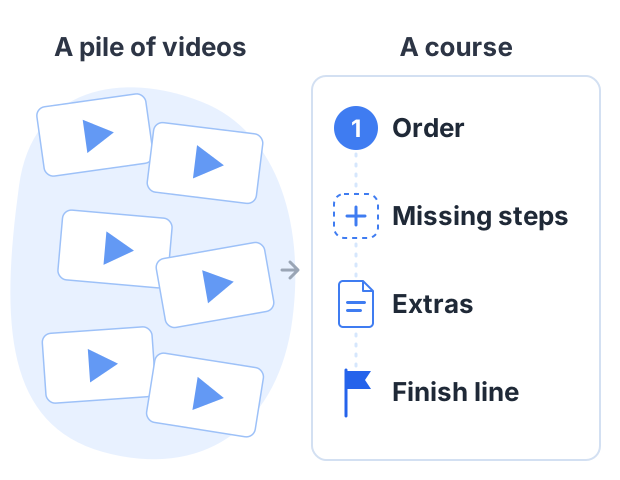
A worked example: 12 YouTube videos become a course
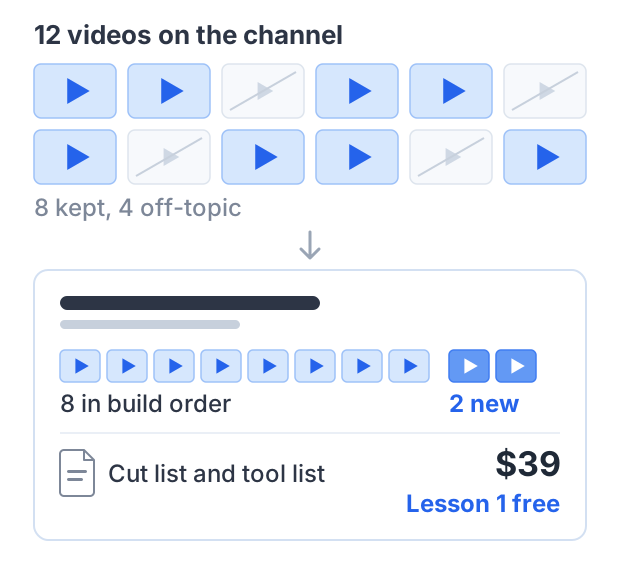
Leo runs a woodworking channel. Over two years he posted 12 videos about building a workbench, but they are out of order, and viewers keep asking which video to watch first.
Leo builds a course called “Build your first workbench in a weekend”:
- He picks 8 of the 12 videos and puts them in build order. The other 4 are off-topic.
- He records 2 short new lessons to fill the gaps: choosing wood and fixing common mistakes.
- He adds a PDF with the cut list and tool list.
- He sets the price at $39 and lets anyone watch the first lesson free.
If 40 people buy in the first two months:
- Gross sales: 40 × $39 = $1,560
- Stripe fees: 40 × ($1.13 + $0.30) = about $57
- What Leo keeps on his own site: about $1,503, minus his plan
On Gumroad, the same 40 direct sales would cost 40 × ($3.90 + $0.50) = $176 in Gumroad fees. On Udemy, if all 40 sales were organic, Leo would get 37% of the net amount, about $577 or less.
These figures are arithmetic, not a forecast. The 40 buyers are an assumption. Whether Leo gets them depends on his audience.
Before you sell: check the rights
You can only sell a video if you have the rights to everything in it.
- Music. Music that is free to use in an editing app is often licensed for social posts, not for paid products. Check the license says commercial use.
- Clips and images. Anything you did not make needs a license that covers selling.
- Fair use is not a plan. The US Copyright Office says courts decide fair use case by case, with no fixed amount you can safely use. Don’t build a paid product on it.
Where to host the video files
If your lessons are YouTube videos, be careful with “unlisted”. YouTube’s help page says unlisted videos can be seen and shared by anyone with the link. They don’t show in search, but a buyer could share the link.
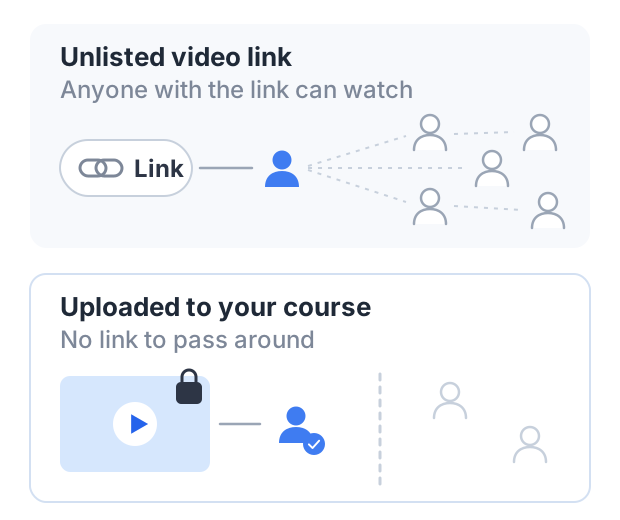
You have two choices:
- Keep the free videos public and sell what they lack. The order, the extra lessons and the files are the product. If a link leaks, the buyer only shares what was already free.
- Upload the paid lessons to your course platform. Then there is no YouTube link to pass around.
You can also mix both: public videos bring people in, and the paid course adds what the free videos don’t have.
How to do this on Courselink
Courselink suits the fifth option: paste YouTube or Vimeo links and the lessons import in order, or upload the files directly, with PDFs, quizzes and certificates alongside them. Uploaded video is capped per plan — 5 hours on Free, 50 on Lite, 250 on Standard, 500 on Plus — while YouTube lessons are unlimited on every plan. Build free first, since the Free plan cannot sell; paid courses and coupons start on Lite at $19 a month, your own domain on Standard, and Courselink takes 0% of your sales on every plan. See pricing, or read how to make money selling courses for the steps after the course is built.
Sources
Fees come from each company’s own pages, as they stood when this guide was published:
- Udemy instructor revenue share: 97% with an instructor coupon or referral link, 37% otherwise
- Gumroad pricing: 10% + $0.50 per direct sale, 30% per Discover sale
- Patreon pricing: 10% of income, plus processing, currency conversion and payout fees, and taxes
- Stripe pricing: 2.9% + 30¢ per successful domestic card transaction
- YouTube Help: change video privacy settings: unlisted videos can be seen and shared by anyone with the link
- US Copyright Office: fair use index: fair use is decided case by case
Vendor fees change. Check each vendor’s own page before you choose.