

A course sales page needs to say, in this order: who the course is for, what result they get, what is inside, who teaches it, what it costs, and why they can trust it. Add a refund policy and answers to the common questions, and you have every section that matters.
Everything else, such as countdown timers, long stories and stacks of bonuses, is optional, and some of it can hurt you. This guide goes section by section, shows a before-and-after example, and covers the US rules on testimonials and income claims.
The page has to help the wrong person decide no as well as the right person decide yes: a buyer who should not have bought asks for a refund, leaves a bad review, or files a dispute. Before you write, answer three questions in one sentence each — who exactly is this for, what will they be able to do afterwards, and why should they learn it from you. If you cannot answer those, no layout will save the page.
The sections, in order
For four complete sample layouts, see our course landing page examples. For the overview text itself, see the course description formula.
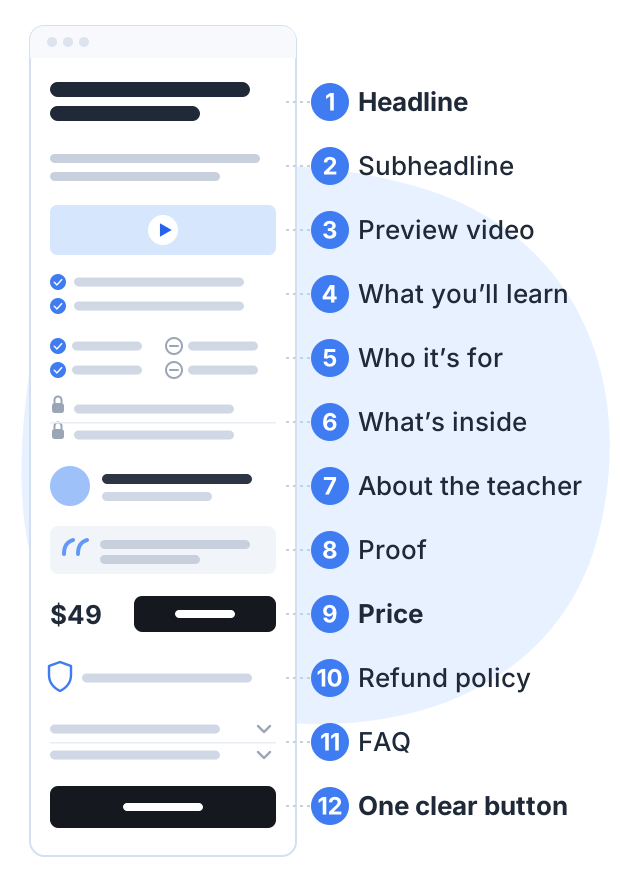
1. Headline: the result, for a specific person
The headline should name the result and, ideally, the person. Avoid clever wordplay. A reader should understand it in one glance.
- Weak: “Unlock your creative potential”
- Better: “Paint your first watercolor landscape in 6 lessons”
- Better still: “Watercolor for complete beginners: paint your first landscape in 6 lessons”
2. Subheadline: who it’s for and how
One or two sentences that add the “how” and remove a doubt. For example: “No drawing skills needed. Short video lessons, a supply list, and one finished painting by the end.”
3. A short preview video
A one to three minute video where you explain what the course covers and show a little of how you teach. It lets a buyer see and hear how you teach before they pay. Keep it short and get to the point in the first few seconds.
4. What you will learn
List results, not topics. Each line should finish the sentence “After this course, you can…”.
- Topic: “Color mixing”
- Result: “Mix the 6 colors you need for skies, trees and water from 3 tubes of paint”
Four to eight lines is enough.
5. Who it’s for, and who it isn’t
Two short lists. This section helps the wrong buyer leave before they pay, which means fewer refunds.
- For you if: you have never painted, you have about an hour a week, you want one finished painting to keep.
- Not for you if: you already paint in watercolor, or you want to learn portraits.
6. What’s inside
Show the actual lesson list, with titles. Add the number of lessons, any files or worksheets, quizzes, and whether there is a certificate. Be exact. “6 video lessons, a printable supply list and a practice sheet” is better than “hours of premium content”.
A free preview lesson goes well here. Let people watch one real lesson before they pay.
7. About the teacher
Three or four sentences. Why you can teach this: your experience, your results, how long you have done it. Write it for the buyer, not as a full biography. A real photo helps.
8. Proof
Real quotes from real students, in their own words, with their names if they agree. Specific beats general:
- General: “Great course!”
- Specific: “I had never held a brush. By lesson 4 I painted a sky I actually liked.”
If you don’t have students yet, don’t invent quotes. Use proof you do have: your own work, results from clients, or comments on your free videos, with permission. See the rules below.
9. Price and what’s included
State the price plainly, with what it includes. If there is a launch discount, say when it ends, and end it then. If you want help with the number, read our guide to online course pricing.
10. Refund policy
Say exactly what it is: “Full refund within 14 days if you are not happy, no questions asked.” Stripe’s advice for preventing disputes is to describe your refund policy clearly and show it to the customer before they pay.
11. Frequently asked questions
Answer the questions that stop people buying: How long do I have access? What do I need? What if I fall behind? Is there support? Use the questions people have actually asked you.
12. One clear button, repeated
Use one button label everywhere on the page, and place it after the price and again at the end. Every button should go to the same checkout.
The rules on testimonials and income claims (US)
In the US, the Federal Trade Commission (FTC) sets rules for testimonials and reviews. They apply to small course sellers too. This is a summary, not legal advice.
Testimonials must be honest. The FTC’s Endorsement Guides, revised in 2023, say an endorsement must reflect the honest experience and opinion of the person giving it.
Unusual results need context. If a testimonial shows a result most students won’t get, the guides say you must make clear what results people can generally expect.
Disclose connections. If the person got free access, was paid, or is a friend, relative or employee, the guides say that connection should be disclosed clearly when readers would not expect it.
Fake reviews are banned. The FTC’s rule on consumer reviews and testimonials, in effect since October 21, 2024, bans fake reviews and testimonials, paying for reviews that must be positive (or negative), and undisclosed reviews from company insiders.
Income claims need proof. If you cannot show what a typical student earns, do not print a number. The FTC enforces this: its 2023 action against the business coaching seller Lurn, settled for $2.5 million in consumer refunds, turned on earnings claims the agency said the company could not back up.
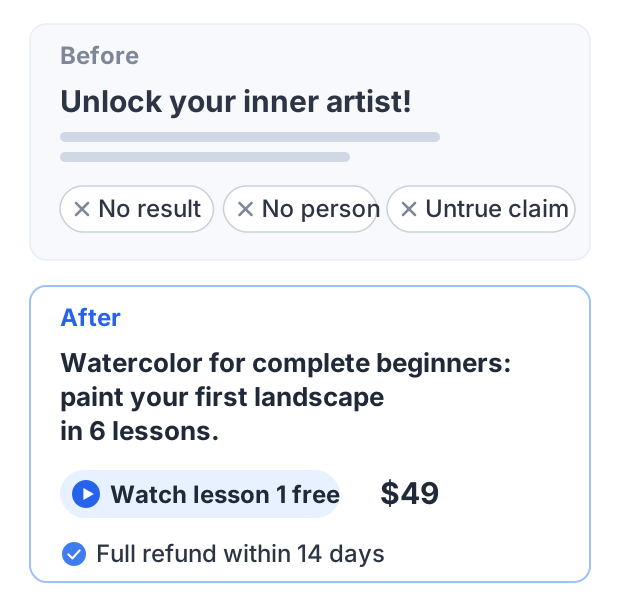
A worked example: before and after
Here is the top of a weak sales page for a watercolor course:
Unlock your inner artist! The ultimate painting masterclass. Hours of premium content. Join thousands of happy students. Buy now, only $49!
Problems: no specific result, no specific person, “thousands of happy students” is not true for a new course, and “hours of content” says nothing about what the buyer gets.
Here is the same page, rewritten:
Watercolor for complete beginners: paint your first landscape in 6 lessons. No drawing skills needed. Six short video lessons, a short supply list, and one finished painting by the end. Watch lesson 1 free. · $49 · Full refund within 14 days
The second version names the person, the result, the size of the course, the price and the refund policy. A buyer can decide in seconds whether it is for them, which is the whole job.
A quick checklist
| Section | Ask yourself |
|---|---|
| Headline | Does it name a result a buyer wants? |
| Preview video | Does it show how I teach, in under 3 minutes? |
| What you’ll learn | Is every line a result, not a topic? |
| Who it’s for | Would the wrong buyer see it isn’t for them? |
| What’s inside | Are the lesson titles and files listed exactly? |
| Proof | Is every quote real and every connection disclosed? |
| Price | Is it clear what the price includes? |
| Refund policy | Is it stated plainly, near the price? |
| FAQ | Does it answer the questions people really ask? |
How to do this on Courselink
Every Courselink course has a detail page with these sections built in: a banner with the course title, subtitle, preview video and background color, then course highlights, the overview, what you’ll learn, the course content lesson list, testimonials and FAQs.
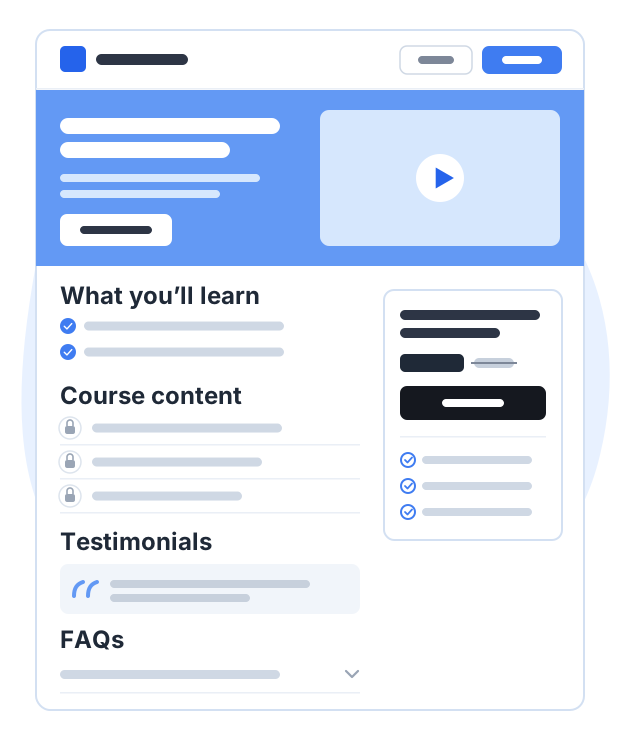
A price with an optional discounted price, free preview lessons, coupons and sales analytics all start on Lite at $19 a month; the Free plan cannot sell. A custom domain and removing Courselink branding start on Standard. Courselink takes 0% of your sales on every plan — see pricing for the full table.
Sources
- FTC: Endorsement Guides, what people are asking: honest opinion, typical results and disclosure of material connections
- FTC: final rule banning fake reviews and testimonials, announced August 14, 2024; 16 CFR Part 465 took effect October 21, 2024
- FTC: action against Lurn over earnings claims, September 28, 2023
- Stripe: how to prevent disputes: show a clear refund policy before purchase
This guide summarizes public FTC guidance. It is not legal advice.