

A white-label course platform lets you run your course site under your own brand only: your domain, your name, and no “powered by” line from the platform. Most course platforms offer this, but only on a higher plan, so the real question is what it costs and what it actually removes.
Below: the two things “white label” can mean, what to check before you pay, what branding removal costs on four platforms, and where each one fits.
Two meanings of “white label”
People use the term for two different products. Know which one you need before you compare prices.
- A branded course site. You sell your own courses. The site runs on your domain and shows only your brand. This is what most creators, coaches and small training businesses mean.
- Resellable software. You take the platform itself, put your name on it, and sell it to your own clients as your product. Agencies and large training companies sometimes want this.
This guide is about the first kind. Courselink offers the first kind on its Standard plan and above. It does not offer the second.
What to check before you pay
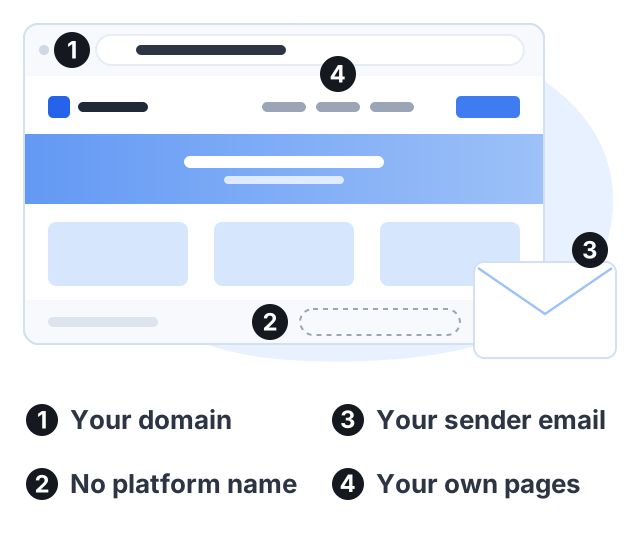
A plan called “white label” can still leave the platform’s name in places students see. Check these four things.
- Your own domain. Students should reach the course at your address, such as learn.yourbrand.com, not at the platform’s address.
- No platform branding on the site. Look at the footer, the login page, the checkout and the lesson pages.
- Email from your own address. Students get emails about sign-up and purchases. Check whose name and address those emails come from.
- Your own pages. You will want an about page, a terms page or a contact page that matches the rest of your site.
Then ask the vendor one direct question: “Where does your brand still appear on this plan?” A clear answer is a good sign.
What branding removal costs
These prices come from each vendor’s own pricing page. Each row is the cheapest plan that lists removing the platform’s branding.
| Platform | Cheapest plan that removes branding | Billed monthly | Billed yearly, per month |
|---|---|---|---|
| Courselink | Standard | $49 | $41 |
| Teachable | Growth | $189 | $139 |
| Thinkific | Grow | $219 | $164 |
| Kajabi | Growth | $249 | $199 |
Two notes on this table:
- Custom domains can come earlier than branding removal. Thinkific’s entry plan, Start at $109 a month, already includes your own domain. Kajabi’s entry plan, Basic at $179 a month, does too. On Courselink, your own domain and branding removal both start on Standard.
- “No branding” may not mean none at all. Kajabi’s help center says its Growth and Pro plans can remove the “Powered by Kajabi” line, but that it is not possible to remove all Kajabi branding, and transactional emails keep it.
Where each platform’s name may still appear
A pricing page says “remove branding”; it rarely says where. This is what each vendor documents on the pages linked in this guide, checked October 2026. “Not stated” means the vendor’s own pricing page does not break it down — not that its brand appears there. It is the list to take into a support conversation before you pay.
| On its branded plan | Site footer | Login page | Checkout | Transactional email |
|---|---|---|---|---|
| Courselink Standard | Removed | Removed | Removed | Your own sender address |
| Teachable Growth | Listed as removed | Not stated | Not stated | Not stated |
| Thinkific Grow | Listed as removed | Not stated | Not stated | Not stated |
| Kajabi Growth | ”Powered by Kajabi” can be removed | Not stated | Not stated | Keeps Kajabi branding, per its help center |
The Kajabi row is the useful one, and not because Kajabi is worse: it is the only vendor here whose help center answers the question directly. Assume the other “not stated” cells are unknown until someone at the vendor tells you otherwise in writing.
A worked example: one year of a branded course site
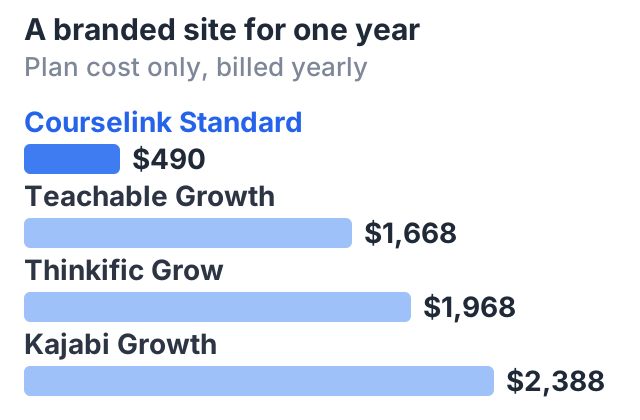
Say you want a fully branded course site for one year. Here is the plan cost alone, using the plans in the table above.
| Plan | 12 months, billed monthly | One year, billed yearly |
|---|---|---|
| Courselink Standard | $588 | $490 |
| Teachable Growth | $2,268 | $1,668 |
| Thinkific Grow | $2,628 | $1,968 |
| Kajabi Growth | $2,988 | $2,388 |
Card processing fees come on top on every platform. Courselink takes 0% of your sales on every plan, and students pay into your own Stripe or Razorpay account.
The price gap is large, but it is not the whole story. These platforms are not selling the same product at different prices. The more expensive plans include more tools, and for some businesses those tools are worth the money.
Where the other platforms win
What the higher price buys:
- A wider set of built-in marketing tools. Teachable and Kajabi list more sales and marketing tools on these plans than Courselink offers. If you want them all in one place, that can justify the price.
- Bigger limits. Courselink Standard covers up to 5,000 students and 250 hours of uploaded video. Unlimited students start on Plus at $99 a month. Check the limits on any plan against your plans for growth.
- A custom domain below their own branding tier. If you only need your domain and can live with a small platform credit, Thinkific Start ($109 a month) and Kajabi Basic ($179 a month) include one without paying for that vendor’s branded plan. Both are still more than Courselink Standard at $49, which includes the domain and the branding removal together — the saving is against the same vendor’s higher tier, not against Courselink.
- Reseller needs. If you want to resell the software itself, none of the plans in this table is built for that. Look for a vendor that sells reseller licenses directly.
Where Courselink fits
Courselink suits a branded course site rather than a large marketing toolkit, and the branding all arrives on one plan:
| Courselink plan | What it adds for your brand |
|---|---|
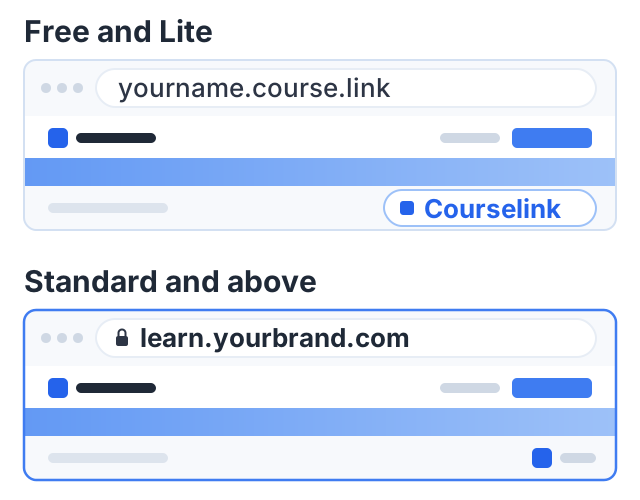
| Free | A course site at yourname.course.link, with Courselink branding. Cannot sell. |
| Lite, $19 a month | Paid and invite-only courses, Stripe and Razorpay, coupons, sales analytics. Still yourname.course.link with Courselink branding. |
| Standard, $49 a month | Custom domain, Courselink branding removed, custom pages and a custom sender email. |
| Plus, $99 a month | Everything in Standard, plus team members and unlimited students. |
Lessons import from a YouTube link or playlist in order, and YouTube lessons and watch hours are unlimited on every plan, so they do not use your video storage. You can build the course free and see how it looks before you pay; the Free plan cannot sell, selling starts on Lite at $19 a month, and the branded version starts on Standard at $49. Courselink takes 0% of each sale on every plan, and students pay into your own Stripe or Razorpay account. The full comparison is on the pricing page.
If you are deciding where your course should live at all, start with where to sell courses. If you are weighing a self-hosted site instead, read selling courses on WordPress.
Sources
- Teachable pricing: plan prices and the plan that lists “Remove Teachable branding”.
- Thinkific pricing: plan prices, branding removal on Grow, and custom domains on Start.
- Kajabi pricing: plan prices, “No Kajabi branding” on Growth, and the custom domain on Basic.
- Kajabi Help Center: Is white labeling possible?: which branding can and cannot be removed.
Courselink plan details come from our own pricing page. Competitor prices change often. Check each vendor’s page before you decide.