

Sell courses on Squarespace by creating a course page, adding a pricing plan, and connecting payments. Compare your plan’s course fees and video storage before you publish: both depend on which plan you are on, and the table below has the figures.
What Squarespace course pages include
According to Squarespace’s guide to course pages:
- Course pages are only available on version 7.1 sites.
- You can add up to 250 lessons to a course page, grouped into chapters.
- Each lesson has one main video. You can upload a file, reuse one from your library, or add a YouTube or Vimeo link.
- A lesson video can be up to three hours long, storage allowing.
- A progress bar shows how much of the course a student has finished.
- Visitors must sign up and log in to see lesson pages.
The guide does not mention quizzes or certificates, so plan without them or check the current help center before you build.
How to sell a course on Squarespace, step by step
These steps follow Squarespace’s guide to selling access to a course page.
- Choose a plan. Squarespace has no free plan. Every site starts with a 14-day free trial.
- Build the course page. Add it from the Pages panel, then add an overview page and your lessons.
- Add a pricing plan. Open the course page, go to Selling tools, and create a pricing plan. There are three types:
- Free: students sign up with an email address.
- Fixed amount: students pay once, or in installments, for lasting access.
- Subscription: students pay weekly, monthly or yearly to keep access, and can cancel.
- Set the paywall. Choose whether it covers all content or lessons only.
- Choose preview lessons if you want some lessons to be public.
- Connect a payment processor: Squarespace Payments, Stripe or PayPal.
- Publish the site, check the course page is enabled, and add it to your navigation.
- Test it. Sign up as a student on a phone and open the first lesson.
The fees and limits that depend on your plan
These figures come from Squarespace’s pricing page and its video storage guide.
| Plan | Billed monthly | Billed yearly, per month | Fee on course sales | Card rate with Squarespace Payments | Video storage |
|---|---|---|---|---|---|
| Basic | $25 | $19 | 7% | 2.9% + $0.30 | 30 minutes |
| Core | $39 | $29 | 5% | 2.9% + $0.30 | 5 hours |
| Plus | $65 | $49 | 1% | 2.7% + $0.30 | 50 hours |
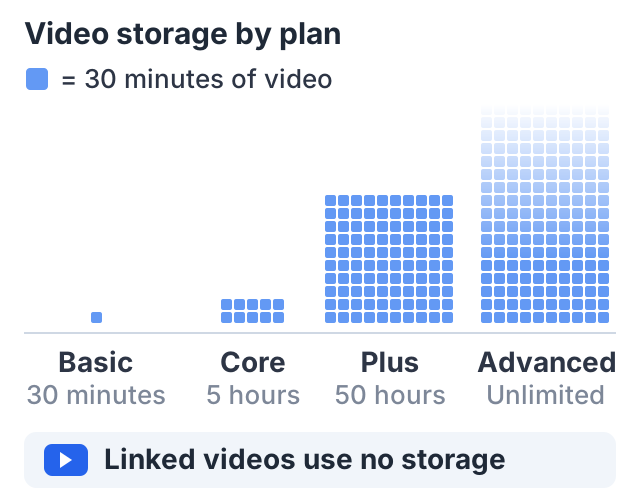
| Advanced | $139 | $99 | 0% | 2.5% + $0.30 | Unlimited |
The fee on course sales is what Squarespace calls the Digital Content and Memberships transaction fee. Squarespace’s help center says your payment processor also charges its own fee on each sale, so the two add up.
Video storage is the limit people hit first. Basic has 30 minutes for the whole site. If your lessons are on YouTube or Vimeo, add them by link instead, and they do not use your storage.
A worked example
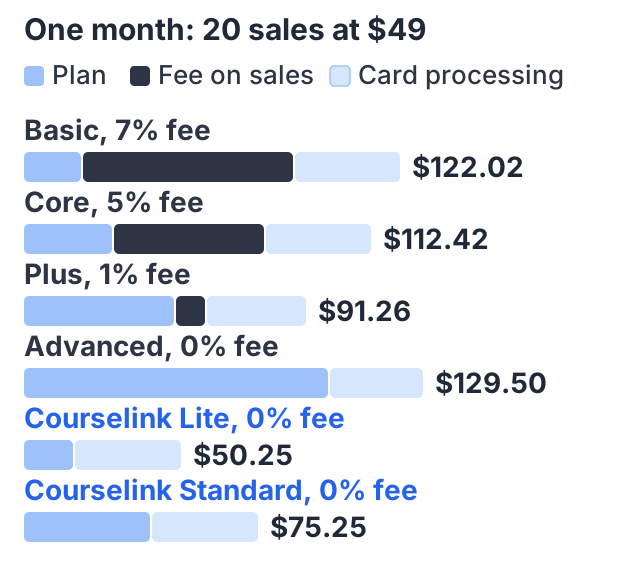
Say you sell a $49 course and 20 people buy it in one month: $980 in sales. Here is one month on each plan, billed yearly, with card payments through Squarespace Payments or your own Stripe account.
Under annual billing there is no monthly bill, so “per month” below is the yearly price divided by twelve. The Squarespace figures are the per-month prices its own pricing page displays for annual billing; the Courselink figures are its annual prices divided by twelve — $190 a year is $15.83 a month, and $490 a year is $40.83.
| Plan, per month | Fee on sales | Card processing | Total cost | |
|---|---|---|---|---|
| Squarespace Basic | $19 | $68.60 (7%) | $34.42 | $122.02 |
| Squarespace Core | $29 | $49.00 (5%) | $34.42 | $112.42 |
| Squarespace Plus | $49 | $9.80 (1%) | $32.46 | $91.26 |
| Squarespace Advanced | $99 | $0 | $30.50 | $129.50 |
| Courselink Lite | $15.83 | $0 | $34.42 with Stripe | $50.25 |
| Courselink Standard | $40.83 | $0 | $34.42 with Stripe | $75.25 |
Courselink Standard is in the table because every Squarespace plan can use your own domain, and on Courselink that starts on Standard. If a custom domain is a requirement for you, Standard is the row to compare.
Card processing on Courselink uses Stripe’s standard US rate of 2.9% + 30¢, from Stripe’s pricing page.
Two things stand out. First, on Squarespace the cheapest plan is not the cheapest way to sell: at this volume, Plus costs less than Basic because of the lower fee. Second, the fee grows with your sales, while a plan price does not.
One difference the table cannot show: every Squarespace plan is a full website builder, not only a course tool.
Where Squarespace wins
Squarespace is the better choice in four cases:
- You already have a Squarespace site. Your course sits on the same site and domain as your homepage, blog and services. There is no second login for you to manage.
- You want your own domain on a low plan. Every Squarespace plan can use your own domain. On Courselink that starts on Standard.
- You want subscription or installment pricing. Squarespace pricing plans offer both.
- You sell other things too. Squarespace is a full website builder, with an online store and more, not only a course tool.
Where a course platform fits better
- The course is your main product, and a 5% or 7% fee on every sale adds up.
- You have hours of video and do not want to upgrade for storage. Courselink’s Lite plan includes 50 hours of uploaded video, and YouTube lessons and watch hours are unlimited on every plan.
- You want quizzes, assignments and certificates as part of the course.
The Courselink way, side by side
| Squarespace | Courselink | |
|---|---|---|
| Free option | 14-day trial only | Free plan for free courses, no time limit; selling starts on Lite |
| Fee on course sales | 7% to 0%, by plan | 0% on every plan |
| Lessons from YouTube | Add each lesson’s video by link | Paste a link or playlist; lessons import in order |
| Uploaded video | 30 minutes to unlimited, by plan | 5 hours on Free, 50 on Lite, 250 on Standard, 500 on Plus |
| Quizzes and certificates | Not in the course pages guide | Included |
| Your own domain | Every plan | Standard and above |
| A full website around the course | Yes | Course site with custom pages from Standard |
Courselink is built for selling courses: paste your YouTube links or a playlist and the lessons import in order, with PDFs, quizzes, assignments and certificates included. You can build the course free, but the Free plan cannot sell — charging starts on Lite at $19 a month, which also adds coupons and invite-only courses, and your own domain starts on Standard at $49 a month. Students pay into your own Stripe or Razorpay account and Courselink takes 0% of every sale. All plans are on the pricing page.
If you are happy on Squarespace and your course is small, its course pages may be enough. If the course is the business, compare the numbers above with your own. For other options, read where to sell courses or how to sell courses on Shopify.
Sources
- Squarespace Help Center: Course pages: lesson limits, video options and progress tracking.
- Squarespace Help Center: How to sell access to your course page: pricing plans, paywalls and payment processors.
- Squarespace Help Center: Increase your video storage: storage by plan.
- Squarespace pricing: plan prices, card rates and the Digital Content and Memberships fee.
- Stripe pricing: the standard US card rate.
Courselink plan details come from our own pricing page. The worked example is arithmetic from a stated price and a stated number of buyers, not a forecast of what any course will earn.