

You can sell a course on Shopify, but Shopify on its own is a store, not a course player. It can take the payment and send a file or a link; to give students lessons in order behind a login, you add a course app from the Shopify App Store.
That works well if you already run a Shopify store and the course is one more product. If the course is the whole business, you pay for a full store, plus an app, to sell one thing.
Below: the three delivery options, how to choose and wire up a course app, what the whole thing costs with real numbers, and when a course platform fits better.
What Shopify does, and does not do, for a course
Shopify is built to sell products. For digital items it has a free app called Digital Products, made by Shopify itself. According to Shopify’s help center, it sells digital content in two ways:
- Upload a file, such as a video or an ebook. The buyer gets a link to download it. Each product variant can hold up to 50 files, with a combined size of up to 5 GB.
- Add a link to content hosted somewhere else. The supported providers include YouTube, Vimeo, Google Drive, Notion, and course platforms such as Teachable, Thinkific and Kajabi.
What the app does not give you is a course. There is no lesson list, no page for each lesson and no quiz. The buyer gets a download or a link, and that is the end of it.
The link option has a weakness you should know about. Shopify’s help center says the destination URL “isn’t monitored”, and that customers who saved the URL can still open it directly. If you sell a link to an unlisted YouTube playlist, anyone the buyer forwards it to can watch. Shopify tells you to manage access in the provider’s own settings.
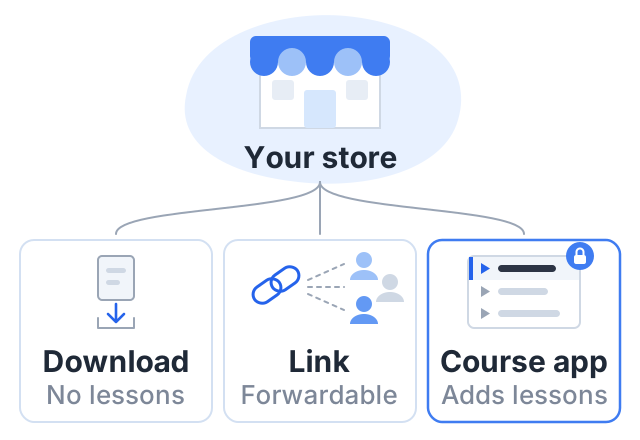
So on Shopify you really have three choices:
- Sell a download. Fine for a PDF workbook or a small pack of video files.
- Sell a link to a course hosted on a course platform. It works, but you now pay for two platforms and run two logins.
- Install a course app that adds lessons and student accounts inside your store. This is what most people mean by “a course on Shopify”.
How to sell a course on Shopify, step by step
These steps follow the third route.
- Choose a plan. Shopify’s Basic plan is $39 a month billed monthly, or $29 a month billed yearly, on Shopify’s pricing page. There is a short free trial first. You can connect a custom domain on every plan.
- Set up payments. With Shopify Payments, US online card payments on Basic cost 2.9% + 30¢. If you use a third-party payment provider instead, Shopify adds its own 2% transaction fee on Basic, on top of that provider’s charges.
- Pick a course app. Search the Shopify App Store for “course”. Each app sets its own price on its listing, and most charge a monthly fee on top of your Shopify plan. The section below walks through two listings and what to check.
- Build the course in the app. Upload or link your videos, put the lessons in order, and attach any files.
- Connect the course to a product. Most apps link a course to a Shopify product, so it appears in your store with a price and goes through the normal checkout.
- Turn off shipping for that product. A course is not a physical item, so make sure checkout does not ask for a delivery address.
- Place a test order. Buy the course yourself. Check the email, the login, and the first lesson on a phone.
- Publish and share the product link.
Give yourself time for step 3. Course apps differ a lot, and you will live with your choice every time you add a lesson.
Step 3 in detail: two apps, and what their listings say
Two of the more established listings, checked on the Shopify App Store in October 2026. Both show prices in your store’s billing currency, so your exact figure depends on where you are billed; the US-dollar figures below are the listings’ own estimates.
| App | Plans listed | Trial |
|---|---|---|
| Courses Plus | Free, limited to 5 lessons per store; then roughly $20, $80 and $200 a month | 7 days on paid plans |
| Tevello Courses & Communities | One paid plan at about $29 a month; the free plan is for development stores only | 14 days |
How a purchase becomes access. Both listings describe the same shape: the course is sold as a normal Shopify product through the native Shopify checkout, and the app controls who can open the lessons afterward using Shopify’s customer accounts. Courses Plus’s listing mentions tag-based access on its Professional plan and limited-time access on Basic; Tevello’s mentions access control and activating accounts at the cart. Neither listing spells out the exact trigger that enrolls a buyer, so read the app’s own documentation on that before you commit — it is the part that breaks quietly if it is wrong.
What to check on any app listing, beyond the price:
- Where the videos live, and how much storage the plan includes. An app that hosts video has a storage cap; one that embeds YouTube or Vimeo does not, but then the privacy of those videos is your job.
- Whether the free tier is usable on a live store. Several “free” plans are development-store only.
- What the student sees after buying: a dashboard and a login, or an email with a link.
- Whether lesson access is tied to the product, a customer tag, or a manual step. A manual step does not scale past a few students.
- Whether the app survives a theme change, since many course pages are theme app extensions.
What it costs: a worked example
Say you sell a $49 course and 20 people buy it in one month. That is $980 in sales.
Card processing at 2.9% + 30¢ on a $49 sale is about $1.72. Over 20 sales that is $34.42. Stripe’s standard US rate for domestic cards is the same, 2.9% + 30¢, on Stripe’s pricing page, so this line is equal on both sides.
| Shopify Basic, billed monthly | Courselink Lite, billed monthly | |
|---|---|---|
| Plan | $39 | $19 |
| Card processing on 20 sales | $34.42 (Shopify Payments) | $34.42 (your own Stripe account) |
| Platform fee on sales | $0 with Shopify Payments, or $19.60 (2%) with a third-party provider | $0, on every plan |
| Course app | The app’s own price | Not needed |
| Total, before any app | $73.42 | $53.42 |
Add the app and the gap widens: at the $29 a month listing above, the Shopify side comes to about $102 for the month, against $53.42. Choose the cheaper app tier and it is closer; choose one with per-student pricing and it moves with your enrollments.
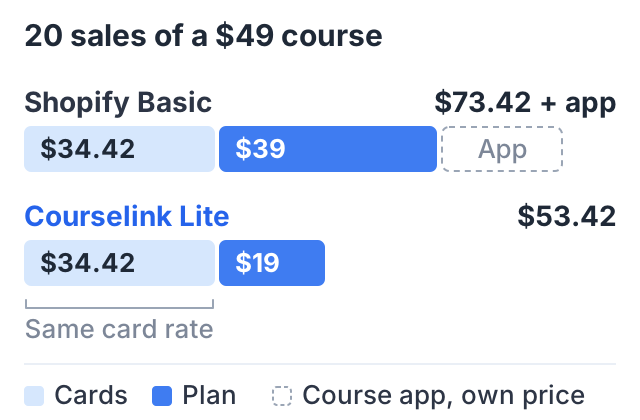
The $20 difference is not the main point. The bigger costs on Shopify are the app fee and your time: choosing an app, learning it, and keeping the store, the app and the course in step.
When Shopify is the right choice
Shopify is the better choice in three cases:
- You already have a Shopify store with customers. The course sits beside your other products, in one admin and one checkout. Your buyers already know that checkout.
- You sell physical products with the course. A craft kit with video lessons, or a printed workbook with a video series. Courselink does not sell physical products at all.
- You want Shopify’s store tools for everything. Its checkout, discounts and reports cover your whole catalog, not only the course.
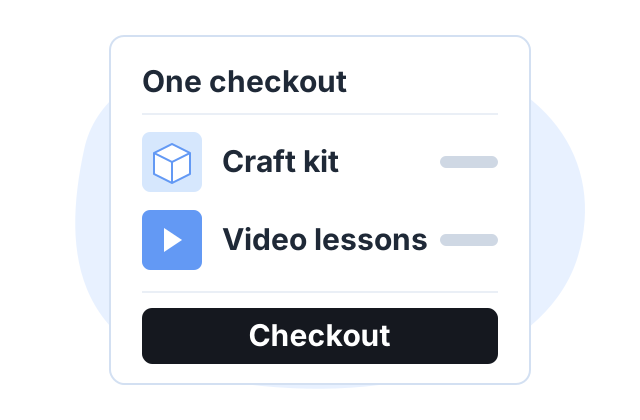
In these cases, adding a course app to Shopify is sensible. A separate course platform would be one more system to run.
When a course platform fits better
- The course is your main product. You do not need a full store around it.
- Your lessons are already on YouTube. A course platform can turn them into lessons directly, instead of selling a bare link.
- You do not want to compare, install and maintain apps. Lessons, quizzes and certificates are part of the platform, not an add-on.
The Courselink way, side by side
| Shopify | Courselink | |
|---|---|---|
| Start | Shopify plan from $29 a month billed yearly | Free plan to build and publish free courses; selling starts on Lite at $19 a month |
| Lessons | Install and set up a course app | Built in: paste a YouTube link or playlist and the lessons import in order |
| Quizzes and certificates | Depends on the app | Included |
| Payments | Shopify Payments, or a third-party provider plus 2% on Basic | Your own Stripe or Razorpay account, from Lite |
| Platform cut of sales | 0% with Shopify Payments | 0% on every plan |
| Your own domain | Every plan | Standard ($49 a month) and above; other plans use yourname.course.link |
| Physical products | Yes | No |
Courselink does one job: selling a course, with the lessons, quizzes and certificates built in rather than installed. You can build the course free, but the Free plan cannot sell — charging starts on Lite at $19 a month, which also adds coupons and invite-only courses, and your own domain starts on Standard. Courselink takes 0% of every sale on every plan; see the pricing page.
If you sell physical products too, keep Shopify for those. If the course is the product, you can skip the store.
For other options, see the guide on where to sell courses, or compare this with selling courses on WordPress.
Sources
- Shopify pricing: plan prices, card rates, third-party transaction fees and custom domains.
- Shopify Help Center: Digital Products: file limits, supported link providers and how sold links work.
- Shopify App Store listings for Courses Plus and Tevello Courses & Communities, checked October 2026: plans, trials and what each says about access.
- Stripe pricing: the standard US card rate.
Courselink plan details come from our own pricing page. The worked example is arithmetic from a stated price and a stated number of buyers, not a forecast of what any course will earn.